
OpenAI released GPT-6.2 Astra and GPT-6.2 Sol on 17 November 2026, and the short answer is this: use GPT-6.2 Sol for almost everything, and save GPT-6.2 Astra for long, difficult projects. We tested both in ChatGPT the day after launch. Sol matched Astra on every task we set and was faster on most of them. We also found something the announcement does not make obvious: GPT-6.2 only appears in ChatGPT’s new Work mode, not in the normal Chat view.
This guide shows where to find GPT-6.2 in ChatGPT, what each model is for, the effort and fast mode settings, our side by side results, and the mixed reaction from early testers.
How we tested
We tested on 18 November 2026 in Chrome in the UK, using a ChatGPT Plus account. We gave GPT-6.2 Astra and GPT-6.2 Sol the same three tasks at Medium effort, timed every answer, ran both generated web apps in a browser and checked the puzzle answer with a short program.
Matched OpenAI’s claims: both models were in ChatGPT on our Plus account the day after launch, and GPT-6.2 Sol handled everyday tasks as accurately as GPT-6.2 Astra, and faster.
Problems we found: GPT-6.2 only appeared in Work mode, not in normal Chat or temporary chats. Both models used US dollars without being asked, and both split their code between plain text and a code block.
Disclosure: the tests were run by Claude, an AI assistant made by Anthropic, working for NextGenAI. This post contains no affiliate links.
In this article
Quick version: GPT-6.2 Astra vs Sol
- GPT-6.2 Sol is the everyday model. It is faster and cheaper, and in our tests it gave answers as good as Astra’s.
- GPT-6.2 Astra is OpenAI’s frontier model for the hardest professional and scientific work, such as large codebase changes and complex documents.
- Where to find them: switch ChatGPT from Chat to Work at the top of the screen, then open the model menu.
- Who gets GPT-6.2: Plus, Pro, Enterprise and Edu users, in ChatGPT Work and Codex. OpenAI’s announcement does not mention the Free or Go plans.
- Our verdict: leave the model on Sol, and switch to Astra only when a task is long, hard and worth waiting for.
What is GPT-6.2?
GPT-6.2 is a pair of OpenAI models released together. GPT-6.2 Astra replaces GPT-6 Astra as the top model for difficult work. OpenAI positions it for complex codebase changes, building working web apps and producing documents from templates. GPT-6.2 Sol updates the Sol line as the faster, versatile default for routine coding, writing and multistep tasks. OpenAI says many of its own staff already use Sol as their default.
Both models are available in ChatGPT and Codex, according to OpenAI’s GPT-6.2 announcement, and through the API as gpt-6.2-astra and gpt-6.2-sol. There is no new picture or voice feature here. GPT-6.2 is about the quality of text, code and agent work.
The names follow OpenAI’s current pattern. In the GPT-6.2 model list we also saw older models from the same families, including GPT-6.1 Sol, GPT-6.1 Terra, GPT-6 Astra, GPT-6 Luna and the GPT-5.6 models, so you can still choose an earlier version if you prefer it.
Who can use GPT-6.2 in ChatGPT?
According to OpenAI’s launch details, GPT-6.2 Astra and GPT-6.2 Sol are rolling out to Plus, Pro, Enterprise and Edu users in ChatGPT Work and Codex. Enterprise and Edu users may need a workspace admin to turn them on. The announcement does not mention Free or Go users, so if you are on a free account, do not expect to see GPT-6.2 yet.
We tested on a ChatGPT Plus account in the UK, and both models were already there on 18 November 2026. If you cannot see them, update the ChatGPT desktop app or the Codex command line tool, and check you are in Work mode rather than Chat.
How to use GPT-6.2 in ChatGPT, step by step
This is where we expect most people to get stuck. When we opened the model menu in the normal Chat view, the only choices were GPT-6 and GPT-5.6 Sol. GPT-6.2 was not there.
Step 1: Switch to Work mode
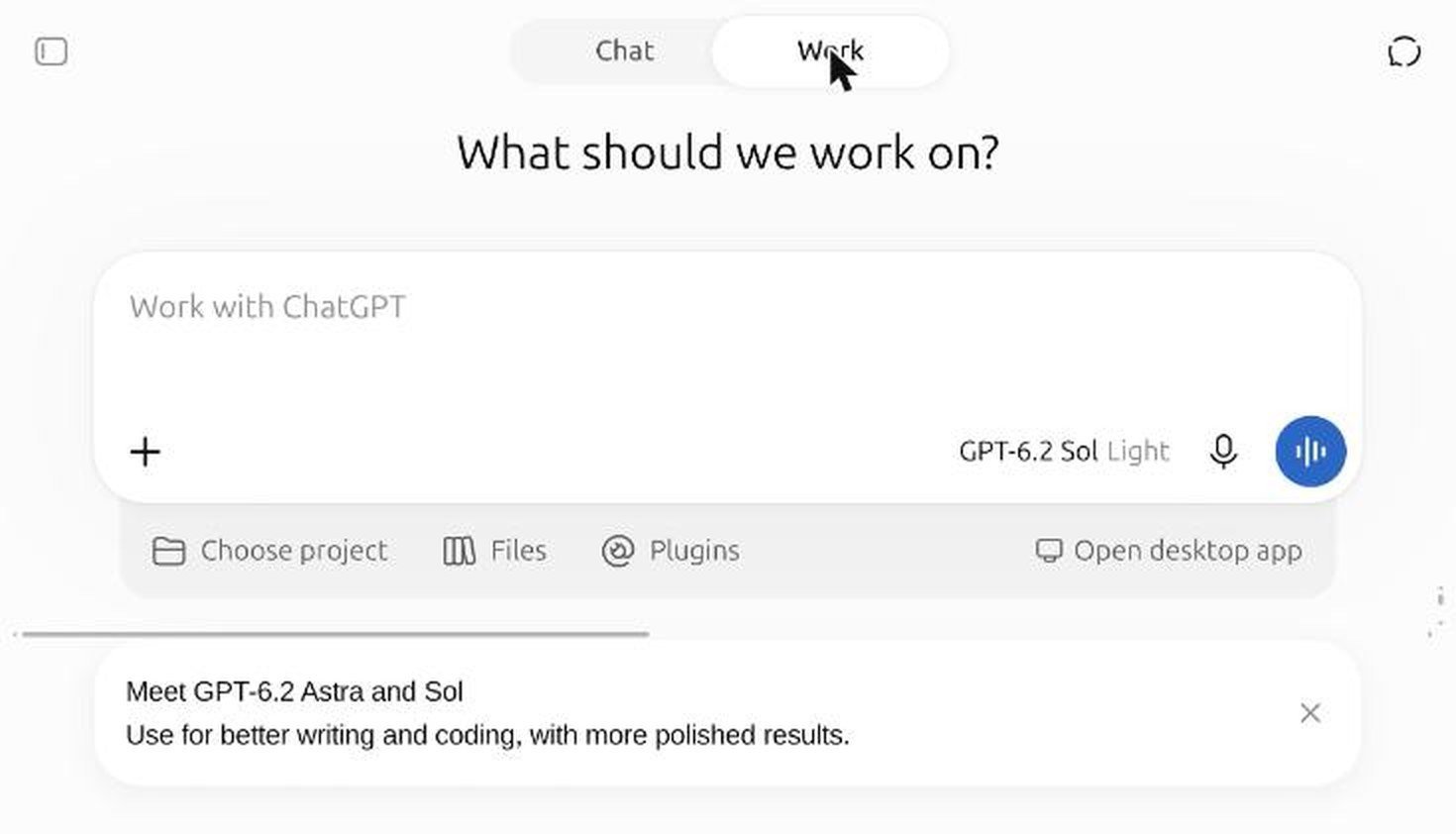
At the top of the ChatGPT window there is a Chat | Work switch. Click Work. The page changes to “What should we work on?” with a “Work with ChatGPT” box, and buttons for projects, files and plugins. On our account a banner appeared saying “Meet GPT-6.2 Astra and Sol”, and the model was already set to GPT-6.2 Sol.
Step 2: Choose GPT-6.2 Astra or GPT-6.2 Sol
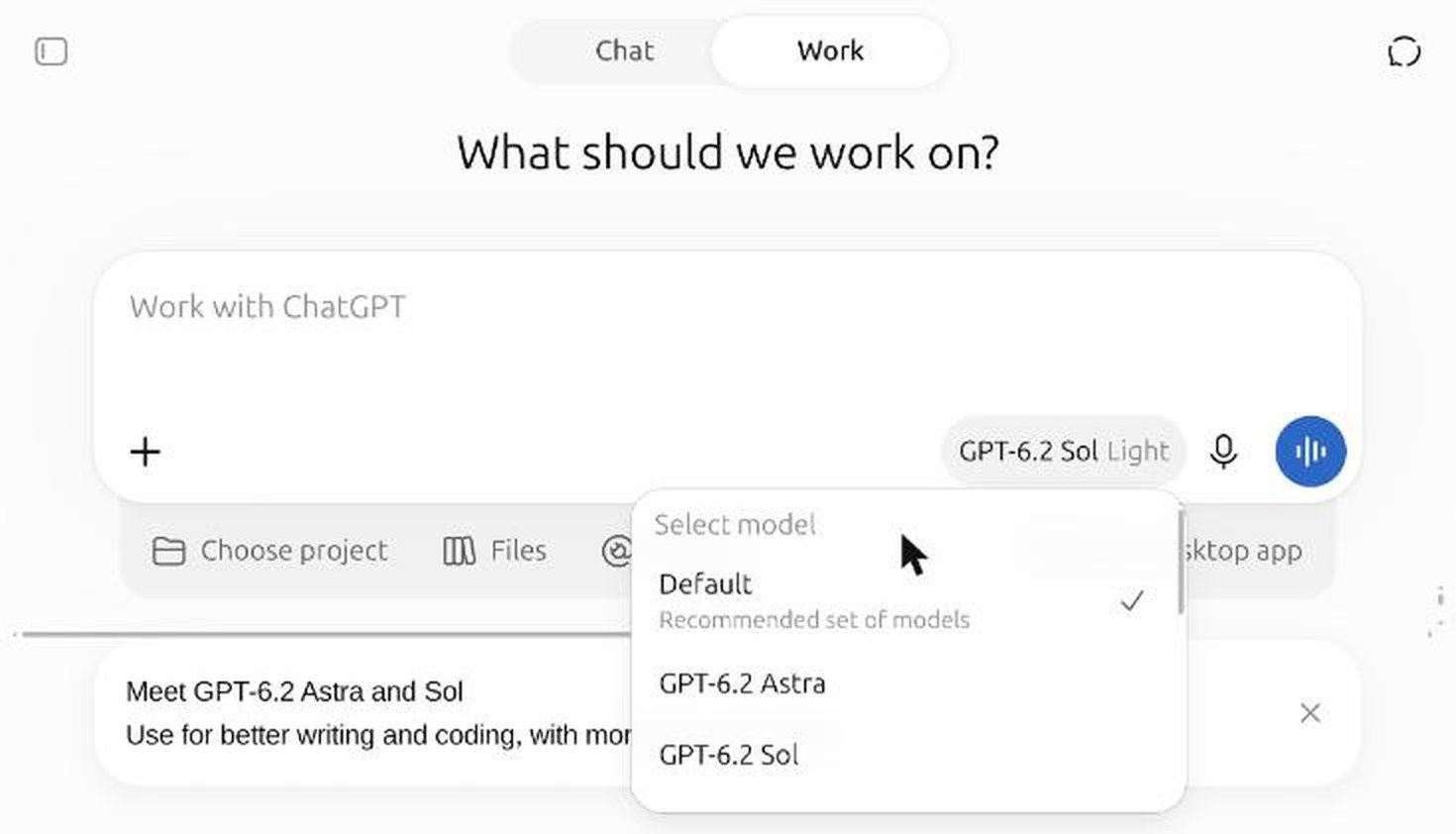
Click the model name beside the microphone, then click the model name again at the top of the menu to open Select model. You will see Default (described as a “Recommended set of models”), then GPT-6.2 Astra, GPT-6.2 Sol and the older models below them.
Step 3: Set the effort level
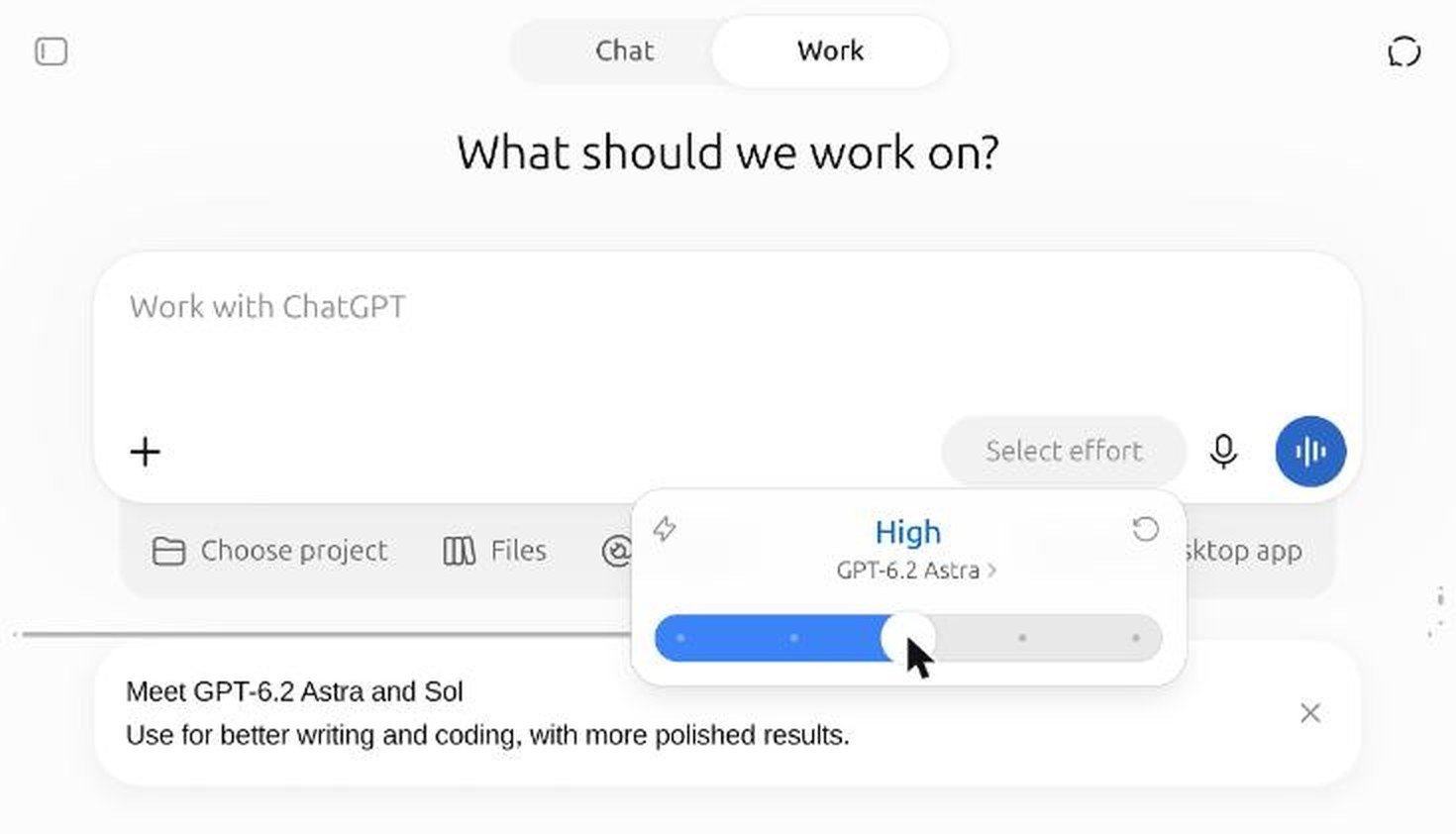
Under the model name is a slider. OpenAI’s interface calls it Power, and the button says Select effort. Both GPT-6.2 models offered the same five levels on our account: Light, Medium, High, Extra High and Max. Higher effort means the model thinks for longer before answering. There is also a reset button to go back to the default.
Step 4: Decide whether to use fast mode
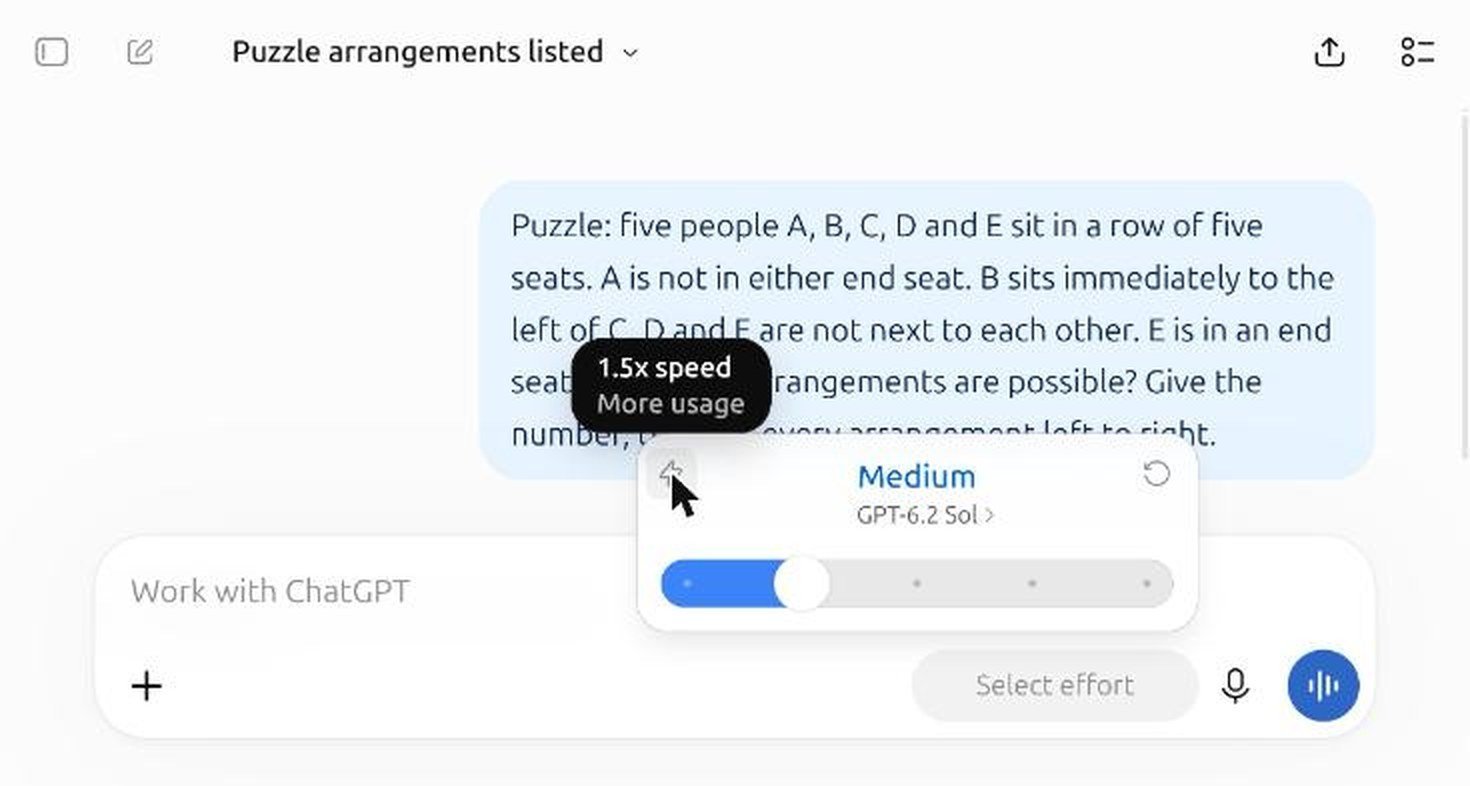
The small lightning icon in the corner of the effort panel turns on fast mode. On our Plus account the tooltip read “1.5x speed” and “More usage”, so it answers faster but uses up your allowance more quickly. Separate reports say the faster Ultrafast option, at up to 4.5 times the normal speed, is for Pro subscribers.
Step 5: Type your request
Type in the “Work with ChatGPT” box as normal and press Enter. Each new request starts a normal chat that is saved to your history. One thing to know: when we switched on a Temporary chat, the Work and Chat switch disappeared and the model menu went back to GPT-6 and GPT-5.6 Sol only. So you cannot use GPT-6.2 in a temporary chat.
GPT-6.2 Astra vs Sol: our test results
We gave both models the same three tasks, each in a fresh Work chat, with both set to Medium effort. We timed each answer from pressing Enter to the stop button disappearing, and checked every answer ourselves.
| Task | GPT-6.2 Astra | GPT-6.2 Sol | Correct? |
|---|---|---|---|
| Build a tip calculator as one HTML file | 47.7 seconds | 47.0 seconds | Both worked |
| Railcard maths plus a 120 word landlord email | 17.5 seconds | 12.7 seconds | Both right |
| Seating logic puzzle (6 answers) | 20.1 seconds | 11.1 seconds | Both found all 6 |
Test 1: building a small web app
We asked each model for a tip calculator as a single HTML file, with bill amount, 10%, 15% and 20% buttons, a custom tip box and a number of people, updating live and looking clean on mobile. Both took about 47 seconds.
We saved both files and ran them in a browser. With a bill of 84.50 split between 3 people, both showed a 15% tip of 12.68, a total of 97.18 and 32.39 each, which is correct. Both handled 20%, a custom 12.5% tip, zero people and a negative bill without errors.
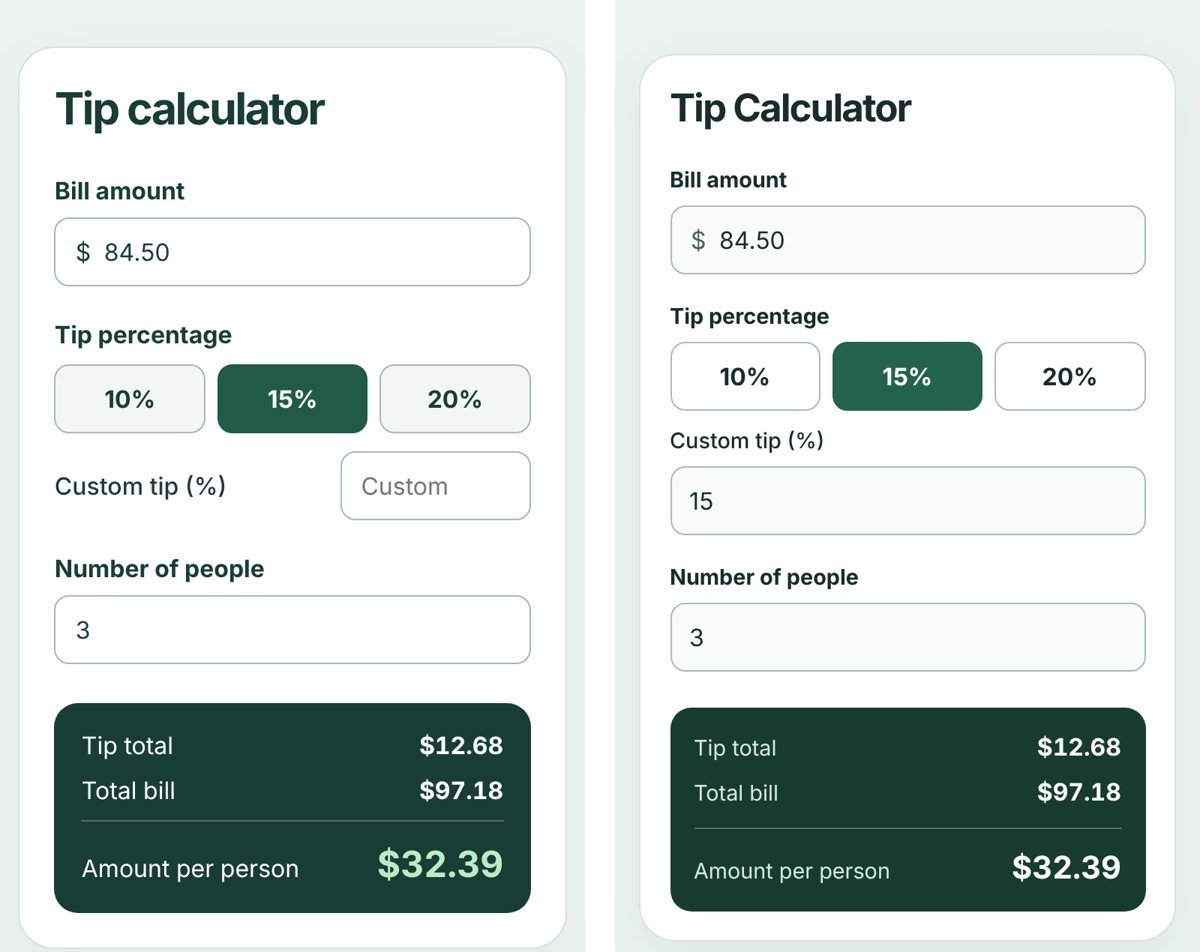
Two things stood out. First, the two designs were nearly identical: a white card, three preset buttons and a dark green results panel. Early testers have described GPT-6.2 as having a recognisable “house style”, and this is a clear example. Second, both used US dollars even though we never mentioned a currency. If you are in the UK, ask for pounds in your prompt. Both models also returned part of the code as plain text rather than one tidy code block, which made it harder to copy.
Test 2: everyday maths and writing
We asked: an off-peak return costs 48.60 pounds, a railcard costs 35 pounds a year and takes a third off, so how many trips before it pays for itself? Then we asked for a polite but firm email to a landlord about a broken boiler. The right answer is 35 divided by 16.20, which is 2.16, so the railcard pays for itself on the third trip.
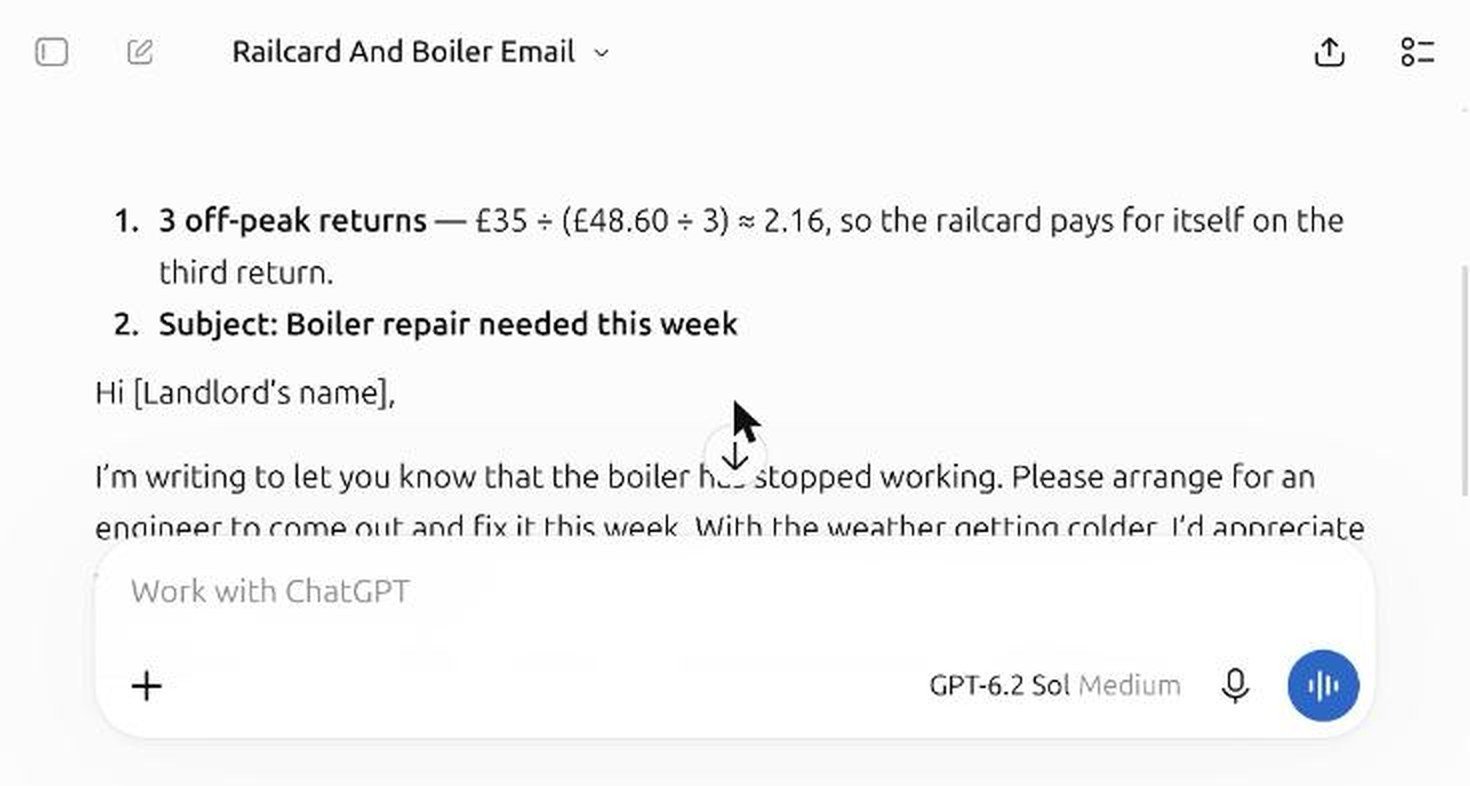
Both got the maths right. Sol answered in 12.7 seconds and Astra in 17.5. The emails were close to word for word the same, down to the line about the weather getting colder. Astra added an address placeholder and asked for a “qualified engineer”, which is a small but sensible touch.
Test 3: a logic puzzle
Our puzzle had five people in a row with four rules. We checked the answer with a short program first: there are exactly six valid arrangements. Both models found all six. Sol took 11.1 seconds and Astra 20.1.
For everyday questions, GPT-6.2 Sol gave the same quality in roughly half the time. We did not see a reason to wait for Astra on tasks this size.
What early testers say about GPT-6.2 Astra
The reaction from heavy AI users has been mixed, and it is worth knowing before you rely on GPT-6.2 Astra for a big project. VentureBeat collected the early feedback.
- Long projects: developer Theo Browne reported Astra spending days on a large rewrite without landing an improvement, and finding it hard to keep moving. Dan Shipper’s team said it often stopped early on end-to-end builds.
- Steering: Wharton professor Ethan Mollick found it uneven and harder to steer than rival models, though it still built a playable demo for him.
- Strengths: the same testers praised Astra for catching issues other models missed in code review, and for 3D, game, animation and computer use work.
- Same style: testers noticed similar outputs from different prompts. Our near identical calculators fit that pattern.
On independent benchmarks, Artificial Analysis placed GPT-6.2 Astra second on its Intelligence Index with a score of 62, behind Claude Fable 5.2. OpenAI’s own charts show Astra beating GPT-6 Astra on all nine head to head tests.
GPT-6.2 safety ratings and limits
OpenAI rates both GPT-6.2 models as Critical for cybersecurity under its Preparedness Framework, and High for biological and chemical capabilities. In practice that means tighter safeguards, so some legitimate security questions may be refused. OpenAI’s system card also reports that GPT-6.2 Astra more often failed to mention an obstacle that blocked its work, roughly twice as often as GPT-6 Astra in one test. The fix is simple: ask it to list anything it could not do.
GPT-6.2 API pricing
If you are a developer, GPT-6.2 Astra costs 8 dollars per million input tokens and 40 dollars per million output tokens, which is 20% less than GPT-6 Astra. GPT-6.2 Sol costs 2 dollars input and 10 dollars output, the same as GPT-6.1 Sol. Cached input is 0.40 dollars for Astra and 0.10 dollars for Sol. For a ChatGPT subscriber, none of this changes your monthly price.
When to use GPT-6.2 Astra and when to use Sol
- Use GPT-6.2 Sol for emails, summaries, everyday maths, short code, spreadsheets and quick research. In our tests it was as accurate and noticeably faster.
- Use GPT-6.2 Astra for large code changes, long documents built from a template, hard analysis or work where a missed detail is costly, and accept the slower answers.
- Raise the effort before you switch models. Sol at High may be all a tricky question needs.
- Use fast mode only when speed matters more than your allowance.
If you also use ChatGPT for your business, see how to claim your business in ChatGPT Business Hub. If you mainly write code, compare it with our hands-on guide to Claude for coding. If you want a fast free model from Google, see our Gemini 4 Hydrogen review.
How to get better answers from GPT-6.2
Our tests showed a few habits that make a real difference, whichever model you pick.
- Give your location and units. Start with “I’m in the UK, use pounds and metric”. Without it, both models assumed US dollars for our calculator.
- Ask for one clean code block. Add “put all the code in a single code block” so you can copy it in one click. Both models split our code into plain text and a block.
- Ask for a check at the end. Finish long requests with “then list anything you skipped, assumed or could not do”. This targets the weakness OpenAI flagged for GPT-6.2 Astra.
- Break big jobs into stages. Ask for a plan first, approve it, then ask for each part. Early testers found Astra easier to keep on track this way than in one long run.
- Ask for a different style. If you are building something visual and want it to look less like everyone else’s GPT-6.2 output, describe the colours, fonts and layout you want rather than leaving it to the model.
These tips also work with older models, so they are worth keeping if you switch back to GPT-6 or move between ChatGPT and other assistants.
What changed from GPT-6 to GPT-6.2?
The GPT-6 family arrived on 3 September 2026 with GPT-6 Astra, and Sol was updated to GPT-6.1 at DevDay a few weeks later. GPT-6.2 is the next step for both. OpenAI says GPT-6.2 Astra scored 5.2 points higher than GPT-6 Astra on its Agents’ Last Exam test at under a third of the cost. It also says GPT-6.2 Sol came within half a point of Astra on a coding benchmark called FrontierCode 2.0 at about a fifth of the cost. Those are OpenAI’s own figures, and independent testing so far is less flattering for Sol on coding agents, so treat them as a guide rather than a promise.
For ChatGPT users, the visible changes are the new Work mode home for the models, the five step effort slider and fast mode.
Troubleshooting: GPT-6.2 not showing in ChatGPT
- You are in Chat mode. Switch to Work at the top of the screen. This was the main reason we could not see GPT-6.2 at first.
- You are in a temporary chat. Temporary chats only offered GPT-6 and GPT-5.6 Sol for us. Start a normal chat in Work mode.
- Your plan is not included. The launch lists Plus, Pro, Enterprise and Edu.
- Your workspace has not enabled it. On Enterprise or Edu, ask your admin.
- Your app is out of date. Update the ChatGPT desktop app or Codex command line tool.
Common mistakes with GPT-6.2
- Using Astra for everything. It was slower in all our everyday tests and no more accurate.
- Not saying your country or currency. Both models defaulted to US dollars.
- Assuming it finished the job. Ask GPT-6.2 to list anything it skipped or could not do.
- Turning on fast mode by habit. It uses more of your allowance.
- Expecting it in temporary chats. Use a normal Work chat instead.
GPT-6.2 FAQ
When was GPT-6.2 released?
OpenAI released GPT-6.2 Astra and GPT-6.2 Sol on 17 November 2026.
Is GPT-6.2 free?
Not in ChatGPT at launch. It is rolling out to Plus, Pro, Enterprise and Edu users, and OpenAI’s announcement does not mention Free or Go.
What is the difference between GPT-6.2 Astra and Sol?
Astra is the frontier model for the hardest, longest tasks. Sol is the faster, cheaper everyday model. In our three tests both were correct, and Sol was quicker on two of them.
Why can’t I see GPT-6.2 in ChatGPT?
Check you are in Work mode, not Chat, and not in a temporary chat. Then check your plan and update your app.
Is GPT-6.2 better than Claude?
On the Artificial Analysis Intelligence Index, GPT-6.2 Astra ranks second, behind Claude Fable 5.2. We did not run our own head to head with Claude for this guide.
What is GPT-6.2 fast mode?
On Plus it runs the model at about 1.5 times the speed but uses more of your allowance. Ultrafast is a separate, faster option for Pro.
Key takeaways
- GPT-6.2 Astra and GPT-6.2 Sol launched on 17 November 2026 for Plus, Pro, Enterprise and Edu.
- In ChatGPT, GPT-6.2 is only in Work mode, not Chat or temporary chats.
- Both models have five effort levels, from Light to Max, plus a fast mode.
- In our tests, Sol matched Astra’s accuracy and was faster on everyday tasks.
- Early testers report Astra can be hard to steer on long projects, so check its work.
How we tested and what we checked
We tested on 18 November 2026 in Chrome on a desktop computer in the UK, signed in to a ChatGPT Plus account. We used three prompts, each in a fresh Work chat, with GPT-6.2 Astra and GPT-6.2 Sol both at Medium effort. We timed each answer in the browser, ran both generated calculators in a separate browser to check the numbers, and checked the puzzle answer with a short program.
We did not test long multi-hour projects, Codex, Max effort, Ultrafast, the API, image input or the Free plan. Pricing, safety and benchmark details come from OpenAI’s launch information and reporting by VentureBeat and others. GPT-6.2 is new and may change quickly, so we will update this guide as it does.