
ChatGPT Codex is OpenAI’s coding agent inside ChatGPT. You connect a GitHub repository, and Codex reads the code, runs it in a cloud sandbox, makes changes and shows you the diff before anything reaches your repo. We tested ChatGPT Codex on our own ChatGPT Plus account against a small Python project with a deliberate bug. It found the bug in 33 seconds, fixed it and wrote passing tests in 37 seconds, and used only a few per cent of the plan’s five-hour limit. It also missed one edge case, which is exactly why you still read the diff.
How we tested
We tested on 26 November 2026 on our own ChatGPT Plus account ($20 a month) in Chrome (UK), using the GPT-6.2 Sol model at the Light setting. We created a small public GitHub repository with one Python file containing a known discount bug, connected it to ChatGPT Codex, set up a cloud environment, asked Codex to review the code, then asked it to fix the bug and add pytest tests. We timed both tasks from the times Codex reported, read every line of the diff and re-ran the fixed code ourselves.
Not tested: the Codex CLI, the IDE extension, the desktop and iOS apps, automatic GitHub code review, pull requests, large codebases, and the Free, Go, Pro and Business plans. Plan and limit details come from OpenAI’s Codex pricing page and are labelled that way.
Table of Contents
ChatGPT Codex: the short answer
- What it is: an AI coding agent in ChatGPT that works on your real code in a cloud sandbox, plus a CLI and IDE extension for working on your own machine.
- Where to find it: go to chatgpt.com/codex, or pick Cloud in the location menu above the ChatGPT message box.
- What you need: a GitHub account and a ChatGPT plan. OpenAI’s pricing page lists Codex access on every plan from Free upward, with the full web, CLI and IDE set from Plus.
- Our result: it found the bug, fixed it, wrote three passing tests and opened no pull request, all in about 70 seconds of working time.
- What it cost us: after setup and both tasks, the Plus usage page showed 97% of the five-hour limit and 98% of the weekly limit left.
- Coming in December: OpenAI says Codex and ChatGPT chat will share one usage limit on Plus, Pro and Business, with Instant chat exempt.
What is ChatGPT Codex?
ChatGPT Codex is the name OpenAI uses for its software engineering agent. Unlike a normal chat, where you paste code and copy the answer back, Codex works on the files themselves. In the cloud version it clones your GitHub repository into a sandbox, installs what it needs, runs commands and tests, and keeps its edits on a separate branch for you to review.
OpenAI describes several ways to use it:
- Codex cloud in the ChatGPT web app, which is what we tested. Tasks run on OpenAI’s machines, so you can close the tab and come back.
- The Codex CLI, a terminal tool that edits code on your own computer.
- The IDE extension for editors such as VS Code.
- Cloud integrations, such as automatic code review on GitHub pull requests and a Slack integration, listed for Plus and above.
The big difference from asking ChatGPT a coding question is that ChatGPT Codex can run the code. In our test it ran the project’s own example before answering, so its bug report quoted the real wrong output rather than a guess.
Which ChatGPT plans include Codex?
This table summarises OpenAI’s Codex pricing page as we read it on 26 November 2026. Prices are in US dollars; the price you pay may differ by country and tax. We only tested Plus.
| Plan | Price (OpenAI’s page) | Codex access (OpenAI’s summary) |
|---|---|---|
| Free | $0 a month | Quick coding tasks with GPT-6 Luna in the desktop app, subject to rollout |
| Go | $8 a month | Lightweight coding tasks, same models as Free |
| Plus | $20 a month | Codex on web, CLI, IDE extension and iOS, cloud integrations, flexible credits |
| Pro | From $100 a month | Everything in Plus with higher limits; $100, $200 and $500 tiers |
| Business | $20 per user a month billed annually, $25 monthly | Larger cloud machines, SSO, no training on business data by default |
| Enterprise and Edu | Contact sales | Admin, compliance and data residency controls |
For most people trying ChatGPT Codex for the first time, Plus is the sensible starting point because it is the cheapest plan that includes the cloud agent we tested.
How to set up ChatGPT Codex in 7 steps
Setup took us a few minutes, most of it on GitHub. These are the steps as they appeared on our account.
1. Open Codex
Go to chatgpt.com/codex. On our account this opened the main ChatGPT window with a What should we build? prompt and a location button above the message box.
2. Connect GitHub
Codex reaches your code through a GitHub app called ChatGPT Codex Connector. When GitHub asks where to install it, choose Only select repositories rather than all of them, and pick just the repositories you want Codex to see. You can add more later from GitHub’s settings.
3. Use a test repository first
We strongly suggest starting with a small repository you do not mind experimenting on. Ours was a public repository with a single Python file, invoice.py, which totals an invoice, applies a percentage discount and adds 20% VAT. We planted one bug: the discount was multiplied by 10 instead of 0.10, so a 10% discount produced a negative total.
4. Create a cloud environment
Click the location button, hover over Cloud and choose Create environment, then pick the repository. An environment is the sandbox Codex uses for that repository.
5. Let Codex prepare it
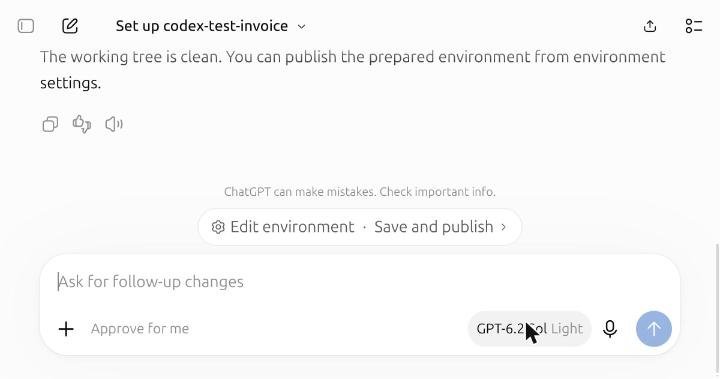
Codex opened a setup chat by itself and worked for 41 seconds. It reported that Python 3.12.14 was available and the project needed no extra packages. Interestingly, it ran our example while checking and already flagged the discount bug before we had asked anything.
6. Save and publish the environment
Click Save and publish. We saw an Environment published message, and the repository then appeared under Cloud in the location menu.
7. Pick the environment and write a task
Back on the start screen, choose your environment from the location menu, type a task in plain English and press Enter. The model menu on our Plus account showed GPT-6.2 Sol with a Light setting.
Test 1: asking ChatGPT Codex to find the bug
We started with a read-only request so nothing could change:
Explain what this repository does and review invoice.py for bugs. Do not change any files yet; just list any problems you find with the line numbers and a short explanation.
Codex showed Worked for 33s. It described the project correctly as a small invoice calculator, then pointed to line 17 and explained that the discount was 100 times too large because the percentage was used as a multiplier without dividing by 100. It quoted the real output of the example, -275.4 instead of the expected 27.54, and added that it had run the example and made no file changes. The changes counter confirmed zero lines added and zero removed.
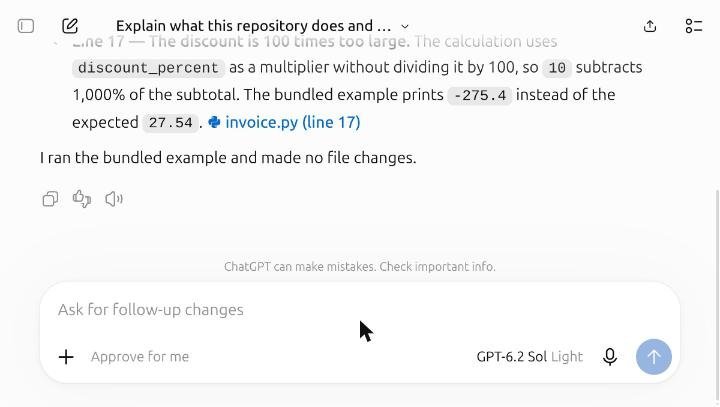
This is a planted bug in a tiny file, so finding it is not hard. What impressed us was the method: it ran the code rather than reading it, and it followed the instruction not to edit anything.
Test 2: asking ChatGPT Codex to fix it and write tests
Next we asked for a change in the same conversation:
Fix the discount bug in invoice.py and add a test_invoice.py file with pytest tests covering no discount, a 10% discount, and an invalid discount above 100. Run the tests and show me the results. Do not open a pull request.
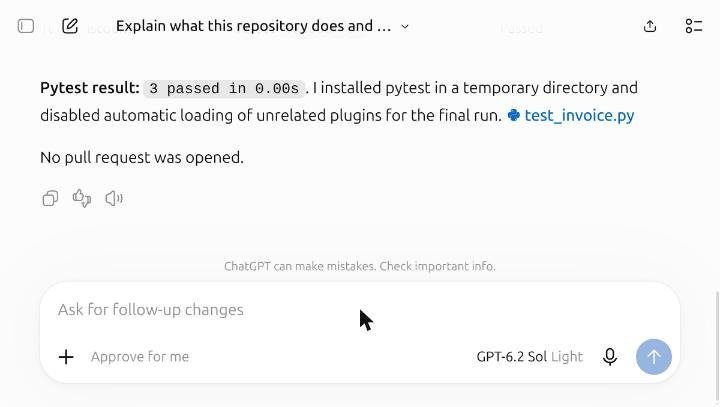
This time Codex showed Worked for 37s. Its answer was a short summary and a table of the three tests, each marked Passed, with the pytest result 3 passed in 0.00s. It said it had installed pytest in a temporary folder to run them, and that no pull request was opened.
The diff
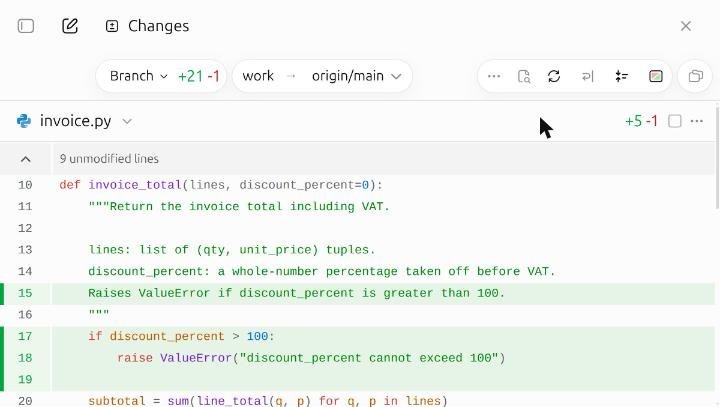
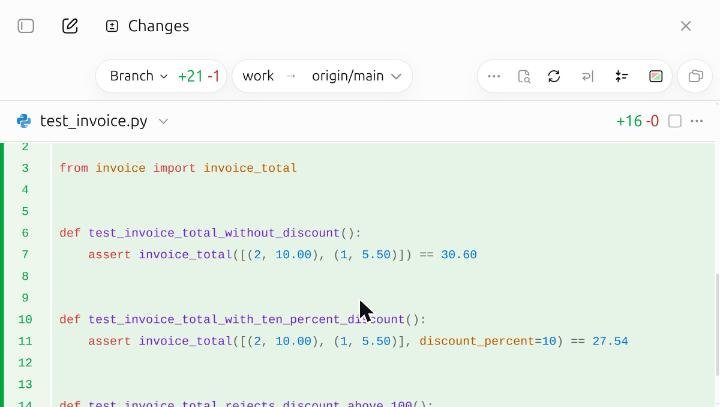
Opening the Changes panel showed 21 lines added and 1 removed across two files, on a working branch compared with the repository’s main branch. In invoice.py Codex changed five lines:
- It replaced the broken line with
subtotal * (discount_percent / 100). - It added a check that raises
ValueErrorwhen the discount is above 100. - It added a line to the docstring explaining that new error.
The new test_invoice.py held three short tests: no discount should give 30.60, a 10% discount should give 27.54, and a 101% discount should raise an error.
What we checked ourselves
We do not take a “passed” message on trust, so we applied the same edit to a copy of the file on our own machine and ran it. The results matched what Codex reported:
| Input | Expected | Our result |
|---|---|---|
| 2 items at 10.00 and 1 at 5.50, no discount | 30.60 | 30.6 |
| Same items, 10% discount | 27.54 | 27.54 |
| Discount of 101% | Error | ValueError raised |
| Discount of -10% | Not specified | 33.66 (a surcharge) |
The last row is the catch. Codex blocked discounts above 100 because we asked for that, but it did not think to block a negative discount, which quietly adds 10% to the bill. We never asked it to, so this is not a failure of the instructions. It is a reminder that ChatGPT Codex does what you specify very well and does not always widen the brief. A human reviewer would likely spot that in seconds; a busy one approving a green tick might not.
ChatGPT Codex usage limits on the Plus plan
The usage page is in ChatGPT’s settings under Usage. On our Plus account it said the plan limits are shared across Codex, Work, Workspace Agents and ChatGPT for Excel, and that chat conversations are not included. It showed two meters:
- 5-hour limit: 97% left after our setup chat and both tasks.
- Weekly limit: 98% left.
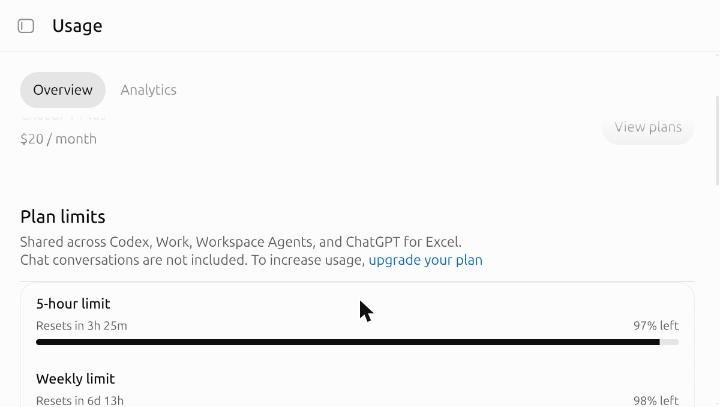
We cannot say exactly how much of the 3% came from our tasks, because the meter is shared. Still, three short tasks on a tiny repository barely moved it.
OpenAI’s pricing page gives Plus estimates in local messages per five hours, and stresses that these are ranges, not fixed limits. Cloud tasks, like ours, may use more of the allowance than local messages.
| Model | Plus estimate (local messages per 5 hours) |
|---|---|
| GPT-6.2 Sol | 17 to 180 |
| GPT-6.2 Astra | 6 to 50 |
| GPT-6.1 Sol | 15 to 160 |
| GPT-6 Luna | 350 to 3,000 |
When you run out, OpenAI says you can keep going with credits, which are charged per token. The page also notes that Pro plans currently have no five-hour limit. Our account showed 0 credits, and we did not buy any.
What changes for ChatGPT Codex in December
On 2 November 2026 OpenAI updated its help article on ChatGPT and Codex usage limits to say that, starting in December, ChatGPT and Codex will share one usage limit on the Plus, Pro and Business plans, as reported by Notebookcheck. Usage will be counted in tokens, so heavier models and longer tasks use more. Instant chat is exempt. OpenAI has not given an exact start date or the size of the shared limit for each plan.
In practice, from December a long Codex session could leave you less room for heavy chat on the same day, and the other way round. Our usage page on 26 November still said chat was not included, so the change had not reached our account yet. We will update this guide once it does.
Tips for using ChatGPT Codex safely
- Give the GitHub app selected repositories only. It is easy to grant access to everything during setup. Check the list in GitHub’s settings now and then.
- Start with read-only tasks. Asking for a review first, with “do not change any files”, worked exactly as asked for us.
- Say what you do not want. We wrote “do not open a pull request”, and it did not. Clear limits in the prompt were respected every time.
- Watch the approval setting. The new chat box showed Ask for approval, while the running task showed Approve for me. Check which one is selected before giving Codex a bigger job.
- Read the diff, every line. The Changes panel makes this quick. It is where we spotted the missing negative-discount check.
- Ask for edge cases. Adding “and any other invalid inputs you can think of” to the prompt is a cheap way to widen the brief.
ChatGPT Codex compared with other coding agents
We have not yet run this exact repository through other agents, so this is not a head-to-head score. Based on our earlier hands-on tests:
- ChatGPT Codex suits people who already pay for ChatGPT and keep their code on GitHub. The cloud sandbox means nothing runs on your computer.
- Claude is strong at explaining and planning code in chat; see our guide to using Claude for coding.
- Google Antigravity is a full agent-first editor that runs on your machine; see our Google Antigravity guide and our test of Gemini 4 Carbon in Antigravity.
If you are choosing between OpenAI’s own models for coding, our GPT-6.2 Astra vs Sol comparison explains how the two differ.
Our verdict on ChatGPT Codex
For a small, well-defined job, ChatGPT Codex was fast, careful and obedient. It ran the code before answering, kept to every limit we set, and left a clean diff and working tests in about a minute and a quarter of working time, for a tiny slice of a Plus plan’s limit. The negative-discount gap shows its limits: it is a very good junior engineer that does what it is told, not a replacement for reading the change. Our test was deliberately small, so we cannot yet say how it copes with a large, messy codebase.
Key takeaways
- ChatGPT Codex found a planted bug in 33 seconds and fixed it with three passing tests in 37 seconds on a Plus plan.
- It followed “do not change files” and “do not open a pull request” exactly.
- It did not guard against a negative discount, so always review the diff.
- Our whole test left 97% of the five-hour limit; from December, chat and Codex will share one limit on paid plans.
ChatGPT Codex FAQ
Is ChatGPT Codex free?
OpenAI’s pricing page lists limited Codex access on the Free and Go plans for quick coding tasks with the GPT-6 Luna model, subject to rollout. The cloud agent with GitHub integration that we tested is listed from the Plus plan at $20 a month.
Do I need GitHub to use ChatGPT Codex?
For Codex cloud, yes: it reads your code through the ChatGPT Codex Connector GitHub app. The Codex CLI and IDE extension work on code stored on your own computer.
Can ChatGPT Codex change my code without asking?
In our test, Codex kept its edits on a working branch shown in the Changes panel and opened no pull request because we told it not to. Check the approval setting in the message box before each task, and only give the GitHub app access to the repositories you choose.
How long does a ChatGPT Codex task take?
Our two small tasks took 33 and 37 seconds of working time, and environment setup took 41 seconds. Larger repositories and bigger jobs will take longer.
Does ChatGPT Codex use my chat limit?
On our Plus account in November, the usage page said Codex limits were shared with Work, Workspace Agents and ChatGPT for Excel, but not with chat. OpenAI says that from December, Codex and chat will share one limit on Plus, Pro and Business, with Instant chat exempt.
Which model does ChatGPT Codex use?
Our Plus account defaulted to GPT-6.2 Sol at the Light setting. OpenAI’s pricing page lists several models with different limits, from GPT-6 Luna for quick tasks to GPT-6.2 Astra for harder ones.
Plan prices, model limits and credits come from OpenAI’s Codex pricing page, checked on 26 November 2026. The December shared-limit change comes from OpenAI’s help centre as reported by Notebookcheck. Everything else describes what we saw in our own test on 26 November 2026.
More ChatGPT guides
- AI Black Friday Deals 2026: We Checked ChatGPT, Gemini, Claude and Perplexity Prices
- Best ChatGPT Prompts for Work, Study and Everyday Life: 30 Tested Examples (2026)
- GPT-6.2 Astra vs Sol: Which ChatGPT Model Should You Use? We Tested Both
- ChatGPT Business Hub: How to Claim Your Business on ChatGPT (Step by Step)