
Gemini 4 Carbon, Google’s most capable model, arrived in Google Antigravity for AI Pro subscribers on 23 November 2026. Until then it was limited to the £79.99-a-month Ultra plan. We gave Carbon and Gemini 4 Argon the same real coding task in Antigravity on an AI Pro account and compared how they worked, what they built and how much of the usage limit each one used. Carbon was slower and asked questions first, but its code was the one we would actually ship.
How we tested
We tested on 25 November 2026 on our own Google AI Pro account, using Antigravity’s web version (Remote Agents at antigravity.google.com/remote), in an existing cloud project. Both models used Medium thinking effort and got the same prompt: build a UK late-payment calculator in Python with tests, and run the tests. We then read both sets of code and checked their maths ourselves.
Not tested: the Antigravity desktop app, Voice Mode, Low or High thinking, and longer multi-file projects. Benchmark figures and launch details come from Google and news reports and are labelled that way. One task is a small sample.
In this article
Gemini 4 Carbon in Antigravity: the short answer
- Carbon asked before building. After about 1 minute 15 seconds of thinking, it looked at our project files and asked three multiple-choice questions, each with a recommended answer. Argon asked nothing.
- Argon was much faster. Argon finished in under 2 minutes. Carbon spent about 1 minute 15 seconds thinking before its questions and about 2 to 3 minutes working after we answered, roughly twice as long, not counting the time we took to reply.
- Carbon’s code was more careful. It used exact decimal maths with proper half-up rounding and wrote 27 tests. Argon used ordinary floats and 9 tests, and its rounding can come out a penny short in some cases.
- Carbon used more of the limit. Carbon used about 4% of the 5-hour Gemini limit; Argon about 1%.
What is Gemini 4 Carbon?
Gemini 4 Carbon is the top model in Google’s Gemini 4 family. Google announced it on 28 October 2026, two weeks after Gemini 4 Argon, and claimed “significant gains” in coding, agentic tasks and cybersecurity defence. According to 9to5Google’s report of the launch, Google said Carbon ranked first on the Artificial Analysis Intelligence Index v5.0 with a score of 59, and that it makes about half as many unsupported claims as Argon. Those are Google’s figures, not ours.
The rollout came in stages, according to news reports:
- 28 October: early access for selected cybersecurity defenders.
- 10 November: general release to paying developers through the Gemini API, and to Google AI Ultra subscribers in the Gemini app, AI Mode and Antigravity.
- 23 November: Google AI Pro subscribers got Gemini 4 Carbon in Antigravity, and Google reset everyone’s Antigravity usage limits, as 9to5Google reported.
9to5Google also reported that Gemini 4 Argon and Gemini 3.8 Flash leave Antigravity on 30 November, which makes this comparison timely: if you have been using Argon, Carbon is what you will be moving to.
What is Google Antigravity?
Google Antigravity is Google’s “agentic development platform”: an app where AI agents write, run and fix code for you. It has desktop apps for Mac, Windows and Linux. Its November update added Remote Agents, which run tasks in cloud machines and can be controlled from a browser or phone at antigravity.google.com/remote, plus Voice Mode and a redesign, according to 9to5Google. Remote Agents are for paid AI Pro and Ultra subscribers.
We used the web version, because it needs nothing installed. Our earlier Gemini 4 Argon vs Neon test used the same cloud project, which is why it is called “invoice-helper-argon”.
Step 1: choosing Gemini 4 Carbon and checking the limits
The model picker under the prompt box listed Gemini 4 Neon, Gemini 4 Carbon, Gemini 4 Argon, Gemini 4 Hydrogen, Gemini 3.8 Flash, Claude Opus 5.5, Claude Sonnet 5.5 and GPT-OSS 120B. Each Gemini model has a thinking effort setting of Low, Medium or High.
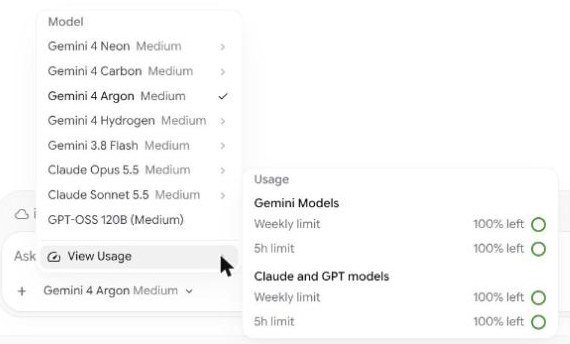
The View Usage option shows two limits for Gemini models, a weekly limit and a 5-hour limit, plus separate limits for the Claude and GPT models. Before our test both Gemini limits showed 100% left, which fits Google’s quota reset.
Step 2: the coding task
We wanted a task with a right answer we could check, not a toy. So we asked for a calculator for UK late commercial payments under the Late Payment of Commercial Debts (Interest) Act 1998:
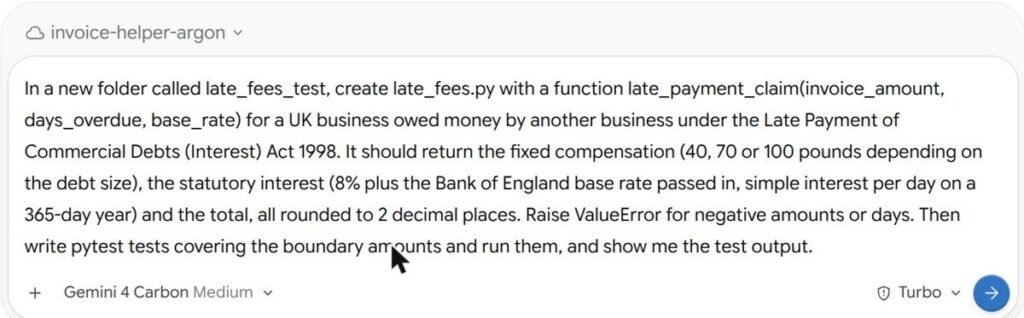
The rules are clear on GOV.UK: fixed compensation of £40 for debts under £1,000, £70 for £1,000 to £9,999.99 and £100 for £10,000 or more, plus simple interest at 8% above the Bank of England base rate. The tricky parts are the exact boundaries and rounding to the penny.
Step 3: Gemini 4 Carbon asked three questions
Carbon thought for about 1 minute 15 seconds, explored the project files and ran some commands, then stopped with “Asking 3 questions”. It had noticed that the existing invoice.py in our project stores VAT as a decimal fraction (0.2), so it asked how we would pass the base rate:
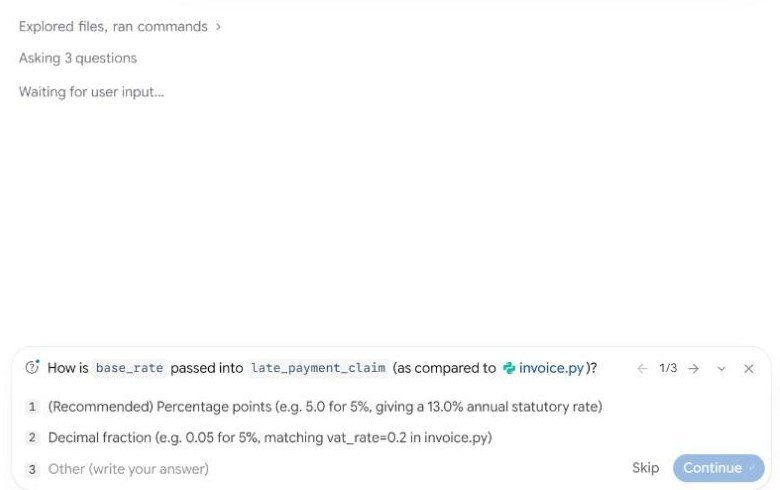
- Base rate format: percentage points (5.0 for 5%) or a decimal fraction (0.05)?
- What “total” means: the late payment claim only (compensation plus interest), or including the original invoice?
- Return type: a NamedTuple, a dictionary or a plain tuple?
Each question had a “(Recommended)” option, and the recommendations were sensible, so we picked all three. These were genuine ambiguities in our prompt. The second one in particular could easily have produced the wrong number on an invoice.
Step 4: what Gemini 4 Carbon built
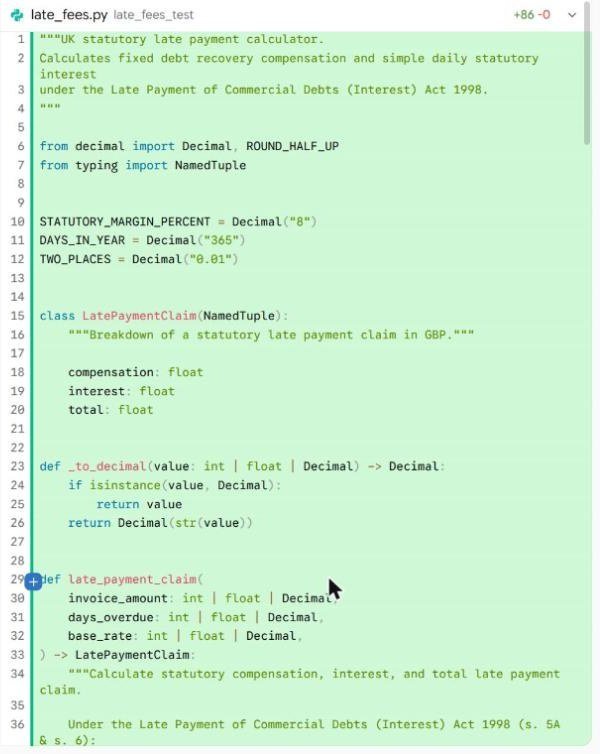
After our answers, Carbon took about 2 to 3 minutes to write the code, write the tests and run them. The result was 2 new files with 197 lines, and 27 tests passed in 0.06 seconds.
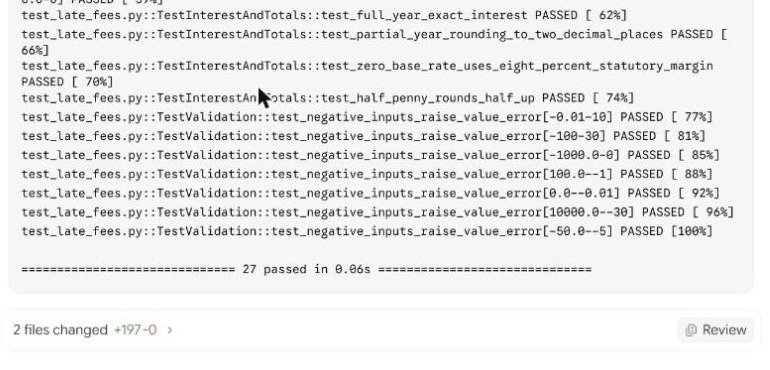
Reading the code, three things stood out:
- Exact money maths. It used Python’s
Decimaltype with half-up rounding, which is how money should be handled. - Thorough boundary tests. It tested 0, 1p, £999.99, £1,000, £1,000.01, £9,999.99, £10,000 and £10,000.01, plus a half-penny rounding case and seven different negative inputs.
- A clear result. It returned a named result with
.compensation,.interestand.total, as we had agreed.
Step 5: what Gemini 4 Argon built
We started a new conversation with Gemini 4 Argon on Medium and sent the same prompt. Argon asked nothing. It assumed percentage points, returned a plain tuple and treated the total as compensation plus interest. It finished in under 2 minutes, with 2 files, 125 lines and 9 tests passed.
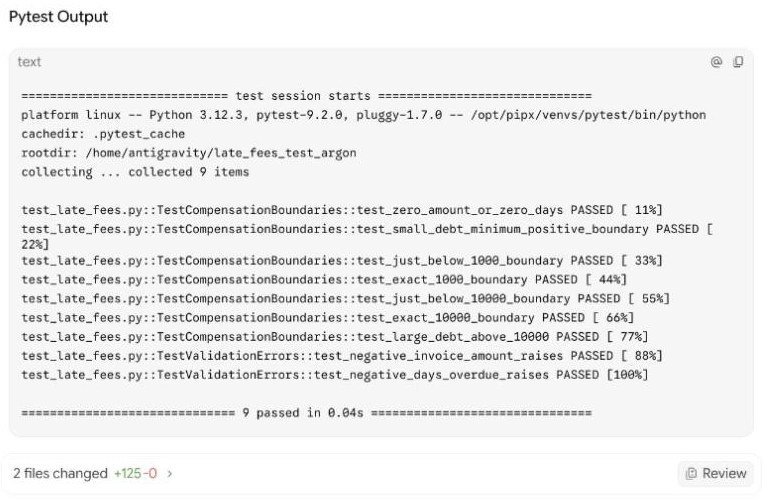
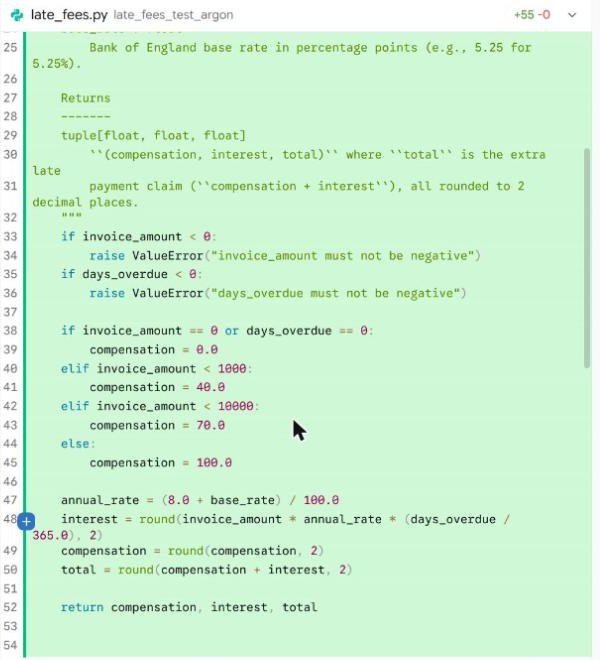
Its compensation tiers were correct, and its tests covered the main boundaries. But it used ordinary floating-point numbers and Python’s round() function for money.
Step 6: checking the maths ourselves
Both versions got the legal rules right: the £40, £70 and £100 tiers at the correct boundaries, and simple daily interest at 8% plus the base rate. Both also return a zero claim when the amount or the days overdue is zero, which is reasonable.
The difference is rounding. We ran both formulas side by side and found cases where they disagree. For example, a £5,110 invoice that is 1 day late with a base rate of 3.75% earns exactly £1.645 of interest. Carbon’s code correctly rounds that to £1.65; Argon’s gives £1.64, because of how floating-point numbers store half pennies. The same happened at 3, 5 and 9 days.
A penny is small, but in an invoicing tool it is exactly the kind of error that makes figures fail to reconcile. Carbon also tested for this case. Argon did not.
Step 7: how much of the usage limit each model used
After Carbon’s task, View Usage showed the Gemini weekly limit at 98% left and the 5-hour limit at 96% left. After Argon’s task, the weekly limit was still 98% and the 5-hour limit was 95%.
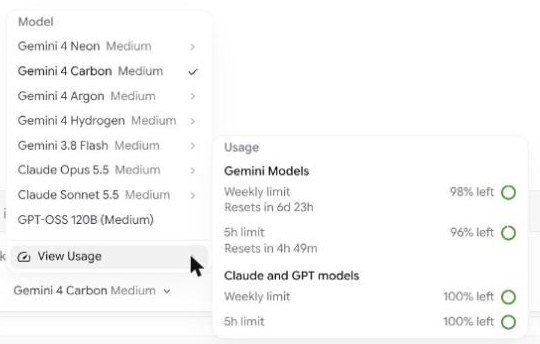
So on this task, Gemini 4 Carbon used about 4% of the 5-hour limit and Argon about 1%. On that rough rate, an AI Pro account could run around two dozen tasks like ours with Carbon in a 5-hour window, but bigger jobs will use more, and the percentages are all Google shows; it does not publish exact numbers.
Gemini 4 Carbon vs Argon: side by side
| Gemini 4 Carbon (Medium) | Gemini 4 Argon (Medium) | |
|---|---|---|
| Asked questions first | Yes, 3, with recommended answers | No |
| Time to finish | About 3.5 to 4 minutes of work (plus time to answer its questions) | Under 2 minutes |
| Code written | 197 lines in 2 files | 125 lines in 2 files |
| Tests | 27 passed | 9 passed |
| Money maths | Decimal with half-up rounding | Floats with round() |
| Legal tiers correct | Yes | Yes |
| Penny-exact on half pennies | Yes | No (e.g. £1.64 instead of £1.65) |
| 5-hour limit used | About 4% | About 1% |
Is Gemini 4 Carbon worth using on AI Pro?
Use Carbon for code where correctness matters more than speed: anything involving money, dates, legal rules or an existing codebase it needs to fit into. Its questions caught real gaps in our prompt, and its code was more careful.
Use a faster model for quick, low-stakes jobs, where waiting for questions and using four times as much of your limit is not worth it. With Argon leaving Antigravity on 30 November, according to 9to5Google, Gemini 4 Neon or Hydrogen will be the faster options; our Argon vs Neon test covers Neon.
If you are deciding whether AI Pro is worth it, Google AI Pro was £18.99 a month on our UK account, and Google’s Black Friday member offer was showing a year for £94.99 on 24 November. Our Google AI plans guide compares Plus, Pro and Ultra.
Tips for better results from Gemini 4 Carbon
Based on how it behaved in our test, a few habits make Carbon more useful:
- Say how the result should be checked. We asked it to write tests and run them, and it showed the test output at the end, so we could see the work rather than take it on trust.
- Name the format of every input. Our prompt did not say whether the base rate was 5 or 0.05, which is why it stopped to ask. If you include details like units, currency and return format up front, it can usually go straight to building.
- Point it at your existing code. Carbon read our project before asking anything and noticed how our other file stored rates. Working inside a real project gives it the context to match your conventions.
- Ask for edge cases by name. If rounding, dates or limits matter, list them in the prompt. Carbon tested half pennies on its own, but Argon did not, and you will not always know which model is running a task.
- Keep tasks focused. One clear job per conversation makes the questions, the review and the usage easier to follow.
How to use Gemini 4 Carbon in Antigravity
- Make sure you have Google AI Pro or Ultra, then open antigravity.google.com/remote (or the desktop app) and sign in with the same Google account.
- Open or create a project. Remote projects run in a cloud machine, from a GitHub repository or Google Drive folder.
- In the prompt box, open the model picker and choose Gemini 4 Carbon. Hover over it to set the thinking effort.
- Describe the task, including how you want the result checked (for example, “write tests and run them”).
- Answer Carbon’s questions if it asks any; the recommended options are a good default.
- Open Review to read the changed files, and check View Usage to keep an eye on your limits.
Mistakes to avoid
- Walking away straight after sending. Carbon may stop to ask questions, and the task waits until you answer.
- Trusting “all tests passed”. Argon’s 9 tests passed too, but they did not test the rounding case it got wrong. Read the tests as well as the result.
- Using High thinking for everything. Even Medium Carbon used four times Argon’s share of the limit on our task.
- Relying on Argon. It is due to leave Antigravity on 30 November, according to 9to5Google, so move projects that depend on it.
Key takeaways
- Gemini 4 Carbon reached Google AI Pro in Antigravity on 23 November 2026, along with a reset of usage limits.
- In our test, Carbon asked three useful questions, wrote 27 tests and handled money with exact decimal rounding.
- Gemini 4 Argon was about twice as fast but rounded some half pennies down.
- Carbon used about 4% of the 5-hour Gemini limit for one task, against about 1% for Argon.
Launch details come from 9to5Google’s Carbon launch report, its report on Carbon reaching AI Pro in Antigravity and its coverage of the Antigravity November update. The late payment rules are on GOV.UK.
Gemini 4 Carbon FAQ
Is Gemini 4 Carbon available on Google AI Pro?
In Antigravity, yes. Google AI Pro subscribers got Gemini 4 Carbon in Antigravity on 23 November 2026, and it appeared in the model picker on our AI Pro account on 25 November. Reports from 10 November said the Gemini app and AI Mode versions were for AI Ultra subscribers.
Is Gemini 4 Carbon better than Argon for coding?
In our one-task test, Carbon produced more careful code: it asked about ambiguities, used exact decimal maths and wrote 27 tests. Argon was about twice as fast and its legal logic was also correct, but it rounded some half pennies down. For money or business rules, we would use Carbon.
How much of the Antigravity limit does Gemini 4 Carbon use?
Our task, which wrote about 200 lines of code and ran tests, used about 4% of the 5-hour Gemini limit and about 2% of the weekly limit on AI Pro. Argon used about 1% of the 5-hour limit for the same task. Google shows usage as percentages only.
Why did Gemini 4 Carbon ask questions?
It read our existing project first and found real ambiguities: our existing code stores rates as decimal fractions, and our prompt did not say whether the total should include the original invoice. It offered recommended answers for each, so answering took a few clicks.
Can I use Antigravity without installing anything?
Yes, for Remote Agents. We ran this whole test in a web browser at antigravity.google.com/remote, using a project that runs in a cloud machine. Remote Agents are for paid AI Pro and Ultra subscribers, according to 9to5Google; the full app is a desktop download for Mac, Windows and Linux.
When does Gemini 4 Argon leave Antigravity?
9to5Google reported that Gemini 4 Argon and Gemini 3.8 Flash leave Antigravity on 30 November 2026. They were still in the model picker when we tested on 25 November.
More Gemini and Google AI guides