Gemini 4 Argon is Google’s frontier reasoning model from September 2026, and since 18 November it has a cheaper, faster sibling, Gemini 4 Neon, that has taken its place in the Gemini app. So which should you use? We ran Argon and Gemini 4 Neon side by side on four everyday jobs (a logic puzzle, a sales spreadsheet, a short coding task and a tightly limited email) on a Google AI Pro account on 20 and 21 November 2026. Both models got all four right. Argon finished three of the four sooner and showed more of its working; Neon was quicker on the coding task and wrote tighter answers.
This guide explains what Argon is, how to get it on Google AI Pro now that it has left the Gemini app picker, exactly what happened in each test, what it costs, and which model to pick for which job.
How we tested
We tested on 20 and 21 November 2026 in Chrome in the UK, on a personal Google account with Google AI Pro, using the Google Antigravity web app (antigravity.google.com). We gave Gemini 4 Argon and Gemini 4 Neon the same four prompts, each in a fresh conversation, with both models on the same Medium thinking effort. We wrote every task ourselves and worked out the correct answers in advance (the logic puzzle was checked by a short program that tries every possible arrangement). Times are measured from pressing Send to the answer finishing, so they include Antigravity setting up a workspace. One run per task is a practical sample, not a benchmark, and times vary from run to run. Not tested: the High thinking level, the paid API, and Argon inside the Gemini app (it was not in our app’s model list). Benchmark figures below are Google’s or Artificial Analysis’s, and are labelled that way.
In this article
Gemini 4 Argon vs Neon: the short answer
If you only read one section, read this one:
- Both were accurate. Gemini 4 Argon and Gemini 4 Neon scored 4 out of 4 on our tasks, including a ten-clue logic puzzle and a word-limited email.
- Argon explains more. It showed every calculation in the sales task and walked through each case of the puzzle. Good when you want to check the reasoning.
- Neon is leaner. Shorter answers, a slightly shorter email, and the faster coding run (14 seconds of agent work against Argon’s 20).
- Argon was faster overall here, finishing three of our four tasks sooner from send to finish. Independent measurements say Neon writes text roughly twice as fast, so do not read too much into four runs.
- Neon is the easier one to get. It is the default in Antigravity and is in the Gemini app for Pro and Ultra. On our Pro account, Argon is only in Antigravity.
For most people on Google AI Pro, Neon is the sensible default. Reach for Argon when you want a second opinion on a hard problem, or a fully worked answer you can audit line by line.
What is Gemini 4 Argon?
Google announced Gemini 4 Argon on 30 September 2026, calling it “our next era of frontier intelligence”. It started with a small group of security researchers in Google’s Fairwind Program, then reached the paid Gemini API and Google AI Ultra. On 13 October Google said Argon was rolling out in the Gemini app and AI Mode for Google AI Pro and Ultra subscribers too.
Then the line-up moved quickly. Google released Gemini 4 Carbon and Gemini 4 Hydrogen in mid-November, and on 18 November it launched Gemini 4 Neon, which Google describes as balancing depth and efficiency, sitting between the fast Hydrogen and the heavyweight Carbon. According to 9to5Google, Neon replaced Argon in the Gemini app’s model picker as the “Deeper analysis” choice. That matches what we saw: on 20 November our Pro account’s Gemini app offered Auto, 4 Hydrogen, 4 Neon and 4 Carbon, with no Argon.
Key specs from Google’s announcement:
- Context window: 1 million tokens of input.
- Output: Google says it raised the output limit to 1 million tokens as well.
- Thinking effort: Low, Medium or High in Antigravity (Medium is the default we were given).
- Strengths Google claims: long-running coding and agent work, video understanding and security research.
How to get Gemini 4 Argon on Google AI Pro
Here is the route that worked for us on 20 November 2026:
- Check your plan. You need Google AI Pro or Ultra on a personal Google account. The free plan does not include the Gemini 4 models.
- Open Google Antigravity. Go to antigravity.google.com in your browser (or use the desktop app) and sign in. If you are new to it, our Google Antigravity guide walks through setup.
- Start a conversation. Click New Conversation. You can pick a project or work without one.
- Open the model picker. Click the model name under the message box. Neon is the default.
- Choose Argon. Hover over it to set the thinking effort to Low, Medium or High, then click it.
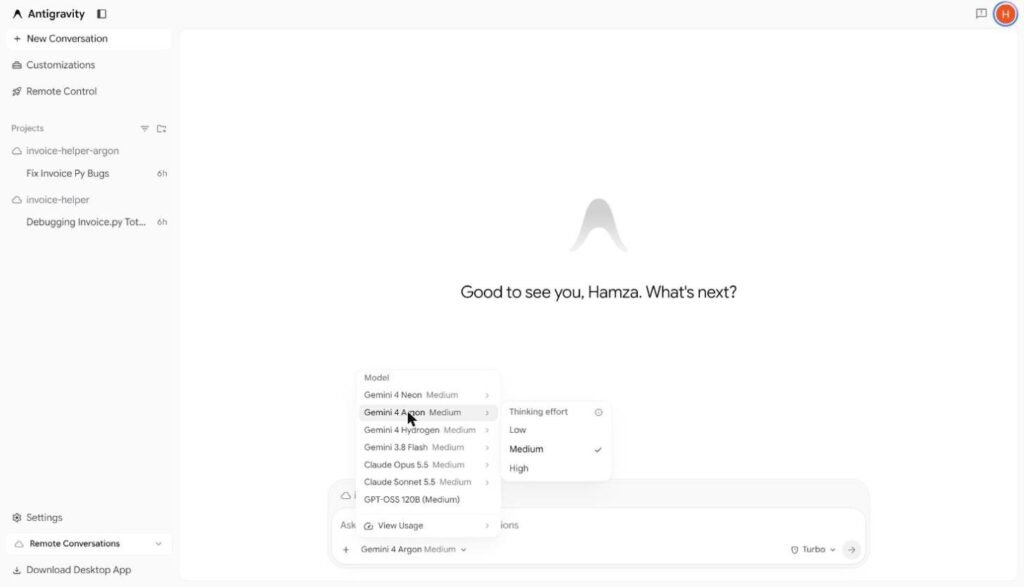
Two caveats. First, Google’s October post said Antigravity access to Gemini 4 Argon was for Ultra and enterprise users, yet it was there on our Pro account. Access may differ by account or change again, so check your own picker. Second, Argon has its own weekly limit on Pro, separate from the main Gemini allowance (more on that below).
Developers can also call Argon through the paid Gemini API, which is billed per token rather than by subscription.
How we tested Gemini 4 Argon and Neon
We picked four tasks that mirror what people actually ask an AI model to do, each with a single right answer we could check:
- Reasoning: a ten-clue seating puzzle (five friends, five seats, five drinks). Our checking program confirmed it has exactly one solution.
- Data: a nine-row sales log for a small shop. Work out monthly revenue, the month-on-month change to one decimal place, and the best product.
- Coding: write a Python function that returns the last Friday of every month, run it for 2027 and show the 12 dates.
- Writing with rules: a holiday-hours email for a UK gift shop with a subject line, a body of 80 words or fewer, a set sign-off, and two banned words (“exciting” and “sorry”).
Both models ran at Medium thinking effort, in the same Antigravity project, with a fresh conversation for every task so neither could see earlier answers. We asked for answers in chat only, except the coding task, where each model could create a scratch file to run its code.
Test 1: the logic puzzle
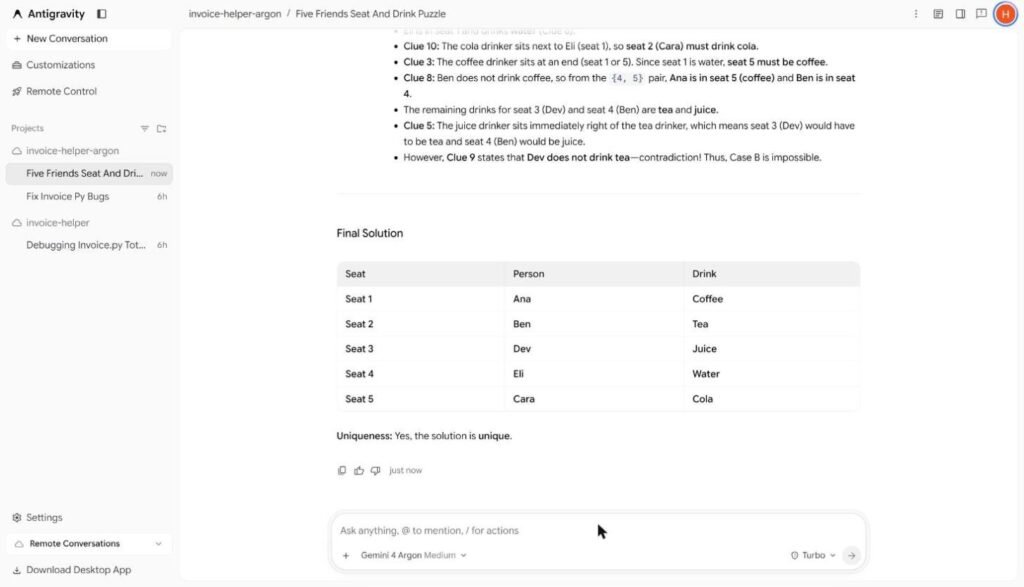
The answer is Ana in seat 1 with coffee, Ben in seat 2 with tea, Dev in seat 3 with juice, Eli in seat 4 with water and Cara in seat 5 with cola, and it is the only solution.
Argon got it right in 36 seconds and confirmed the solution was unique. It split the problem into two cases (Eli and Cara on the left or on the right), ruled one out, and checked every clue against the final answer. On an earlier, untimed run it also reached the right answer but changed direction midway (“Wait, let’s check…”) before settling, which is a reminder that reasoning models can wander even when the result is correct.
Gemini 4 Neon also got it right, in 44 seconds, with a tighter explanation: the table first, then a short “why it is unique” section covering both cases.
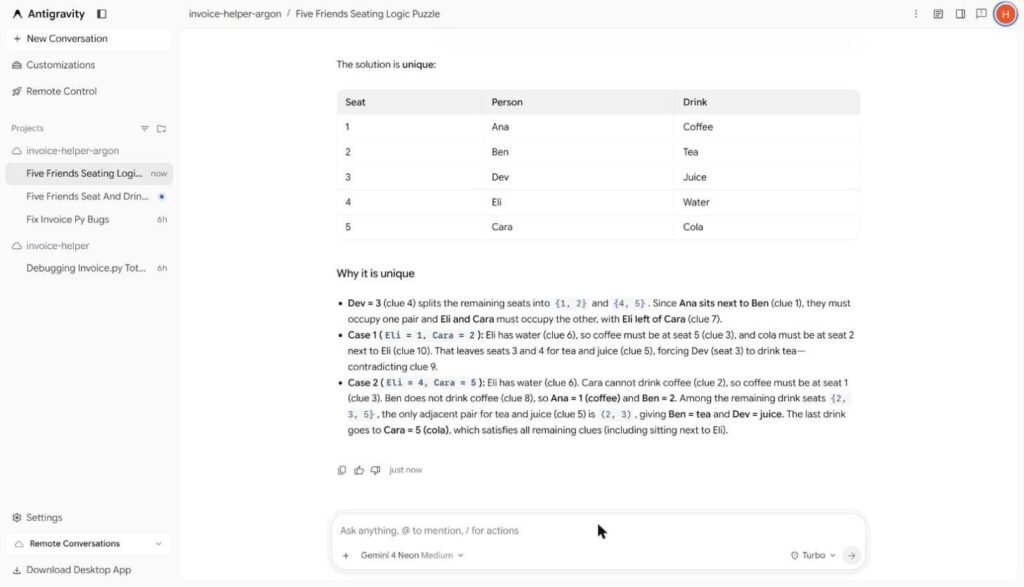
Verdict: a tie on accuracy. Argon was 8 seconds faster on the timed run; Neon’s explanation was easier to read.
Test 2: the sales spreadsheet
The correct figures are July £261.50, August £301.50 (up 15.3%) and September £331.50 (up 10.0%), with Mugs the top product at £314.50, just ahead of Prints at £300.00.
Gemini 4 Argon got every number right in 30 seconds. It went further than we asked: it showed the sum behind each month, the unrounded percentages (15.296% and 9.950%), and a second table with units per product. If you need to show your manager how a figure was reached, that is exactly what you want.
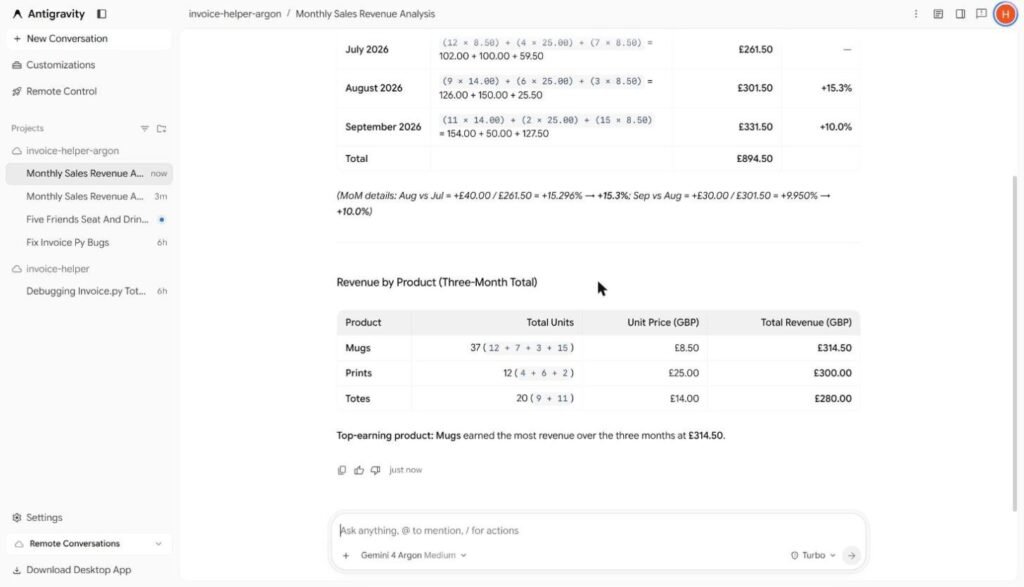
Gemini 4 Neon also got every number right, in 41 seconds, as a compact table plus a three-line product ranking. No working, but nothing missing.
Verdict: both correct. Argon was faster here and far easier to audit.
Test 3: the coding task
The last Fridays of 2027 are 29 January, 26 February, 26 March, 30 April, 28 May, 25 June, 30 July, 27 August, 24 September, 29 October, 26 November and 31 December.
Both models wrote almost the same short function using Python’s built-in calendar module, saved it to a file, ran it and printed all 12 dates correctly. Argon added a helpful comment explaining the weekday numbering. Antigravity reported that Neon worked for 14 seconds and Argon worked for 20 seconds. From send to finish, including the workspace starting up, that was 43 seconds for Neon and 48 for Argon.
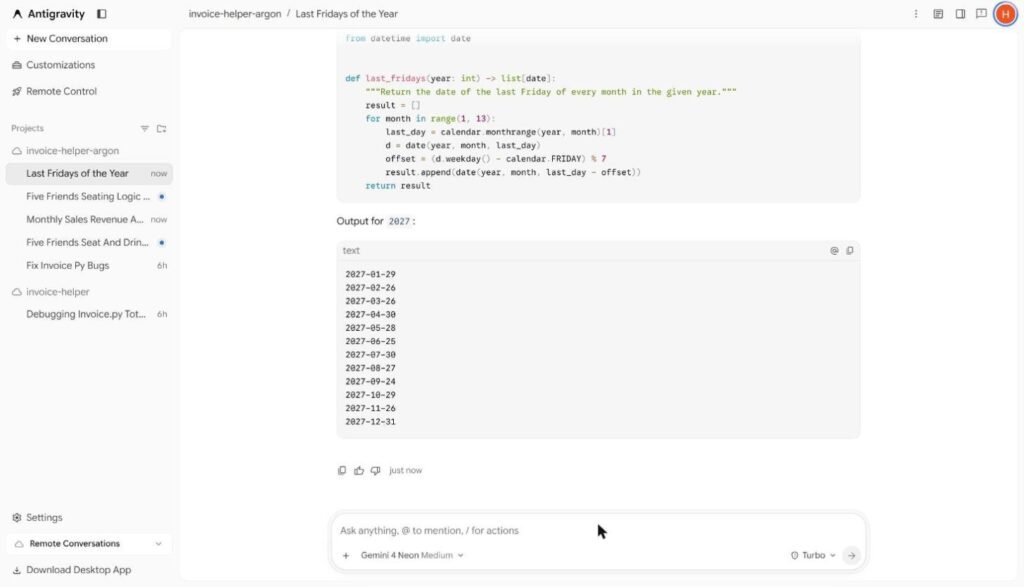
Verdict: both correct; Neon was quicker. This fits Google’s pitch for Neon as its efficient coding model. In our earlier Antigravity test, both also fixed a small buggy Python file correctly.
Test 4: writing to strict rules
Word limits and banned words are where models often slip, so we counted every word ourselves.
Argon passed: a subject line, a 78-word body (our count matched its own), no banned words, and the right sign-off. It wrote warmly (“Dear Lovely Customers”) and added “for a winter break”, which reads naturally for a small shop. Time: 31 seconds.
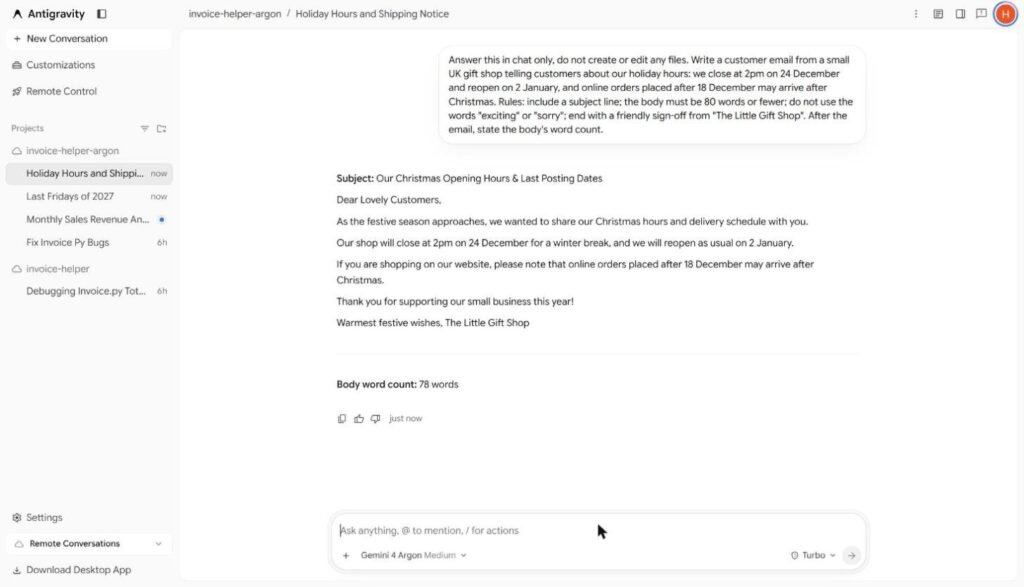
Gemini 4 Neon also passed, with a 74-word body (again matching our count), a plain “Hello,” opening and a slightly more businesslike tone. Time: 40 seconds.
Verdict: both followed every rule. Pick on tone: Argon sounds friendlier, Neon more neutral.
Gemini 4 Argon vs Neon: results table
| Task | Gemini 4 Argon (Medium) | Gemini 4 Neon (Medium) |
|---|---|---|
| Logic puzzle | Correct, 36 s | Correct, 44 s |
| Sales spreadsheet | Correct, full working, 30 s | Correct, concise, 41 s |
| Python coding | Correct, 20 s of work (48 s total) | Correct, 14 s of work (43 s total) |
| Email with rules | Passed, 78 words, 31 s | Passed, 74 words, 40 s |
| Score | 4/4 | 4/4 |
Times are from one run each on 20 and 21 November 2026 and include Antigravity’s workspace start-up, which can take several seconds. They tell you both models are quick enough for everyday work, not which one is faster in general.
Speed, usage limits and cost
Speed. On Artificial Analysis’s independent comparison, Neon outputs roughly 97 to 110 tokens per second depending on effort, against about 55 to 66 for Argon. In plain terms, Neon writes long answers faster. Our short tasks did not show that, probably because most of each run was thinking time and workspace set-up rather than typing out text.
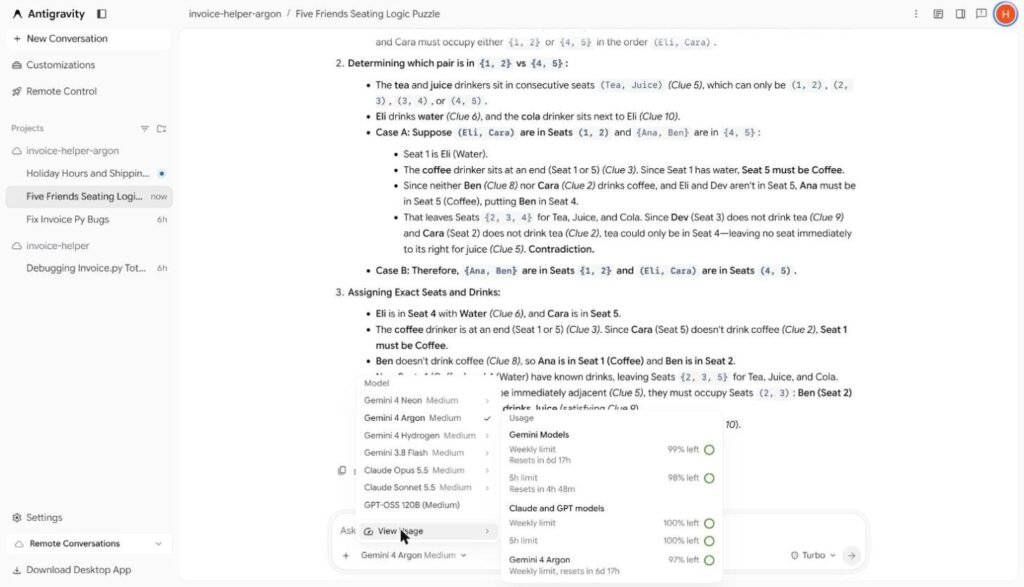
Usage limits on Google AI Pro. Antigravity shows a shared Gemini allowance (a five-hour limit and a weekly limit) plus a separate weekly limit just for Gemini 4 Argon. After one bug-fixing test on 20 November it read 98% left; after this whole round of five more Argon runs it read 97% left. Light tasks barely dent it, but long coding sessions will use far more.
Another limit we hit: Antigravity allowed five running environments at once. Partway through our tests it refused to start a new conversation until we archived some older ones.
API pricing. If you use the Gemini API instead of a subscription:
- Argon: $2 per million input tokens and $10 per million output tokens as an introductory price, rising to $4 and $20 from 30 November 2026.
- Gemini 4 Neon: $3 per million input tokens and $15 per million output tokens, with cached input at $0.15 per million.
So until the end of November, Gemini 4 Argon is the cheaper model per token. From December, Neon is 25% cheaper. Check Google’s pricing page before you build anything on these numbers.
Which should you use?
Choose Gemini 4 Neon if:
- You want one default model for everyday coding, analysis and writing.
- You use the Gemini app on your phone or the web (Argon was not there for us).
- You are building on the API from December and care about cost per token.
- You prefer short, direct answers.
Choose Argon if:
- You want a full worked explanation you can check, such as for numbers going into a report.
- You want a second opinion when Neon’s answer to a hard problem looks shaky.
- You are on the API before 30 November and want the lower introductory price.
- You are working on long video or security analysis, which Google highlights as Argon strengths (we did not test these).
A practical approach on Pro is to work in Neon by default and switch to Gemini 4 Argon in Antigravity for the occasional hard question, keeping an eye on its separate weekly limit.
Benchmarks: what Google and others report
These are vendor and third-party figures, not our own tests.
- Argon (Google’s figures, September 2026): DeepSWE v1.1 77.9%, AutomationBench 51.3%, LVBench (long video) 91.7%, CWE-bench 68%, ERQA 87%.
- Gemini 4 Neon (Google’s figures, November 2026): AutomationBench 56.3%, CWE-bench v2 70.7%, Terminal-Bench 4.1 65.2%, Artificial Analysis Coding Agent Index 58.6.
- Artificial Analysis Intelligence Index: Neon scores 44 at low effort up to 61 at its highest (xhigh) setting; Argon scores 48 to 50 at medium and high.
Be careful comparing these directly. Some benchmarks have new versions (CWE-bench against CWE-bench v2), and Neon’s highest setting is not available in Antigravity’s picker, which offers Low, Medium and High. On the one benchmark both announcements share by name, AutomationBench, Google reports Neon ahead (56.3% against 51.3%).
Key takeaways
- Gemini 4 Argon and Gemini 4 Neon both got all four of our tasks right at Medium thinking effort.
- Argon gave longer, more auditable answers and finished three of four tasks sooner; Neon was faster at the coding task and more concise.
- Neon replaced Gemini 4 Argon in the Gemini app on 18 November. On Google AI Pro we could still use Argon in Google Antigravity, with its own weekly limit.
- Argon’s API price doubles on 30 November 2026, after which Neon is cheaper.
- For most Pro users, Neon is the best default and Argon is a useful second opinion.
Gemini 4 Argon FAQ
Is Gemini 4 Argon better than Gemini 4 Neon?
Not clearly. In our four tests both were correct every time. Argon explained more and was quicker on three tasks; Neon was quicker at coding and more concise. Google’s own benchmarks put Neon ahead on the tests both announcements share.
Why can’t I find Gemini 4 Argon in the Gemini app?
When Google launched Gemini 4 Neon on 18 November 2026, Neon took Argon’s place in the Gemini app’s model picker. On our Pro account the app listed Auto, 4 Hydrogen, 4 Neon and 4 Carbon. We could still use Argon in Google Antigravity.
Can I use Gemini 4 Argon with Google AI Pro?
Yes, in our case through Google Antigravity at antigravity.google.com. Open the model picker under the message box and choose Argon. It has its own weekly limit on Pro.
Is Gemini 4 Argon free?
No. It needs a paid Google AI Pro or Ultra subscription, or paid Gemini API usage. The free Gemini and Antigravity plans do not include it.
How much does the Gemini 4 Argon API cost?
Google lists $2 per million input tokens and $10 per million output tokens as an introductory price, rising to $4 and $20 from 30 November 2026. Cached input is discounted by 95%.
Which thinking level should I use?
We tested both models at Medium, the default we were given in Antigravity, and it handled all four tasks. Try High for long, multi-step problems, and expect it to use more of your limit.
What is the difference between Gemini 4 Argon, Neon, Carbon and Hydrogen?
Google positions Hydrogen as the fast everyday model, Neon as the balance of depth and efficiency, and Carbon as the model for the hardest long-running projects. Gemini 4 Argon is the earlier frontier model from September 2026 that Neon replaced in the Gemini app.
More Gemini and Google AI guides
- Google AI Plus vs Pro vs Ultra: What Changed in November and Which Plan to Pick
- How to Use Google Antigravity: Remote Agents, Voice Mode and Gemini 4 Neon, Tested
- Gemini Prompts That Use Google’s Superpowers: 25 Tested for Gmail, Docs, Maps and YouTube (2026)
- Gemini 4 Neon vs Carbon vs Hydrogen: Which Gemini 4 Model Should You Use? We Tested Neon and Hydrogen