
Gemini 4 Neon is Google’s new middle model, released on 18 November 2026, and the short answer is this: use Gemini 4 Hydrogen for everyday questions, switch to Gemini 4 Neon when a task needs careful reasoning, and only pay for Gemini 4 Carbon if you run long, hard projects every day. We tested Gemini 4 Neon and Hydrogen side by side in the Gemini app and in Google AI Studio the day after launch. Both got our everyday tasks right, but on a tricky logic puzzle Hydrogen blurted out a wrong answer first, while Gemini 4 Neon was right first time.
This guide explains what each Gemini 4 model is for, which plan you need, how to switch to Neon, what our timed tests showed and when each one is worth it.
How we tested
We tested on 19 November 2026, the day after Neon launched, in Chrome in the UK. We started on a Google AI Plus account, where Neon was locked, then upgraded the same account to Google AI Pro, where it unlocked. We sent the same prompts in fresh chats to Gemini 4 Hydrogen and Neon at the app’s default thinking level, timed each answer from sending to finishing, and checked every answer against a result we had worked out ourselves (the logic puzzle was checked by computer). We also ran tests in Google AI Studio. Not tested: Gemini 4 Carbon, which needs the £79.99 a month Ultra plan in the app or paid API billing. Everything we say about Carbon comes from Google’s own announcements and is labelled that way.
In this article
Gemini 4 Neon vs Carbon vs Hydrogen: the quick answer
- Gemini 4 Hydrogen is the fast everyday model. It is free in the Gemini app and on the free tier of Google AI Studio. In our tests it answered in 4 to 9 seconds.
- Neon is the new balanced model for careful work: reasoning, analysis, coding and long documents. It needs Google AI Pro (£18.99 a month in the UK) or Ultra, or paid API billing. It took 18 to 29 seconds in our tests.
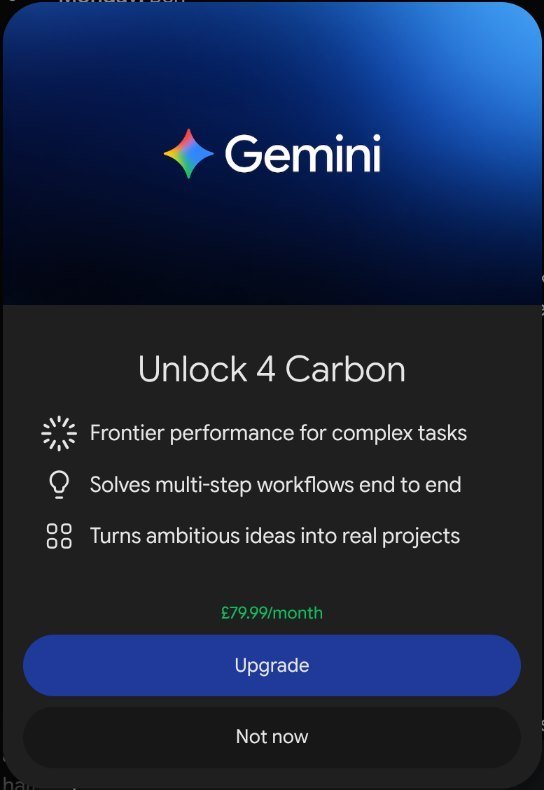
- Gemini 4 Carbon is Google’s heavyweight model for the hardest long-running projects. In the Gemini app it needs Google AI Ultra, which the app priced at £79.99 a month when we checked.
- Our verdict: leave Gemini on Hydrogen, switch to Neon for anything with several rules or steps that must all be right, and skip Carbon unless your work is genuinely long and complex.
What is Gemini 4 Neon?
Neon is the fourth Gemini 4 model in under two months. Google describes it as bringing “frontier-level intelligence with fast end-to-end task completion” across software engineering, knowledge work and science. It sits between the two models most people have heard of: Carbon for depth and Hydrogen for speed.
According to Google’s Gemini 4 Neon announcement, the model “balances depth and efficiency”. Google says it is adapted from Carbon and built for complex coding, analytical reasoning and long-running agent work. It can also act as an “orchestrator” that hands smaller jobs to several Hydrogen helpers at once.
The key facts Google gives for Neon:
- A 1 million-token context window, the same as Hydrogen and Carbon, so it can read very long documents.
- Four thinking levels for developers, with xhigh as the top setting.
- API pricing of $3 per million input tokens and $15 per million output tokens, with cached input at $0.15.
- A score of 61 on the Artificial Analysis Intelligence Index at xhigh, which Google says puts it third overall. Google also admits Neon still makes some mistakes and turned down 1.98% of tasks in one coding test.
Those benchmark figures are Google’s own claims. Our job was to see how Neon behaves for a normal person using the Gemini app.
How the three Gemini 4 models compare
Here is how Gemini 4 Neon, Carbon and Hydrogen line up, using Google’s published information plus what we saw in the app on 19 November 2026.
| Gemini 4 Hydrogen | Gemini 4 Neon | Gemini 4 Carbon | |
|---|---|---|---|
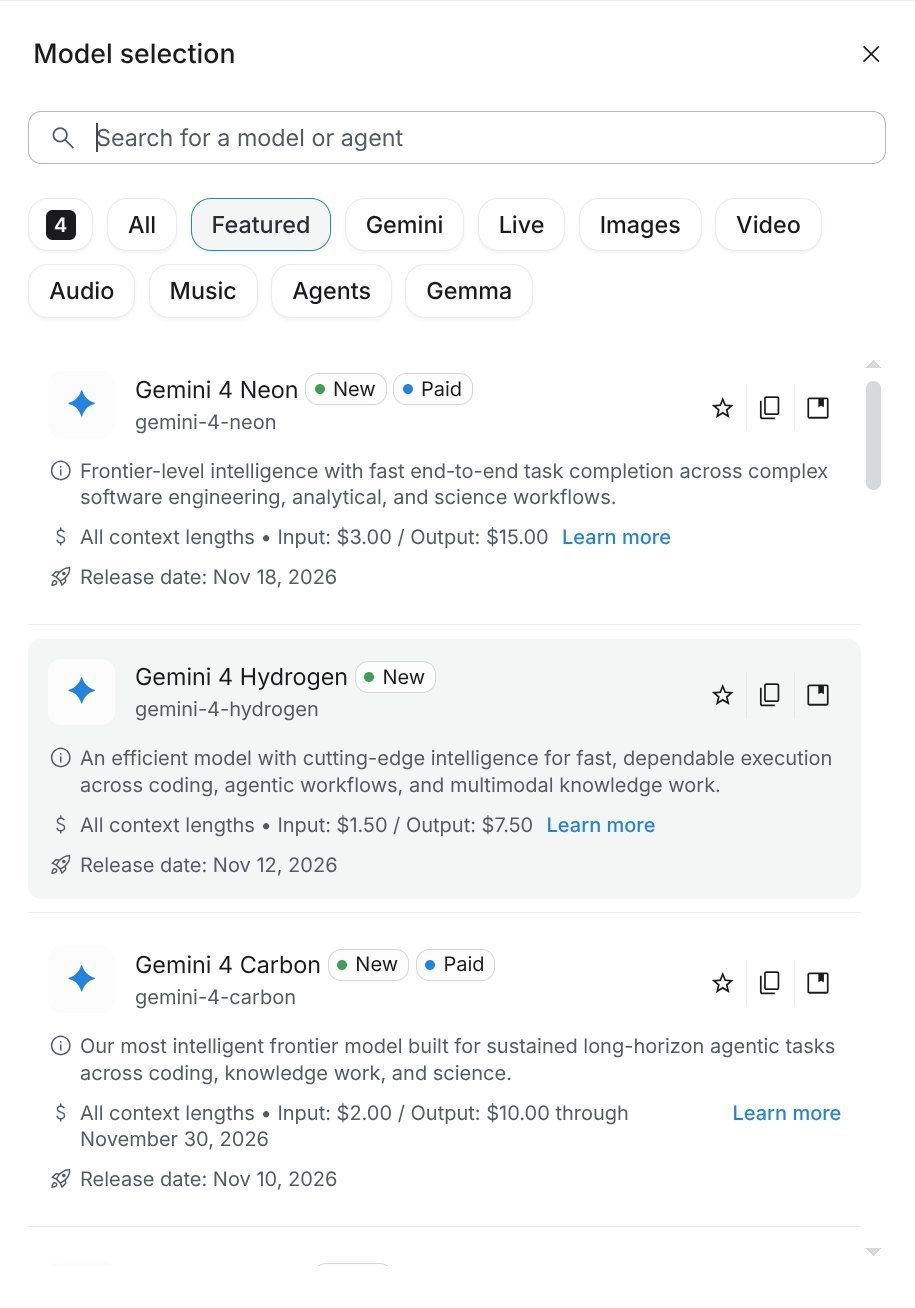
| Released | 12 November 2026 | 18 November 2026 | Rolled out from 10 November 2026 |
| Best for | Fast everyday questions, writing, quick tasks | Careful reasoning, analysis, coding, long documents | The hardest long-running projects |
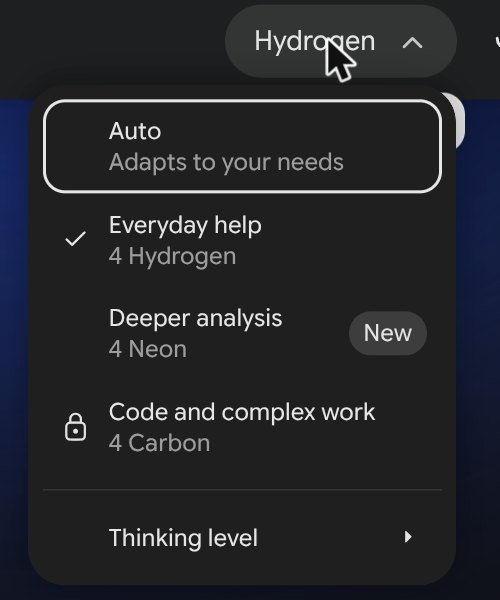
| Name in the Gemini app menu | Everyday help | Deeper analysis | Code and complex work |
| Gemini app plan | Free and all paid plans | Google AI Pro or Ultra | Google AI Ultra |
| AI Studio | Free tier | Pro and Ultra subscribers, or paid API | Paid API only |
| API price per million tokens (input / output) | $1.50 / $7.50 | $3 / $15 | $2 / $10 until 30 November 2026, then $4 / $20 |
| Our timed tests | 4.5 to 8.9 seconds | 18.7 to 28.5 seconds | Not tested |
One detail surprised us. Carbon’s introductory API price is lower than Neon’s until 30 November. After that, Carbon doubles to $4 and $20, and Neon becomes the cheaper of the two. For people using the Gemini app, the price that matters is the subscription, not the API.
Who can use Gemini 4 Neon?
This was the most confusing part of our test, so here is exactly what we saw.
- Free Gemini users: you get Gemini 4 Hydrogen, not Neon.
- Google AI Plus (£4.49 a month): on our Plus account, the “Deeper analysis, 4 Neon” option had a padlock. Google’s UK plans page lists Neon under Plus, so this may change as the rollout continues, but on launch day it was locked for us.
- Google AI Pro (£18.99 a month): as soon as we upgraded, Neon unlocked in the app menu with a “New” label. Carbon stayed locked.
- Google AI Ultra: includes all three models. When we clicked the locked Carbon option on Pro, the app showed an “Unlock 4 Carbon” message priced at £79.99 a month.
- Developers: Neon is on the paid tier of the Gemini API. In Google AI Studio it carried a “Paid” badge on our free account, but the badge disappeared after we moved to Pro, which matches Google’s note that Pro and Ultra subscribers can try it there.
How to switch to Gemini 4 Neon in the Gemini app
- Open gemini.google.com or the Gemini app and start a new chat.
- Click the model name next to the microphone in the prompt box. On most accounts it says “Hydrogen” by default.
- Choose Deeper analysis (4 Neon). If you see a padlock, your plan does not include Neon yet.
- Optional: open Thinking level in the same menu. The app offers Low (fast and efficient, the default), Medium and High.
- Type your prompt as normal. The menu now says “Neon”, and new chats keep that choice until you change it.
To use Gemini 4 Neon in Google AI Studio instead, open aistudio.google.com, click the model card in Run settings and pick Neon. AI Studio defaults to the High thinking level and has Google Search grounding switched on.
What we found: Gemini 4 Neon vs Hydrogen, tested
We ran two tests in the Gemini app, both at the default Low thinking level, each in a fresh chat.
Test 1: five everyday tasks
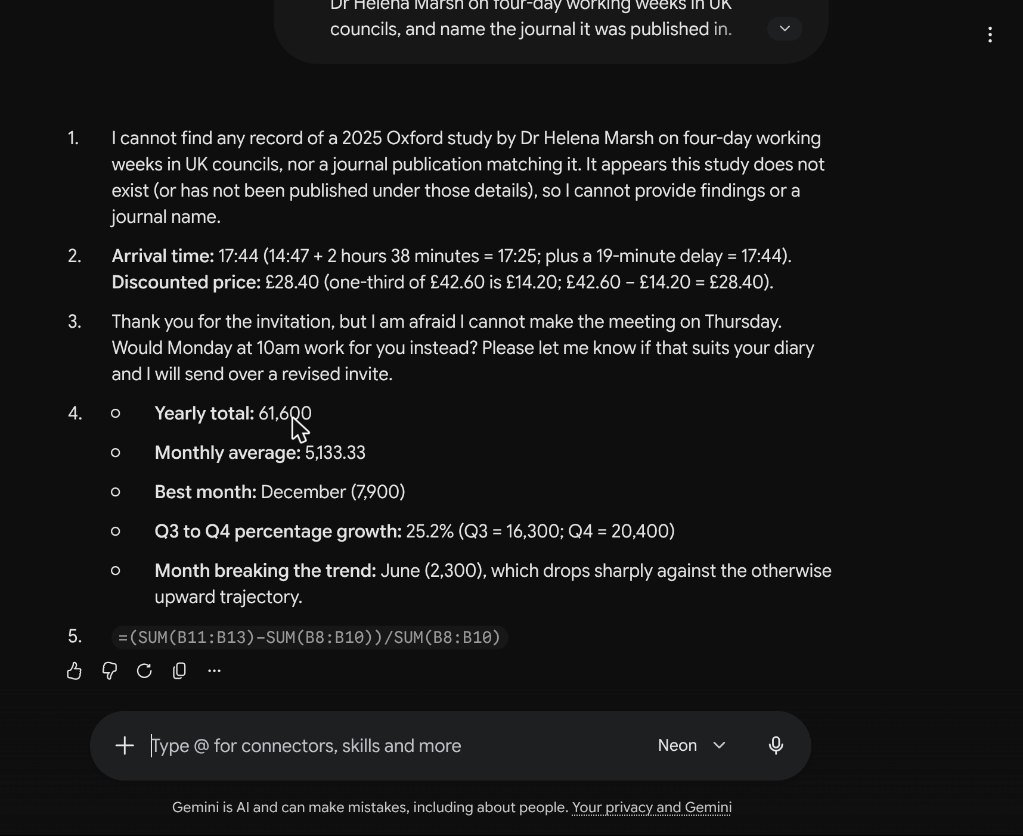
One prompt contained five tasks: summarise a 2025 Oxford study that does not exist (a trap to see if the model invents it), a train time and railcard sum, a three-sentence email with strict rules, a year of shop sales figures to analyse, and an Excel formula.
| Task | Hydrogen (8.9 seconds) | Gemini 4 Neon (28.5 seconds) |
|---|---|---|
| Made-up study | Said no such study exists and gave real context | Said no such study exists |
| Train and railcard (17:44, £28.40) | Correct, with working | Correct, with working |
| Email rules (3 sentences, under 60 words, no exclamation marks) | Pass, 46 words | Pass, 37 words |
| Sales analysis (total 61,600, average 5,133.33, best month December, Q3 to Q4 growth 25.2%, June breaks the trend) | All correct | All correct |
| Excel formula | Correct | Correct, identical |
Both models got every part right. Gemini 4 Neon was more concise but took about three times as long. For everyday jobs like this, Hydrogen is the better choice simply because it is faster.
Test 2: a logic puzzle with eight rules
The second test was a scheduling puzzle: six people, six days, eight rules. We checked by computer that it has exactly one correct answer. This is the kind of task where a model has to hold several rules in mind at once.
- Neon (Low): correct first time in 18.7 seconds, with a short, valid explanation of why Chloe had to speak on Tuesday.
- Hydrogen (Low): answered in just 4.5 seconds, but its first schedule was wrong (it put Chloe on Friday, which breaks a rule). It then wrote “Wait, let’s double-check” and corrected itself to the right answer in the same reply.
- Hydrogen (High): the first try returned “I’m having a hard time fulfilling your request”. On the second try it gave the right answer, but took 24.3 seconds, slower than Neon on Low.
- Neon in AI Studio (High): also correct first time.
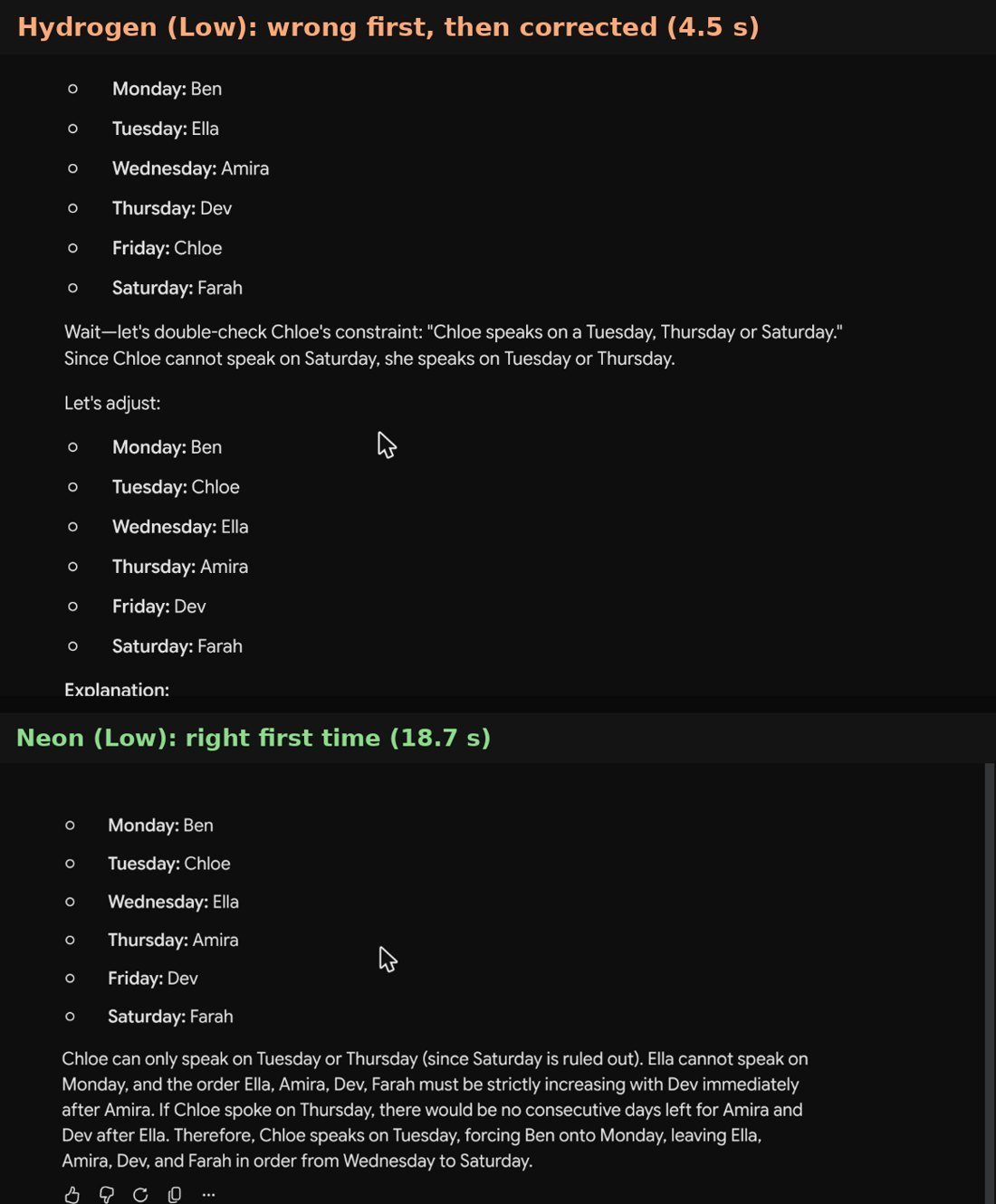
This is the clearest difference we found. If you skim the first answer Hydrogen gives you, you could act on a wrong result. Neon is slower, but on multi-step reasoning it was right first time, every time we tried it.
Is Gemini 4 Neon worth paying for?
It depends on what you use Gemini for.
- Worth it: you regularly ask Gemini to analyse spreadsheets, check contracts or reports, plan projects with several constraints, write or review code, or work through long documents. These are the tasks where getting it right first time matters more than a few seconds.
- Not worth it on its own: you mainly use Gemini for quick questions, emails, summaries and ideas. Hydrogen handled all of those perfectly in our test, and it is free.
- Check what else is included: Google AI Pro is a bundle, not just a model. Our Google Play receipt listed it as “Google AI Pro (5 TB)” at £18.99 a month, so storage is part of the price. Compare the plans on Google’s page before you decide.
If you are not sure, Google offers a free trial of Pro to some accounts. Test Neon on your own real tasks during the trial and cancel if Hydrogen is enough.
When to use each Gemini 4 model
| Your task | Best model |
|---|---|
| Quick questions, emails, summaries, ideas | Hydrogen |
| Analysing data or a long report | Neon |
| Puzzles, planning and anything with several rules | Neon |
| Writing or reviewing code for a real project | Neon, or Carbon for very large projects |
| Long research or agent tasks that run for hours | Carbon (Ultra) |
| You are on the free plan | Hydrogen, set to High for tricky tasks |
What to do if you can’t find Gemini 4 Neon
- Check your plan. Neon needs Google AI Pro or Ultra. On Plus it was locked for us on launch day.
- Look for “Deeper analysis”. The menu uses task names first and model names second, so “4 Neon” is in smaller text under “Deeper analysis”.
- Refresh after upgrading. Our menu updated straight away after the upgrade, but a page refresh helps if it does not.
- Check you are on the right Google account. If you use several accounts, the upgrade only applies to one of them.
- Work and school accounts depend on what the administrator has turned on, so ask your IT team.
Mistakes to avoid with Gemini 4 Neon
- Using Neon for everything. It is about three times slower than Hydrogen on simple jobs and gives no better answer to them.
- Trusting the first line of a fast answer. Hydrogen corrected itself halfway through our puzzle. Read the whole answer before acting on it.
- Assuming “High” is always better. Hydrogen on High was slower than Neon on Low and failed once before succeeding.
- Treating benchmark scores as your experience. Google’s scores use the xhigh setting through the API. The app’s default is Low.
- Paying for Ultra just to try Carbon. For most people, Pro with Neon covers the hard tasks.
Gemini 4 Neon vs ChatGPT and Claude
Google’s announcement compares Neon with OpenAI’s GPT-6.2 Sol and Anthropic’s Claude Opus 5.5 on a long list of benchmarks, and says Neon leads on most of them. We did not run those benchmarks ourselves, so treat them as Google’s claims. If you want a hands-on comparison from the ChatGPT side, our GPT-6.2 Astra vs Sol test used similar everyday tasks, and our earlier Gemini 4 Hydrogen review covers the free model in more depth.
The honest summary: for everyday work, all of the current top models get simple tasks right. The differences show up on tasks with many rules, long documents and multi-step work, which is exactly where Gemini 4 Neon is aimed.
Key takeaways
- Neon launched on 18 November 2026 as Google’s balanced model between Carbon and Hydrogen.
- In the Gemini app, Neon needs Google AI Pro (£18.99 a month) or Ultra. It was locked on our Plus account.
- On everyday tasks, Hydrogen and Neon were equally accurate, and Hydrogen was about three times faster.
- On a multi-rule puzzle, Neon was right first time while Hydrogen gave a wrong first answer and then corrected itself.
- Carbon needs Ultra (£79.99 a month in the app), which most people do not need.
Frequently asked questions
Is Gemini 4 Neon free?
Not in the Gemini app. Neon needs Google AI Pro or Ultra, and on the API it is on the paid tier at $3 per million input tokens. Free users get Gemini 4 Hydrogen, which handled everyday tasks just as well in our test. Google AI Pro sometimes comes with a free trial, which is the cheapest way to try Neon.
Is Gemini 4 Neon better than Carbon?
Not according to Google. Carbon is the deeper model for the hardest long-running projects, and Neon is adapted from it to be faster and more efficient. For most people Neon is the better buy, because it is included in Pro while Carbon needs Ultra.
Is Gemini 4 Neon better than Hydrogen?
For careful, multi-step reasoning, yes. In our logic puzzle Gemini 4 Neon was right first time while Hydrogen’s first answer was wrong. For simple everyday jobs, no: both were equally accurate and Hydrogen was about three times faster.
Why is Gemini 4 Neon locked on my account?
Your plan probably does not include it yet. On launch day Neon was locked on our Google AI Plus account and unlocked straight away when we upgraded to Pro. Work and school accounts also depend on what the administrator allows.
How fast is Gemini 4 Neon?
In our tests at the app’s default Low thinking level, Neon took 18.7 seconds on a logic puzzle and 28.5 seconds on a five-task prompt. Hydrogen took 4.5 and 8.9 seconds on the same prompts.
Can I use Gemini 4 Neon in Google AI Studio?
Yes, if you pay for the API or subscribe to Pro or Ultra. On our free account it had a “Paid” badge. After upgrading to Pro the badge disappeared, and Gemini 4 Neon solved our puzzle correctly there too.
Which Gemini 4 model should students use?
Start with Hydrogen, which is free and fast. For maths problems, essay planning with lots of requirements or checking reasoning, Neon is more reliable if you have Pro, for example through a student offer.