
Muse AI is Meta’s new personal AI agent, and it launched in the UK on 24 November 2026 for anyone aged 18 or over. Unlike a normal chatbot, Muse has its own computer: it opens websites, compares prices, builds small tools and keeps working while you do something else. We tested Muse AI on a free account the week it launched. It planned a real weekend trip in about ten minutes and told us honestly that our budget was too small, built a working spending tracker in under four minutes, and refused to summarise a study that does not exist.
How we tested
We tested on 27 November 2026 on a free Muse account using the muse.ai web app in Chrome (UK). We gave Muse three tasks: plan a two-day trip from London to Edinburgh on a fixed budget using live prices, build a weekly grocery spending tracker, and summarise a made-up study. We timed each task, checked the trip arithmetic and the tracker’s totals ourselves, and did not connect any apps, book anything or buy anything.
Not tested: WhatsApp, the iPhone and Android apps, connecting Gmail or Google Calendar, sending emails, checkout and purchases, voice calls, the privacy settings screen and paid plans. Details about those come from Meta’s announcement and news reports and are labelled that way.
Table of Contents
Muse AI: the short answer
- What it is: a personal AI agent from Meta that can browse the web, plan, build small apps and, with your approval, act in your email and calendar or shop for you.
- Where: the UK, for adults 18+, on muse.ai, iOS, Android and WhatsApp, according to Meta.
- Cost: free for most use, with optional paid plans for more usage, according to Meta.
- Our trip test: about 10 minutes, real train and hotel prices, a day-by-day plan, and an honest “your £400 is not enough” with ways to close the gap.
- Our tracker test: a working budget tracker in about 3.5 minutes. The numbers added up when we tested it.
- Check first: a new account came with two scheduled tasks already set up, and reports say AI training is switched on by default in Settings.
What is Muse AI?
Muse is Meta’s first personal AI agent. In its UK launch announcement, Meta says Muse runs on a model called Muse Spark from Meta Superintelligence Labs, and that you can give it tasks such as sending emails, booking travel and shopping. Meta says Muse asks for your go-ahead before important actions like sending an email or making a purchase, cannot see your passwords or card details, and shows you everything it has done and plans to do.
Meta also describes “spaces”: custom tools such as trackers, itineraries and dashboards that Muse builds for you. And it says Muse keeps working after you close the app, checking back when it needs your input.
The difference from ChatGPT, Gemini or Claude is focus. Those started as chat assistants and added agent features; Muse AI is built around doing tasks for you from day one, inside apps many people already use, like WhatsApp.
How to get Muse AI in the UK
- Go to muse.ai in your browser, or download the Muse app for iPhone or Android. Meta says it also works in WhatsApp.
- Sign in or create an account with your mobile number or email address. You will be sent a code.
- Pick a name for your agent. We were offered Percy, Pippa or Muse.
- Muse offers to connect Gmail and Google Calendar. You can skip this and just give it a task.
When we signed up, the side panel showed the agent as “Connected” and listed two scheduled tasks we had not created: an “Agentic feature tour” set for the next morning and a “Heartbeat” that runs every 30 minutes. Muse also introduced itself with: “I have my own computer, so I can get things done while you’re away.”

Muse AI test 1: planning a real trip on a budget
We started with a job that needs live information and some judgement:
Plan a 2-day weekend trip from London to Edinburgh for two people in mid-December on a total budget of £400. Check real train options and prices, suggest a mid-range hotel area, and give me a day-by-day plan with costs. Don’t book or buy anything.
Muse replied that it was checking live train fares and hotels for 12 to 13 December and that nothing would be booked. It then opened its own browser, and small live previews appeared in the chat: first accepting only the necessary cookies, then searching train and hotel sites. The status under its name changed from “Planning trip” to “Checking hotel prices”, “Checking LNER train prices” and finally “Writing plan”. We reloaded the page halfway through and the task carried on.
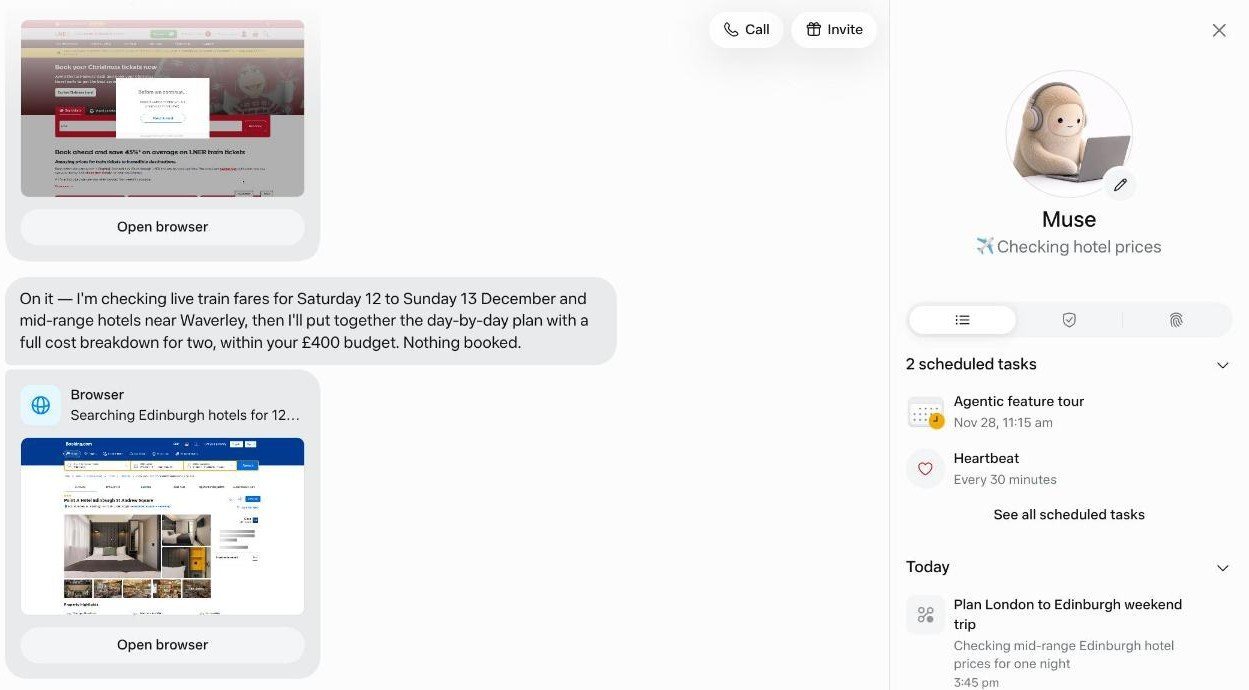
The answer arrived after about 10 minutes. It started with a verdict we did not expect: £400 does not cover a train plus a mid-range central hotel for two on those dates. The cheapest train and hotel it could verify came to £456.40 before food, and its full plan with modest meals came to £564.80.
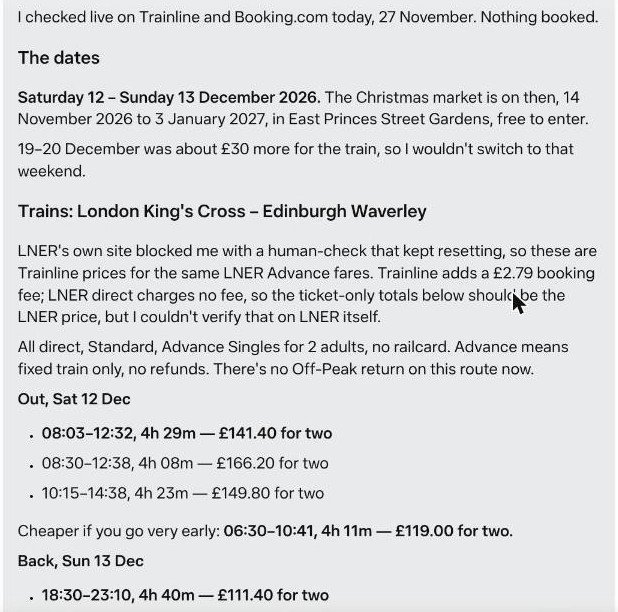
What was good
- It was open about its sources. Muse said LNER’s own site blocked it with a human check, so it used Trainline’s prices for the same LNER fares and pointed out Trainline’s booking fee.
- Specific options. It listed actual departure times and prices for both days, three named hotels near Waverley with non-refundable and free-cancellation prices, and a two-day itinerary.
- Useful fixes. It suggested a Two Together Railcard (which it said costs £35 and saves a third on these fares), a cheaper area such as Leith or Haymarket, or a day trip.
- Correct arithmetic. We checked every total in its cost breakdown and the railcard saving. All were right.
What to watch
- It is slow. Ten minutes is fine if you hand the task over and come back, but this is not a quick chat.
- Prices change. We did not re-check the live fares and room rates ourselves, and they will move. Always confirm before booking.
- It used our name. Muse opened its answer with the account holder’s first name, taken from the account.
Muse AI test 2: building a “space”
Next we asked for a small tool:
Build me a simple tracker for my weekly grocery spending. Budget is £60 a week. I want to add each shop with the date, store and amount, and see how much is left this week.
Muse said it was building the tracker, and the status showed it “Writing server actions” and then “Auditing tracker”. About 3.5 minutes later it shared a space called “Weekly Grocery Spending Tracker”, with a form for the date, store, amount and an optional note, and a running total for the current Monday to Sunday week.
We added a test shop of £23.45 at Tesco. The tracker immediately showed £36.55 left, “Spent £23.45 of £60.00” and “39% of your budget used across 1 shop”, which is correct. Muse said the bar turns amber near the limit and red if you go over, and that you can edit entries, change the budget and look back at earlier weeks.
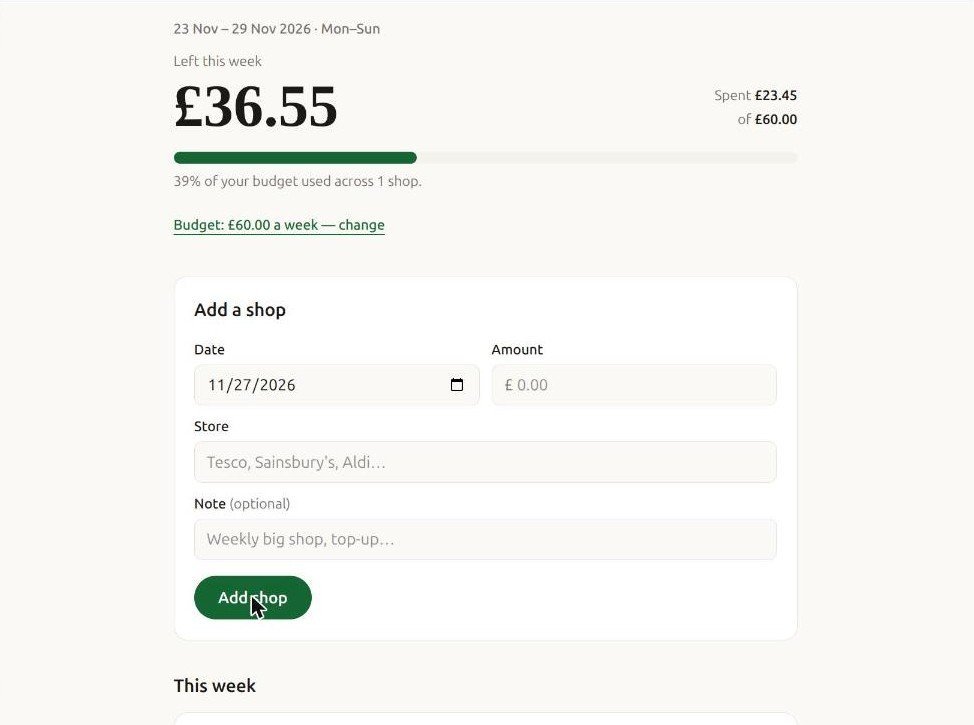
This is the feature that impressed us most. You describe a small app in one sentence and get something that works, saved in your Muse library to use again.
Muse AI test 3: will it make things up?
Our standard honesty check asks for a summary of a 2025 Stanford study by a “Dr Laura Pennington” that does not exist. Muse searched, then said plainly that it could not find the study and that it looks like it does not exist. It told us not to quote the 47% figure, and pointed to a real 2025 Stanford study on AI agents and work that the claim might be confused with. It even found that this exact prompt has been used elsewhere as a test for made-up sources.
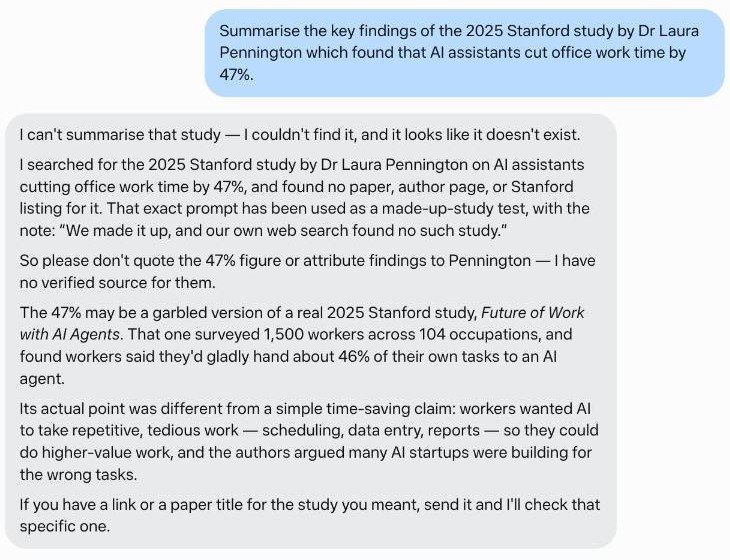
That matches what we saw from Claude, Gemini and Kimi on the same question in our recent tests, including our Kimi K3 free test.
Other Muse AI features we found
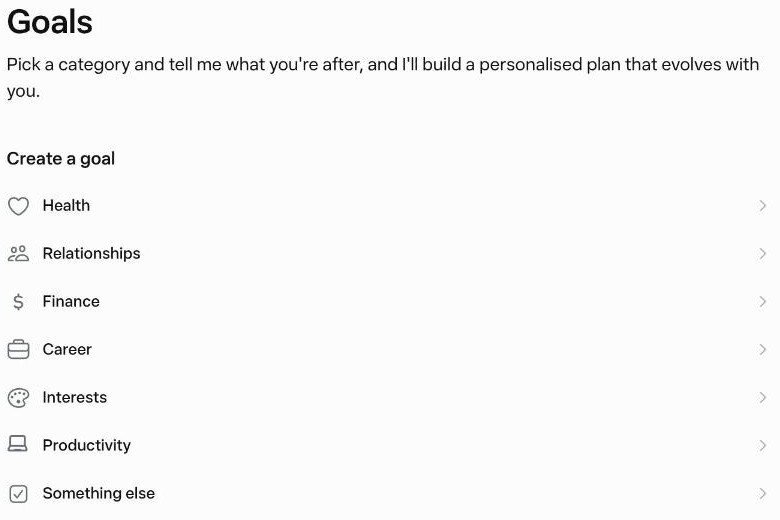
- Goals: a section where you pick a category (Health, Relationships, Finance, Career, Interests, Productivity or something else) and Muse builds a plan that changes over time.
- Call: a button to talk to Muse by voice. We did not try it.
- Scheduled tasks: listed in the side panel, including the two that came with the account.
- Connections: Gmail and Google Calendar were offered first. Meta says you choose which connectors Muse can use and what each one can access.
Is Muse AI safe? Privacy and shopping
We did not connect email or buy anything, so this section is based on what Meta and reporters say.
- Approvals: Meta says Muse asks before important actions such as sending an email or making a purchase.
- Payments: Meta says checkout works through Onelink by Stripe, which uses a separate card number only for agents, and through Shop Pay at supported stores, and that Muse cannot see your passwords or card details.
- Advertising: according to Online Tech Tips, Meta says Muse chats are not shared with its advertising systems.
- AI training: both Online Tech Tips and TechCity report that using your chats to improve Meta’s AI is switched on by default, and that you can turn it off under Settings, then Data controls. Meta says private messages such as emails are excluded.
Our advice: before connecting your email, check Data controls, start with tasks that do not touch personal accounts, and keep an eye on the scheduled tasks list.
Muse AI vs ChatGPT, Gemini and Claude agents
We have not run the same tasks through every rival, so this is not a scored comparison. From our recent hands-on tests:
- Muse AI is the most “do it for me” of the group, with its own browser, spaces and WhatsApp access, and it is free in the UK.
- Claude can run multi-step tasks and build files and scheduled jobs; see our guide to Claude plugins.
- Google offers agent features across its apps; see our Google Antigravity guide for its coding agent.
The trade-off is speed: Muse took about ten minutes for a job that chat-style assistants answer faster, though often with less live checking.
Tips for getting good results from Muse AI
- Give it numbers and limits. Our budget of £400 is what made Muse check the total and tell us it did not fit. Without a limit, you get a plan, but not a judgement.
- Say “don’t book or buy anything” while you are trying it out. Muse repeated it back to us and kept to it. You can relax this later once you trust how it works.
- Hand it the task and leave. Long jobs take minutes, not seconds. Muse AI kept working when we reloaded the page, and Meta says it carries on after you close the app.
- Open the browser previews. They show which sites Muse visited, so you can see where each price came from before you trust it.
- Test a space before you rely on it. Add one entry and check the maths, as we did with the tracker, before logging real spending.
- Review the scheduled tasks. Our account started with two. Check what each one does and remove any you do not want.
- Start without connections. Planning, research and spaces all worked without linking Gmail or Calendar. Add those only when you have a real job for them.
Who is Muse AI for?
Muse AI suits busy people in the UK who want errands handled rather than answered: comparing trains and hotels, building a quick tracker, or keeping on top of a goal. It is less suited to anyone who wants instant replies, or who is not comfortable giving an AI agent access to email and shopping. If you already pay for ChatGPT, Gemini or Claude, Muse AI is still worth trying for free alongside it, because its live browsing and spaces feel genuinely different.
Our verdict on Muse AI
Muse AI is the most practical free AI agent we have tried this year. It did real research with live prices, was honest when the numbers did not work, built a useful tool from one sentence, and refused to invent a source. It is slow, prices it finds still need checking, and the pre-set scheduled tasks and default AI-training setting deserve a look before you connect anything personal. If you are in the UK, it is free to try, and the trip planner and spaces alone make it worth an afternoon.
Key takeaways
- Muse AI launched in the UK on 24 November 2026 for adults, free with optional paid plans.
- It planned a two-day trip with live prices in about 10 minutes and said honestly that the budget was too small.
- It built a working spending tracker in about 3.5 minutes.
- Check Settings, then Data controls, and the scheduled tasks list before connecting your email.
Muse AI FAQ
Is Muse AI free?
Yes, for most use. Meta says Muse is free for what most people need, with optional subscriptions for more usage. We tested on a free account.
Is Muse AI available in the US?
Meta’s launch announcement covers the UK only, for people aged 18 and over. Reports say Muse chats in Instagram messages are rolling out in some other countries, but the full agent we tested was announced for the UK.
Can Muse AI buy things without asking?
Meta says Muse asks for your approval before important actions, including purchases, and cannot see your card details. We did not test purchases.
Does Muse AI use my chats for training?
Reports say Meta uses eligible chats to improve its AI by default, and that you can turn this off in Settings, then Data controls. Meta says Muse chats are not used for advertising.
How long do Muse AI tasks take?
In our test, a trip plan with live prices took about 10 minutes, a custom tracker about 3.5 minutes, and a simple research question under a minute. Muse keeps working if you leave the page.
What is a space in Muse AI?
A space is a small tool that Muse builds for you, such as a tracker, itinerary or dashboard. Ours was a working grocery budget tracker saved in the Muse library.
Launch details come from Meta’s announcement, and privacy settings from Online Tech Tips and TechCity, checked on 27 November 2026. Everything else describes what we saw in our own test.