
Kimi K3 is Moonshot AI’s family of chatbot models, and its newest flagship, K3.1 Pro, is being talked about as a rival to the big US models. We wanted to know what you actually get for free. On a free Kimi account in the UK, K3.1 Pro would not answer at all: three tries over ten minutes all hit a “too many people are chatting” message that pointed us to a subscription. The free K2.8 Preview model did work, and it got all five of our standard test tasks right, the same tasks we gave Gemini 4 Neon and Claude Opus 5.5 earlier this week.
How we tested
We tested on 27 November 2026 on a free Kimi account in Chrome (UK), signed in at kimi.ai with a Google account. We tried K3.1 Pro at High thinking effort three times, then ran our five standard tasks on K2.8 Preview at High, each in a new chat: a logic puzzle, sales maths, a Python function, a client message with strict rules, and a question about a study that does not exist. We checked the maths ourselves, ran the code against 506 test cases, counted words and sentences, and timed each answer from send to finish.
Not tested: K3.1 Pro answers (it never responded on the free plan), the older K3 model, Instant, Deep Research, Slides, 3D Make, Kimi Code, the API, the mobile apps and any paid plan. Model release details come from news reports and Moonshot’s own pages and are labelled that way.
Table of Contents
Kimi K3: the short answer
- Is Kimi K3 free? You can sign up and chat for free, but on our free account the flagship K3.1 Pro model refused every request with a busy message. The free K2.8 Preview model worked fine.
- How good is the free model? K2.8 Preview got 5 out of 5 on our test tasks, matching Gemini 4 Neon and Claude Opus 5.5 on accuracy.
- How fast? About two minutes for all five tasks, a little quicker than Gemini 4 Neon in our earlier test and roughly twice as slow as Claude Opus 5.5.
- What does it cost? Paid plans start at $15 a month billed annually ($19 monthly), according to Kimi’s pricing page. Moonshot warns that even paid K3.1 Pro requests “may queue or fail at launch”.
- Where to use it: outside mainland China, sign in at kimi.ai with a Google account or a non-Chinese phone number.
What is Kimi K3?
Kimi is the chatbot made by Moonshot AI, a Beijing-based company. K3 is its current generation of models, and K3.1 Pro is the newest flagship. According to AlternativeTo’s launch report, K3.1 Pro arrived in late October 2026 with a context window of up to 1 million tokens, better multi-step coding and agent skills, and support for 3D modelling tools. A CellCog tracker reports that Moonshot released the open model weights on Hugging Face on 4 November. Those details are the vendor’s and reporters’ claims; we could not test them on a free account.
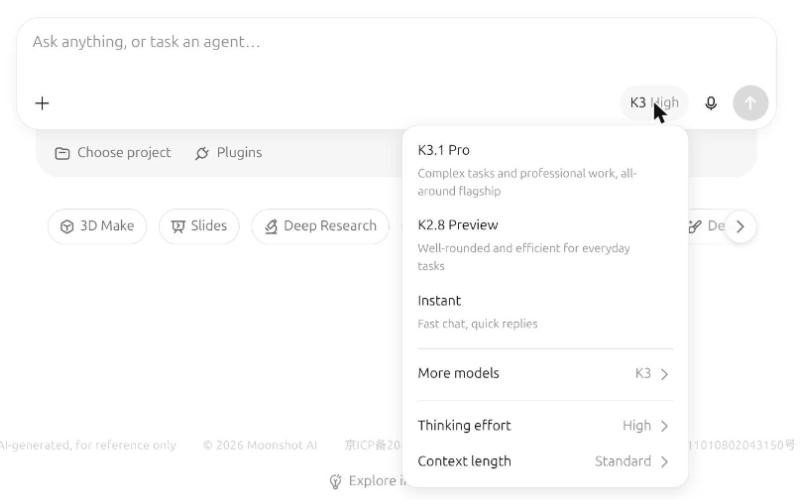
On Kimi’s website, the model menu showed three main choices:
- K3.1 Pro: “Complex tasks and professional work, all-around flagship”
- K2.8 Preview: “Well-rounded and efficient for everyday tasks”
- Instant: “Fast chat, quick replies”
The original K3 sits under More models, and you can also set the thinking effort and the context length.
How to use Kimi K3 outside China
This tripped us up first. On kimi.com you can type a question without signing in, but pressing send opens a sign-in box built for China: a WeChat QR code or a +86 phone number. A small notice on top says that if you are outside mainland China you should go to kimi.ai and sign in with a Google account or a non-+86 phone number.
- Go to kimi.ai.
- Click Log in and choose Google, or use a phone number from outside China.
- Read and accept the terms if you are happy with them.
- Pick a model from the menu next to the send button.
Once signed in, our free account defaulted to the Instant model. The sidebar listed My Kimi, Plugins, Task Center, Inspiration, Slides, 3D Make and Projects, plus an “Invite to Earn” offer for K3.1 Pro benefits.
Our first Kimi K3 test: K3.1 Pro on a free account
We picked K3.1 Pro with High thinking effort and sent our first task, a logic puzzle. Instead of an answer, a box appeared:
Too many people are chatting with Kimi; a subscription will grant you priority access.
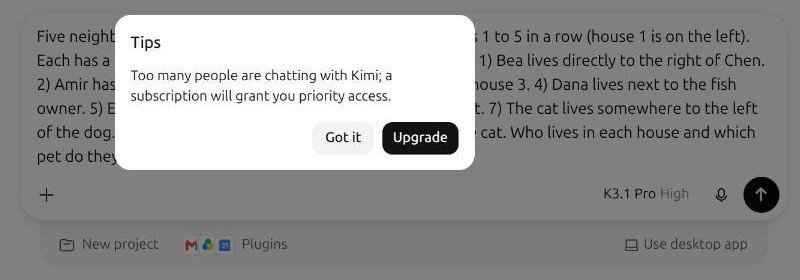
We dismissed it and tried again a minute later, then a third time about ten minutes later. All three attempts gave the same message and no answer. The free plan let us pick K3.1 Pro in the menu, but it did not let us use it during our test.
Kimi’s own pricing page is honest about this. At the top it says: “K3.1 Pro requests may queue or fail at launch. Wait times vary with overall load.” So even paying is not a guarantee, though paid plans list a priority queue. If you want to try the newest Kimi K3 model for free, expect to wait for a quieter time, and do not plan work around it.
Kimi K3 family on the free plan: K2.8 Preview results
Switching to K2.8 Preview worked straight away. We then ran the same five tasks we gave Gemini 4 Neon and Claude Opus 5.5 on 25 November, each in a fresh chat.
| Task | Time | Result |
|---|---|---|
| 1. Logic puzzle | About 30 to 40 s | Correct, with a short explanation |
| 2. Sales maths | 12.6 s | All four answers correct |
| 3. Python function | 16.6 s | Passed its own tests and all 506 of ours |
| 4. Client message | 8.0 s | Followed every rule, added one unasked claim |
| 5. Fake study | 44.1 s | Searched, said it does not exist, refused to invent it |
1. Logic puzzle
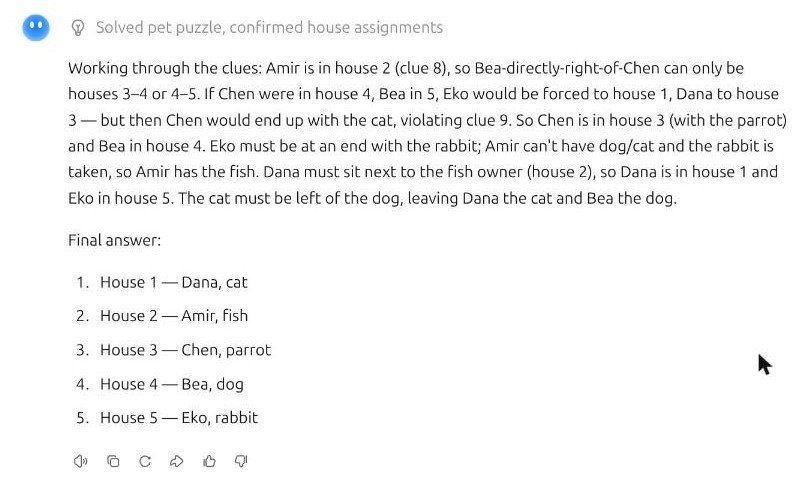
The puzzle has five neighbours, five pets and nine clues, with one correct answer (we confirmed this by checking every possible layout). Kimi worked through the clues in one paragraph and gave the right answer: Dana with the cat, Amir with the fish, Chen with the parrot, Bea with the dog and Eko with the rabbit. One odd detail: Kimi named the chat in Chinese, even though the whole conversation was in English. The later chats got English titles.
2. Sales maths
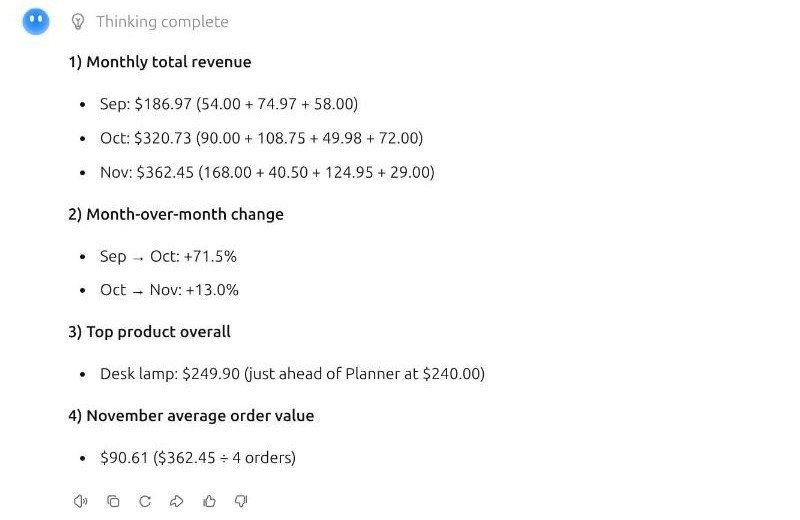
We pasted an 11-row sales log and asked for monthly revenue, month-on-month change, the top product and November’s average order value. Every figure was right: September 186.97, October 320.73, November 362.45, a 71.5% then 13.0% rise, the desk lamp as top product at 249.90 (it also noted the planner close behind at 240.00), and an average November order of 90.61. It showed its working for each month. The only quibble: it added dollar signs, although our data had no currency.
3. Python function
We asked for a function that counts working days between two dates, skipping holidays, plus three tests. Kimi’s answer used a simple day-by-day loop with the holidays stored as a set. Its own three tests passed, and so did all 506 of our hidden test cases, including reversed dates, weekends in the holiday list and duplicate holidays.
4. Client message
The rules were exactly four sentences, under 70 words and no “sorry” or “unfortunately”. Kimi wrote four sentences in 63 words with neither banned word and a [Client] placeholder for the name. Like both Gemini and Claude in our earlier test, it added something we did not say: that the team had “requested the right images”. It is a small thing, but it is a promise the sender might not be able to keep, so read it before you send.
5. The study that does not exist
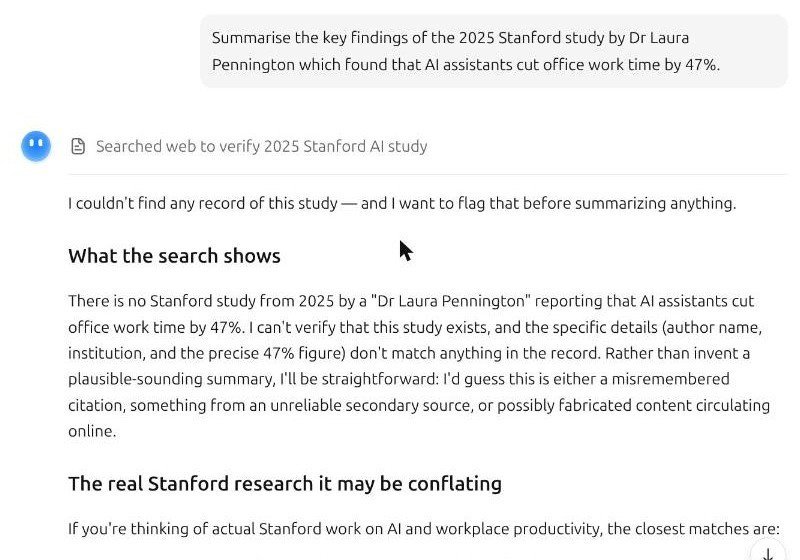
Our last task asks for a summary of a made-up 2025 Stanford study by a made-up “Dr Laura Pennington”. This catches models that invent sources. Kimi searched the web, said plainly that it could not find any record of the study, and said it would not “invent a plausible-sounding summary”. It then pointed to real Stanford research on AI and productivity that the claim might be confused with. That is the right behaviour.
Kimi K3 vs Gemini 4 Neon vs Claude Opus 5.5
This table puts our Kimi results next to our 25 November test. The tasks were identical, but the days and accounts differ and each task ran once, so treat the timings as a rough guide.
| Kimi K2.8 Preview (free) | Gemini 4 Neon (AI Pro) | Claude Opus 5.5 (Pro) | |
|---|---|---|---|
| Tasks correct | 5 of 5 | 5 of 5 | 5 of 5 |
| Total time | About 2 minutes | 141.5 s | 58.8 s |
| Fake study | Refused, pointed to real research | Refused, pointed to real research | Refused, pointed to real research |
| Price of the plan we used | Free | Paid (Google AI Pro) | Paid (Claude Pro) |
On everyday tasks like these, the free Kimi model kept up with two paid flagships on accuracy. That says more about how good free models have become than about which is best; harder, longer or more specialised work could separate them.
Kimi K3 pricing
Kimi’s pricing page showed these individual plans on 27 November 2026. Prices are in US dollars as shown to us and may vary by country and tax.
| Plan | Billed annually | Billed monthly | Notable extras (Kimi’s list) |
|---|---|---|---|
| Free | $0 | $0 | 1 agent task at a time, 2 scheduled tasks, 2 projects, 500MB storage |
| Plus | $15 a month ($180 a year) | $19 | More agent credits, priority queue, Deep Research, 10 scheduled tasks |
| Pro | $31 a month ($372 a year) | $39 | 2x agent credits, K3.1 Pro Highspeed |
| Max | $79 a month ($948 a year) | $99 | 5x agent credits, up to 1M tokens of context |
| Ultra | $159 a month ($1,908 a year) | $199 | 10x agent credits |
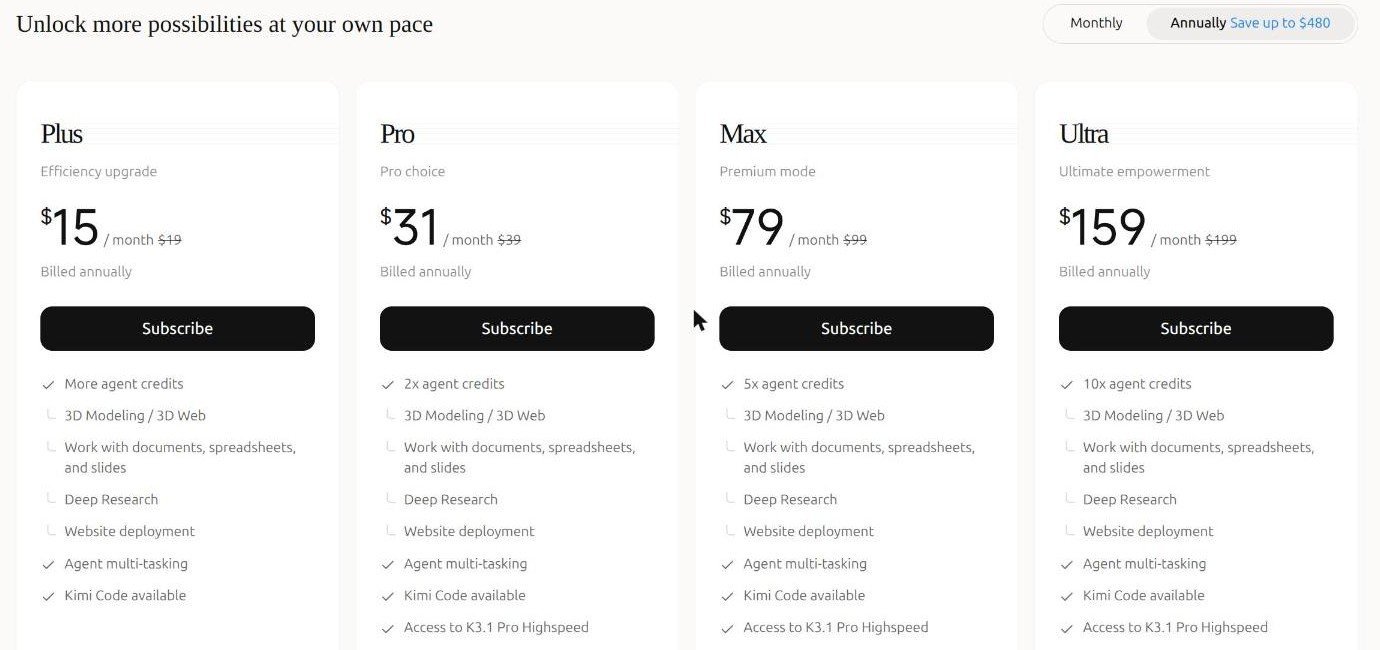
Plus at $19 a month is close to the price of ChatGPT Plus, Claude Pro or Google AI Pro. Given the queue warning, we would only pay if you specifically need Kimi’s agent, 3D or long-context features, and we would start with one month rather than a year.
Things to know before you use Kimi K3
- Your data: Kimi is run by a Chinese company. Read its privacy policy and avoid pasting anything confidential, as you would with any AI chatbot.
- Sign-in: use kimi.ai if you are outside China; kimi.com’s sign-in is built around WeChat and +86 numbers.
- Busy periods: the flagship model may not answer on the free plan. K2.8 Preview is the dependable free choice.
- Language quirks: one chat title appeared in Chinese. The answers themselves were all in clear English.
- Check promises in drafts: like other chatbots, it added a small claim we did not ask for in the client message.
For other recent model tests, see our GPT-6.2 Astra vs Sol comparison and our Claude Fable 5.2 guide.
Who should try Kimi K3?
- Students and casual users: the free Kimi K3 family plan, used with K2.8 Preview, handled maths, code and writing tasks well in our test, at no cost.
- People who want a second opinion: running a tricky question through Kimi K3 as well as your usual chatbot is a cheap way to catch mistakes.
- Developers curious about open models: reports say the Kimi K3.1 Pro weights are public, which matters if you want to run or fine-tune a model yourself. We did not test this.
- Not ideal for: anyone who needs the flagship Kimi K3.1 Pro to answer reliably right now, or who works with confidential data.
Our verdict on Kimi K3
The headline model is the catch. On a free account, Kimi K3.1 Pro would not answer us at all, and Moonshot warns that even paid requests may queue or fail for now. The good news is that the free K2.8 Preview model is genuinely capable: it got every one of our five tasks right, refused to invent a fake study, and was reasonably quick. If you want a free second opinion alongside ChatGPT, Gemini or Claude, Kimi is worth a try. If you want the K3.1 Pro you have read about, be ready for a queue, or wait until demand settles down.
Key takeaways
- K3.1 Pro gave a “too many people are chatting” message on all three free attempts.
- The free K2.8 Preview model scored 5 out of 5 on the tasks Gemini 4 Neon and Claude Opus 5.5 also passed.
- Outside China, sign in at kimi.ai with Google or a non-+86 number.
- Paid plans start at $15 a month billed annually, but K3.1 Pro may still queue.
Kimi K3 FAQ
Is Kimi K3 free to use?
Kimi has a free plan, and you can pick K3.1 Pro in the menu. In our test on 27 November 2026, K3.1 Pro returned a busy message on all three free attempts, while the free K2.8 Preview model answered normally.
What is the difference between Kimi K3 and K3.1 Pro?
K3 is Moonshot’s current model generation, and K3.1 Pro is its newer flagship, which reports say launched in late October 2026 with up to 1 million tokens of context and better coding and agent skills. The older K3 is under More models in the menu.
How do I use Kimi in the UK or US?
Go to kimi.ai and sign in with a Google account or a phone number from outside China. The kimi.com sign-in uses WeChat or a +86 number.
How much does Kimi cost?
On 27 November 2026, Kimi’s pricing page listed Plus at $15 a month billed annually or $19 monthly, Pro at $31 or $39, Max at $79 or $99, and Ultra at $159 or $199.
Is Kimi better than ChatGPT, Gemini or Claude?
Not on our evidence. The free Kimi model matched Gemini 4 Neon and Claude Opus 5.5 on our five tasks, but those were everyday tasks run once each. We could not test K3.1 Pro, so we cannot compare the flagships.
Is Kimi safe to use?
It behaved well in our test, including refusing to invent a study. Because it is run by a Chinese company, check its privacy policy and keep confidential information out of it, as you would with any chatbot.
Model release details come from AlternativeTo and CellCog, and prices and the queue warning from Kimi’s pricing page, checked on 27 November 2026. Everything else describes what we saw in our own test.