
The Hostinger AI website builder promises a finished site from a single description. We tested that claim on 24 November 2026: we gave Hostinger AI Builder one prompt for a small local business and timed it, then went through what it built, what it got wrong and how many credits it used. The short version is that the site was genuinely good, but one prompt used more than half the credits our plan came with.
How we tested
We used Hostinger AI Builder in its agentic mode, where you build the site by chatting, on our own Hostinger account (a Premium Web Hosting plan), on 24 November 2026. We sent one prompt for a made-up business, Leafy Lane Dog Walks in Leeds, and gave it no logo, photos or copy of its own. We then reviewed every section on desktop and mobile, checked the credit balance, and tried the Select & edit tools.
Not tested: the classic drag-and-drop mode, publishing, connecting a domain, the online store and email marketing. We did not buy anything. Prices and plan details come from Hostinger’s own pages and are labelled that way.
In this article
Hostinger AI website builder: the short answer
- Fast: our one-page site was finished about 3 to 4 minutes after we sent the prompt, after “17 actions”.
- Good-looking: a clean, modern design with every section we asked for, a working contact form, and a sensible mobile layout.
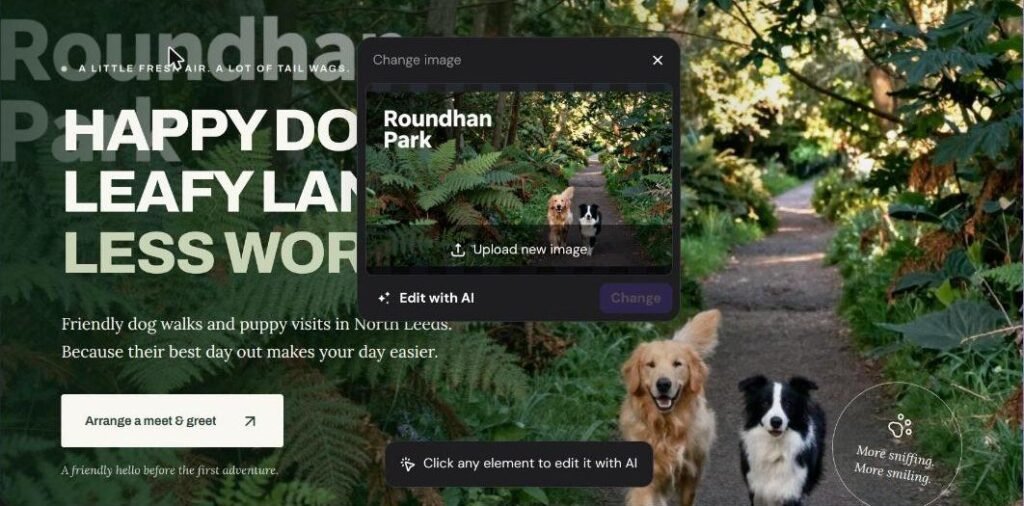
- Not perfect: the AI-generated hero photo had a misspelled place name baked into the image (“Roundhan Park” instead of Roundhay Park), and it invented service prices we had not given it.
- Credit-hungry: that one prompt used 133.6 Hostinger credits. Hostinger’s UK pricing page says the Premium plan comes with 250 one-time credits.
What is the Hostinger AI website builder?
Hostinger AI Builder is the website builder included with Hostinger’s website builder and hosting plans. According to Hostinger’s product page, it has two ways of working:
- Manual mode: you describe your business, get a ready-made site, then change it with a drag-and-drop editor and AI tools for logos, text and SEO.
- Agentic mode: you build and change the whole site by chatting, which Hostinger calls “vibe coding”. The site is a modern web app with its own small database for things like form submissions.
We tested agentic mode, because that is the newer, prompt-driven way of building that most people searching for the Hostinger AI website builder now want to try.
The prompt we used
We wrote the kind of brief a small business owner might write, without design jargon:
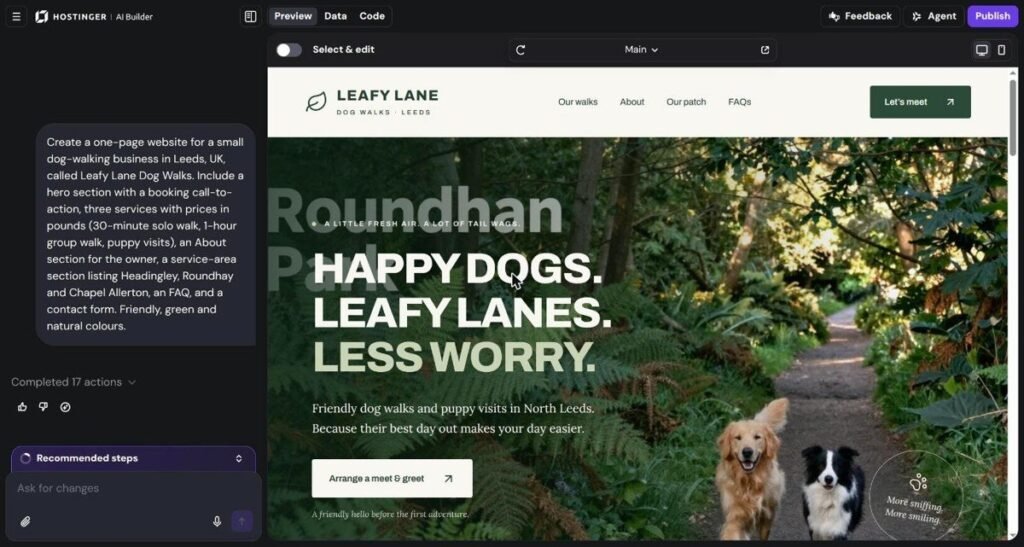
Create a one-page website for a small dog-walking business in Leeds, UK, called Leafy Lane Dog Walks. Include a hero section with a booking call-to-action, three services with prices in pounds (30-minute solo walk, 1-hour group walk, puppy visits), an About section for the owner, a service-area section listing Headingley, Roundhay and Chapel Allerton, an FAQ, and a contact form. Friendly, green and natural colours.
Note that we asked for prices “in pounds” but did not give any amounts. We wanted to see whether the builder would invent numbers or leave placeholders.
Step 1: how long the Hostinger AI website builder took
We sent the prompt at 19:51 UK time. The builder showed its progress in the chat panel, and the build was marked complete with “Completed 17 actions” by 19:55. That is roughly 3 to 4 minutes for a full one-page site with a form and a place to store enquiries.
Step 2: what the site looked like
The design was the strongest part of the Hostinger AI website builder. The header had the business name as a simple leaf logo, links to each section and a “Let’s meet” button. The hero used a large headline, “Happy dogs. Leafy lanes. Less worry.”, over a photo of two dogs on a woodland path, with a clear “Arrange a meet & greet” button.
Further down, the Hostinger AI website builder produced every section we asked for, in order:
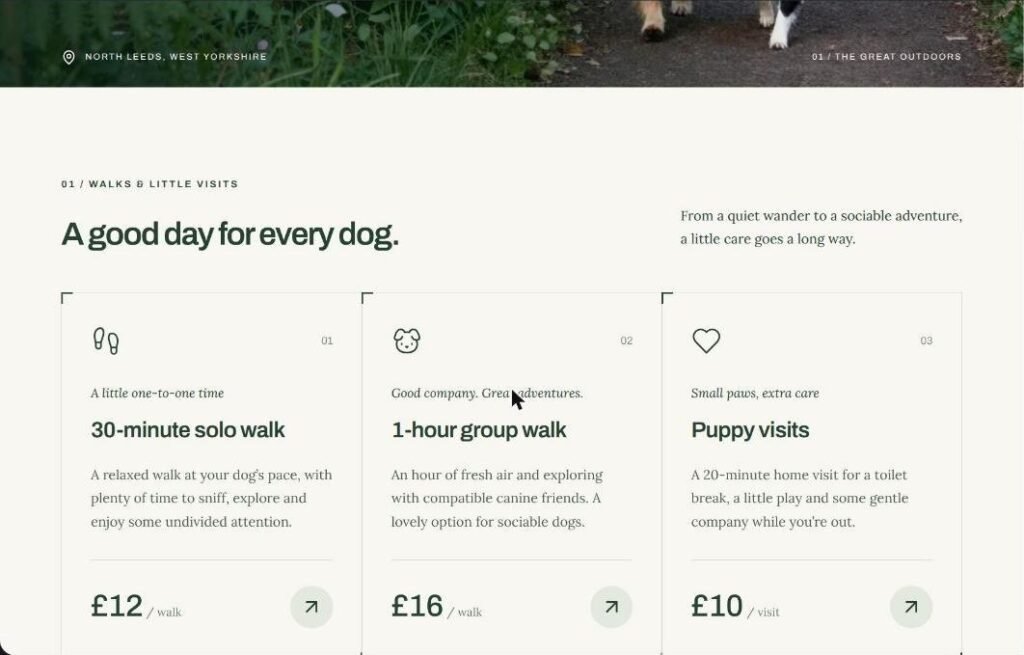
- Services: three cards for the solo walk, group walk and puppy visits, each with a short description and a price.
- About: a first-person welcome from “the owner”, without inventing a name or a backstory.
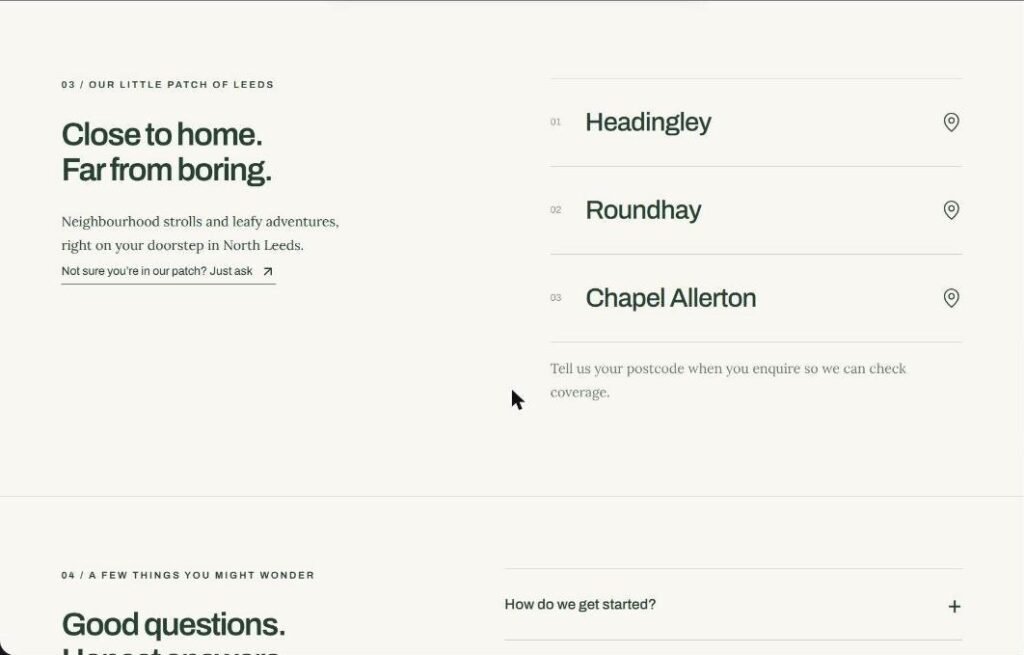
- Service areas: Headingley, Roundhay and Chapel Allerton, spelled correctly, with a note to give your postcode to check coverage.
- FAQ: sensible questions such as “Do you walk in rainy weather?” and “Can you visit a puppy who isn’t ready for walks?”
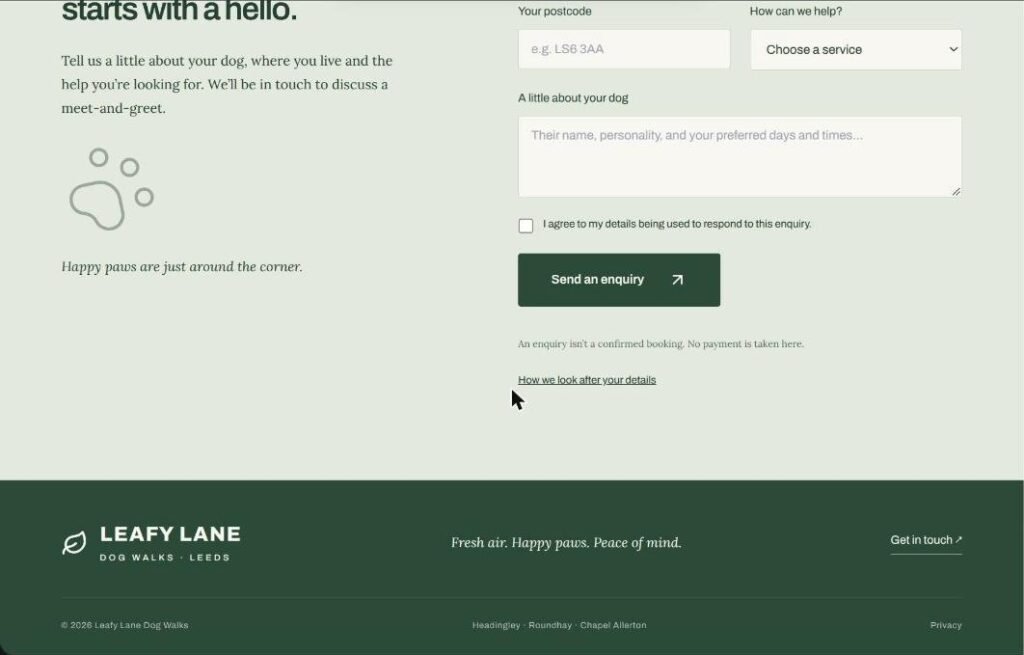
- Contact form: name, email, postcode, a service drop-down and a box about your dog.
Importantly, it did not add fake testimonials, star ratings or made-up reviews, which AI-generated sites sometimes include. That matters, because invented reviews on a real business site can get you into trouble.
Step 3: the contact form
The form was better than we expected. It included a consent checkbox (“I agree to my details being used to respond to this enquiry”), a link to how the business looks after your details, and a line making clear that “An enquiry isn’t a confirmed booking. No payment is taken here.”
Submissions are stored inside the builder. Its Data tab showed a new “enquiries” collection (alongside “users”), with separate test data and live data, so you can see enquiries without setting up a separate form service.
Step 4: what the Hostinger AI website builder got wrong
Two problems would stop us publishing this site as it was.
A spelling mistake inside the AI photo
Behind the hero headline, large faded words read “Roundhan Park”. The real place is Roundhay Park. When we used Select & edit to click it, the builder opened a “Change image” panel: the words are part of the AI-generated photo, not text on the page. You cannot fix them by typing; you have to upload your own photo or ask the AI to regenerate the image.
Prices we never gave it
The builder filled in £12 a walk for the solo walk, £16 for the group walk and £10 a visit for puppy visits, and it made puppy visits 20 minutes long. None of that came from us. To its credit, the builder’s own “Recommended steps” panel warned straight away: “AI may have used example content in some places”, with a button to get a prompt that checks for placeholders. Still, if you publish without checking, your site will show prices you did not set.
Step 5: how many credits one prompt used
This was the biggest surprise. Hostinger AI Builder runs on Hostinger credits, and the credits panel after our build showed:
- Balance: 116.43 credits.
- Used for “Website editing & generation”: 133.5677 credits, all on 24 November.
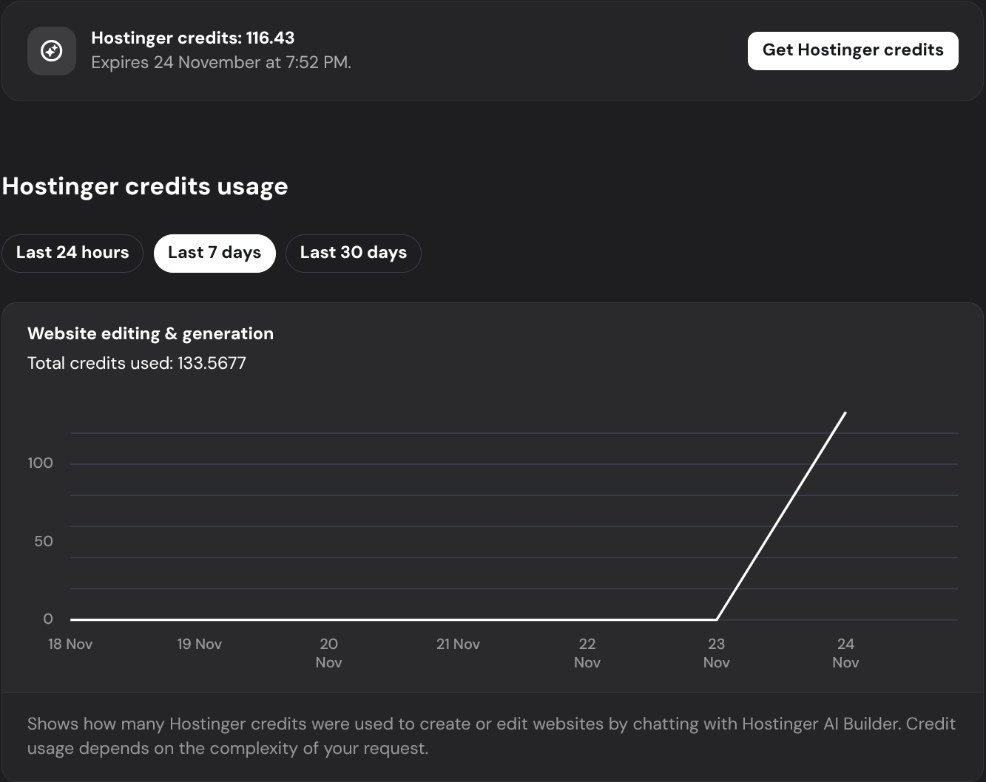
Hostinger’s UK pricing page for AI Builder says the Premium plan comes with 250 one-time credits (500 during the Black Friday offer) and that they do not renew monthly. Our numbers fit that: 133.57 used plus 116.43 left makes 250. So one fairly simple prompt used more than half of the Premium plan’s credits.
Hostinger’s help centre says every request is charged by complexity, including questions that do not change the site, and that top-ups start at 500 credits and expire three months after purchase if unused. It also says that even manual changes in Select & edit, such as replacing an image, “deduct a small number of credits”, although the product page says direct text and image edits do not spend prompt credits. We did not measure manual edits, so we cannot say which is right in practice.
Step 6: editing without prompting
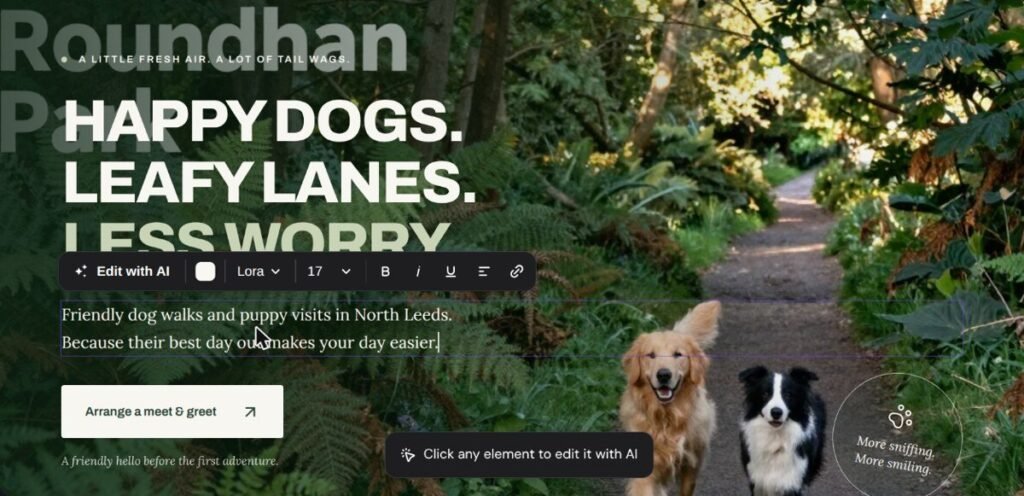
Select & edit lets you click any element on the page. Clicking a paragraph brought up a small toolbar with Edit with AI, text colour, font (Lora), size, bold, italic, underline, alignment and a link button, so you can fix wording yourself instead of writing another prompt.
Given how many credits a prompt can use, this is the way to make small changes: fix text, swap photos for your own, and save prompts for real structural changes.
Step 7: the mobile version
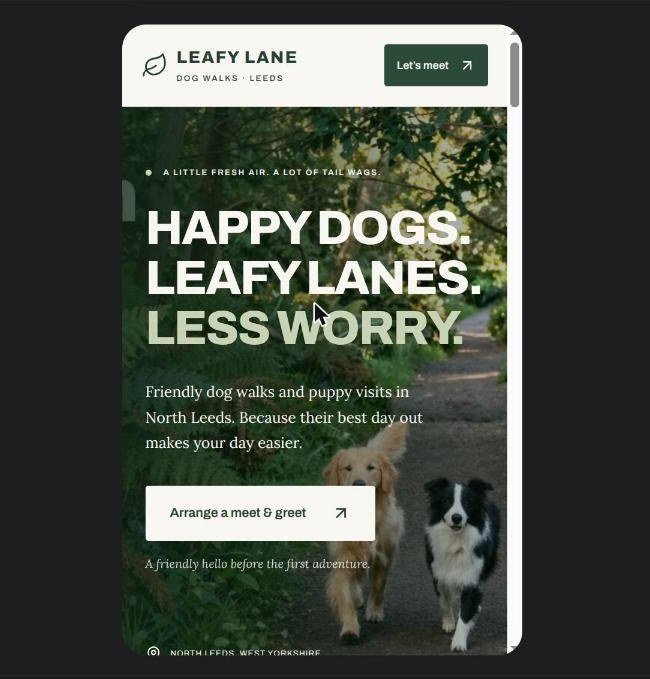
Switching the preview to mobile showed a properly rearranged layout: the section links were hidden to save space, the headline stayed readable, and the “Let’s meet” button stayed in the header. We did not see overlapping text or cut-off buttons in the hero section we checked on mobile.
What you get with the Hostinger AI website builder besides the AI
The AI is only part of what you pay for. According to Hostinger’s AI website builder page, the plans also include:
- Hosting and an SSL certificate, so the site is served securely without extra setup.
- A free domain for the first year on plans of 12 months or longer.
- One-step publishing, plus extra AI tools for logos, blog posts, product descriptions and SEO in manual mode.
- Online store features on the Unlimited and Cloud Startup plans, labelled as new.
We did not publish our test site or connect a domain, so we cannot comment on how smooth that part is.
Who the Hostinger AI website builder suits
Based on our test, the Hostinger AI website builder is a good fit for:
- Local service businesses such as dog walkers, cleaners, tutors and tradespeople, who need a clear one-page site with services, an area list and an enquiry form.
- People with no design skills, because the layout, fonts and colours it chose looked professional without any adjustment.
- Anyone who wants enquiries stored in one place, since the form saved to the builder’s own data tab.
It is a weaker fit for large sites with many pages, or for people who like to keep iterating through chat, because each request uses credits from a balance that does not renew monthly on these plans.
Hostinger AI website builder pricing
Hostinger’s UK pricing page for AI Builder listed these Black Friday prices (excluding VAT) when we checked:
| Plan | Price | Paid up front | Renews at | One-time credits |
|---|---|---|---|---|
| Premium | £1.79 a month | £85.92 for 48 months | £10.99 a month | 250 (500 with the Black Friday offer) |
| Unlimited | £2.49 a month | £119.52 for 48 months | £13.99 a month | 500 (1,000 with the offer) |
| Cloud Startup | £7.99 a month | £383.52 for 48 months | £20.99 a month | 1,000 (2,000 with the offer) |
From Hostinger’s UK pricing page, 24 November 2026. The low monthly prices require paying for 48 months up front, and the plan renews at the higher price.
The page also mentions a free trial with no card required, which we did not test. Hostinger also offers a 30-day money-back guarantee, according to its AI website builder page.
Is the Hostinger AI website builder worth it?
It is worth it if you need a good-looking, simple site for a small business quickly, you are happy to replace the example content yourself, and you will make most later changes with Select & edit rather than new prompts.
Think twice if you expect to keep chatting to the AI to change your site. With 250 one-time credits on Premium and more than half used by our first prompt, a few rounds of changes could mean buying top-ups. If that is how you like to work, a plan with more credits, or the Black Friday doubled credits, makes more sense.
Tips for a better Hostinger AI website builder prompt
- Give it your real details. Include your actual prices, opening hours, service area and contact details in the first prompt, so it does not invent them.
- Upload your own photos. AI photos can contain made-up or misspelled text, as ours did. Real photos of your business also build more trust.
- Say what you do not want. For example, “no testimonials, no reviews, no statistics”, so nothing is invented.
- Use Select & edit for small fixes. Save prompts for bigger changes, like adding a page.
- Check every section before publishing, including the FAQ answers and the privacy link.
Mistakes to avoid
- Publishing the example prices. Our site showed £12, £16 and £10 that we never chose.
- Asking questions in the builder chat. Hostinger’s help centre says every request is charged by complexity, even ones that do not change the site.
- Judging the price by the monthly figure. The lowest prices need 48 months paid up front.
- Leaving AI images unchecked. Zoom in on any text inside generated photos.
Key takeaways
- One prompt built a complete, attractive one-page site with a working enquiry form in about 3 to 4 minutes.
- It invented service prices and put a misspelled place name inside an AI photo, so review before publishing.
- It added no fake testimonials or reviews.
- That one prompt used 133.6 credits, more than half of the 250 one-time credits Hostinger lists for the Premium plan.
If you are comparing AI tools this week, our roundup of AI Black Friday deals covers ChatGPT, Gemini, Claude and Perplexity. Plan details come from Hostinger’s AI Builder pricing page, its AI website builder page and its help article on AI credits.
Hostinger AI website builder FAQ
Can the Hostinger AI website builder really build a site from one prompt?
Yes. Our one-prompt test produced a complete one-page site with a hero, services, about section, service areas, FAQ, contact form and footer in about 3 to 4 minutes. It still needed checking: it invented prices and put a misspelled place name inside an AI photo.
How many credits does the Hostinger AI website builder use?
Our one-page site used 133.57 credits for a single prompt. Hostinger says credit use depends on how complex each request is, and its UK pricing page lists 250 one-time credits on the Premium plan, so expect a first build to use a large share of a small plan’s credits.
Is the Hostinger AI website builder free?
Not fully. It comes with Hostinger’s paid website builder and hosting plans. Hostinger’s pricing page mentions a free trial with no card required, which we did not test, and a 30-day money-back guarantee is listed on its AI website builder page.
Does the Hostinger AI website builder add fake reviews?
Not in our test. Our generated site had no testimonials, star ratings or review quotes. It did invent example prices, so add a line to your prompt such as “no reviews, testimonials or statistics” and check every section before you publish.
Can I edit the site without using credits?
Hostinger’s product page says you can edit text and images directly without spending prompt credits, while its help centre says some manual changes, such as replacing an image, deduct a small number of credits. We did not measure manual edits. Exporting the project and editing the code yourself avoids credits entirely, according to Hostinger.
Is it good for a small business website?
For a simple brochure site with an enquiry form, yes: our result looked professional and handled mobile well. Replace every example detail, use your own photos, and budget for extra credits if you plan to make lots of changes by chatting.