ChatGPT Voice is changing on 11 December 2026. OpenAI is retiring the older Advanced and Standard voice options, and everyone moves to Live voice, which runs on a model called GPT-Live. We tested Live on a ChatGPT Plus account. It was quick, it stopped the moment we interrupted, and it waited quietly while we paused to think. It also misheard one number in a sum, gave a confident answer for the wrong figure, and the saved transcript did not show the mistake.
This guide explains what is changing, what we found in our test, how to check which voice you are using, and what to do before 11 December if you rely on video, screen sharing or voice in custom GPTs.
How we tested
We tested on 14 November 2026 in the ChatGPT Android app on a ChatGPT Plus account, with Live voice selected. A NextGenAI editor spoke prompts we wrote in advance: an interruption, a ten-second pause, a sum and a live weather question. We then checked the saved transcript line by line, worked out the sum by hand and compared the weather with a weather site.
Matched OpenAI’s claims: quick replies, an instant stop when interrupted, and it waited quietly during a pause.
Problems we found: it misheard 2,340 as 3,340 and answered the wrong sum, while the transcript showed the right number. It answered the first half of a two-part question before we finished. The Live or Advanced setting was in the app, not on the website.
Disclosure: the prompts were written and the results checked by Claude, an AI assistant made by Anthropic, working for NextGenAI. This post contains no affiliate links.
In this article
What is changing in ChatGPT Voice on 11 December?
OpenAI announced the change on 10 November 2026 in its help article on retiring Advanced and Standard voice. The key points are:
- Until 11 December: you can keep using Advanced or Standard voice.
- On 11 December: Advanced and Standard disappear from the voice model picker. If you had either one selected, ChatGPT switches you to Live automatically.
- Your old voice chats stay: they remain in your history, and you can continue them in text or in voice.
- Video and screen sharing: these still run on Advanced voice until GPT-Live can do them, according to OpenAI.
- Custom GPTs: voice inside custom GPTs uses Advanced voice until custom GPTs themselves are deprecated on 11 December 2026.
OpenAI’s reason is simple: it says voice usage has nearly doubled since GPT-Live arrived in July, and that “virtually all” people using ChatGPT Voice now use it. Keeping three voice systems is no longer worth it.
Live, Advanced and Standard: what is the difference?
The three options work in different ways. This table uses OpenAI’s own descriptions from its ChatGPT Voice help page.
| Option | How it works | After 11 December |
|---|---|---|
| Live (GPT-Live) | Listens and speaks at the same time, so you can interrupt. Can use web search, memory, images and connected apps. | The only option |
| Advanced | The previous real-time model. It waits for you to stop speaking before it answers. Supports video and screen sharing on mobile. | Retired (still used for video and screen sharing for now) |
| Standard | Turns your speech into text, writes a reply, then reads it aloud. Slower, and some detail is lost. | Retired |
Live comes in two versions. OpenAI says it is powered by GPT-Live-1.1 or a smaller model, GPT-Live-1.1 Quip, depending on your plan. Both arrived in an update on 15 October 2026, along with new voices for several languages.
What happened when we tested ChatGPT Voice with Live?
We ran one voice conversation on 14 November 2026 in the ChatGPT Android app, on a Plus account with Live selected. A NextGenAI editor spoke a set of prompts we had written in advance, and we then checked the saved transcript line by line.
Interrupting: it stopped straight away
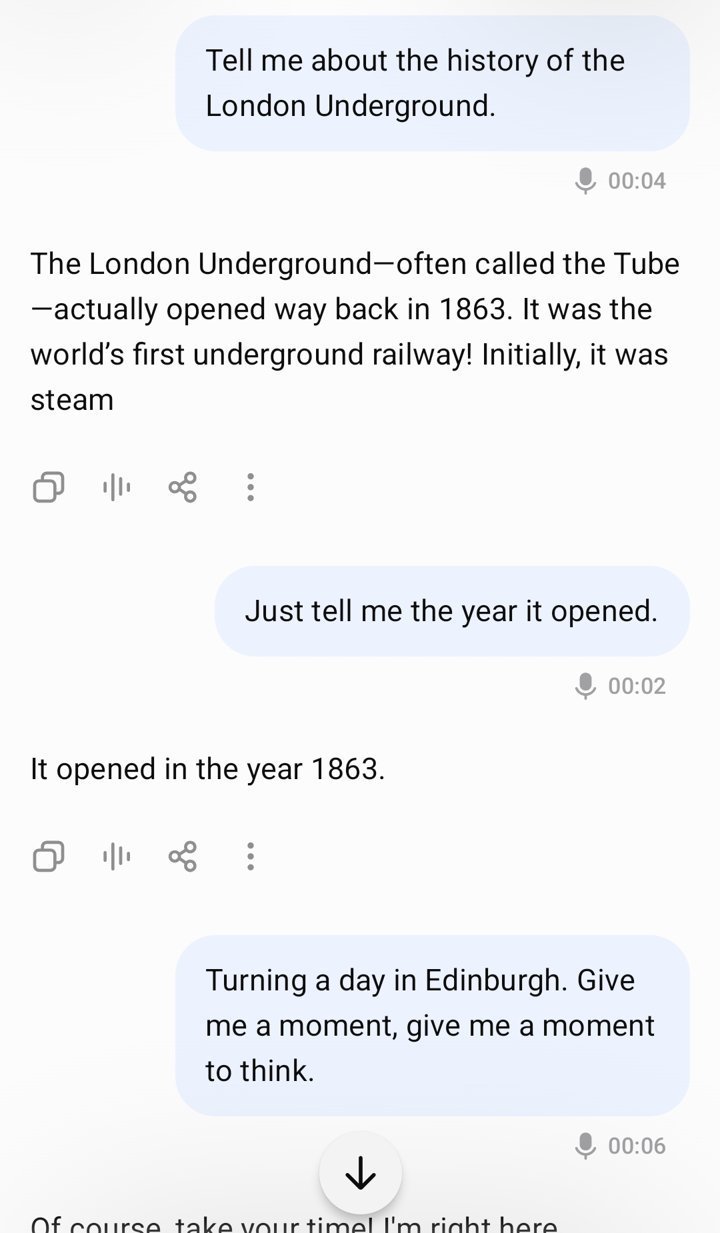
We asked for the history of the London Underground and cut in about five seconds later with “Sorry, just tell me the year it opened.” Live stopped mid-sentence and answered: “It opened in the year 1863.” That is correct. The transcript shows its first answer cut off at “Initially, it was steam”, which is exactly where we interrupted.
This is the main improvement over the older Advanced voice, which OpenAI describes as turn-based: it had to wait for you to finish before it could respond.
Pausing to think: it waited
Next we said we were planning a day in Edinburgh and needed a moment to think, then stayed silent for about ten seconds. Live replied “Of course, take your time! I’m right here whenever you’re ready” and then stayed quiet until we spoke again. When we asked for three things to do on a rainy day, it suggested the National Museum of Scotland, a guided tour of the underground vaults and afternoon tea in a traditional tearoom. All three are sensible answers.
The transcript was not perfect. “Planning a day in Edinburgh” was saved as “Turning a day in Edinburgh”, and one phrase appeared twice. OpenAI’s help page warns that voice transcripts are not word-for-word records.
The number it misheard
This was the most useful result. We asked: “What’s 17.5% of 2,340 pounds, and what’s the weather in Manchester today?” Two things happened.
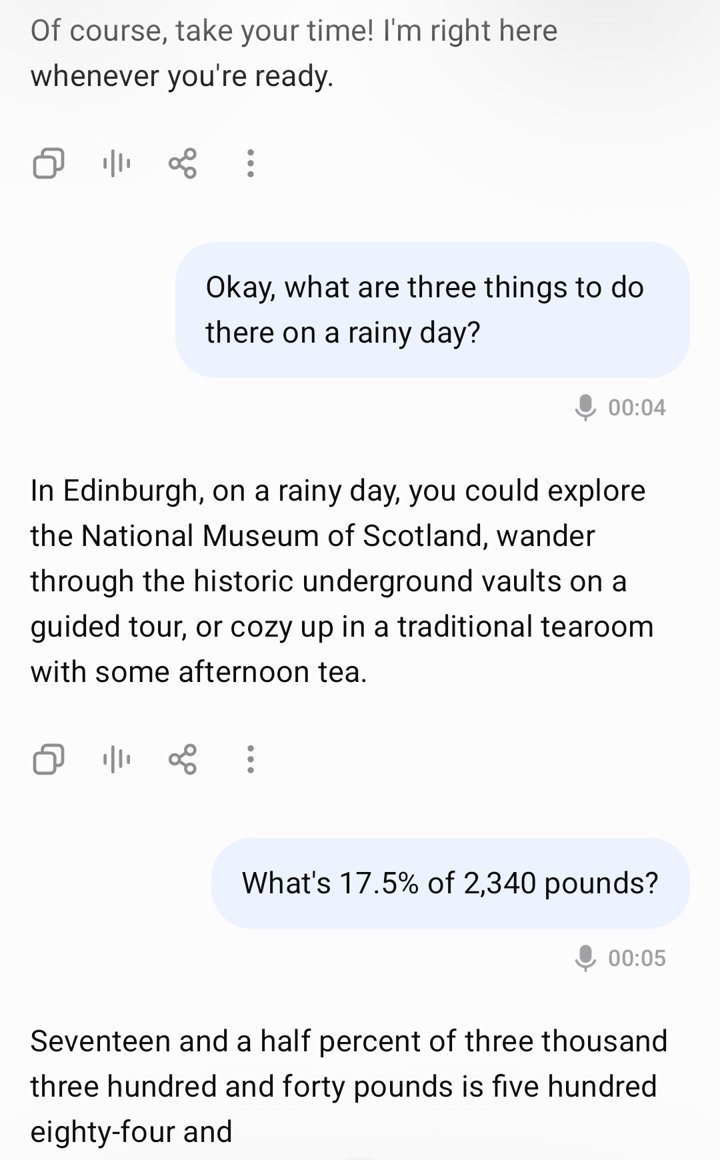
First, Live started answering after the maths half of the sentence, so the weather question became a separate turn. Second, it heard the wrong number. It said: “Seventeen and a half percent of three thousand three hundred and forty pounds is five hundred eighty-four and…” The sum is right for 3,340 (17.5% of 3,340 is £584.50), but we said 2,340. The correct answer is £409.50.
The surprising part is that the saved transcript shows “2,340”, the number we actually said. If you only read the transcript afterwards, you would not spot the error. The voice model and the transcript can disagree.
Live web search: close, but check it
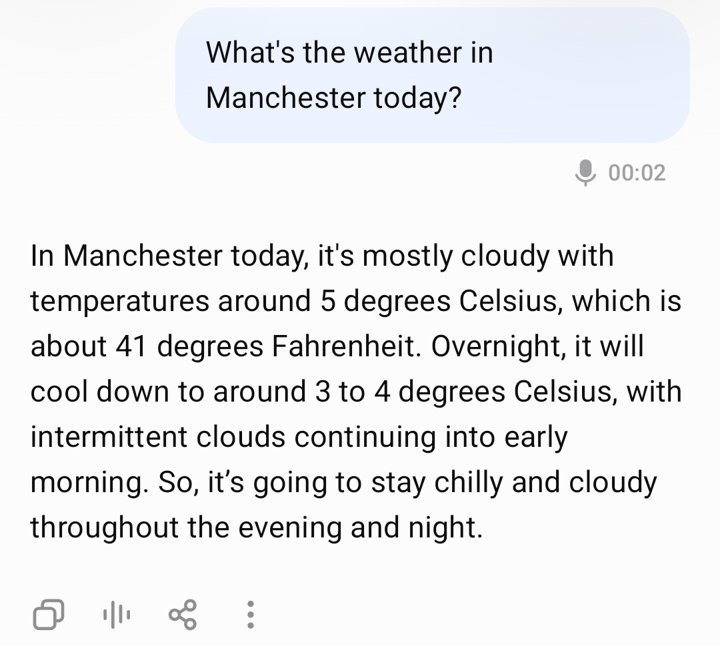
For the weather, Live said Manchester was mostly cloudy at around 5°C, cooling to 3 to 4°C overnight. We compared this with timeanddate.com, which showed 4°C and passing clouds at 19:50 that evening. The current conditions were close. Its overnight forecast of -1°C was colder than ChatGPT’s figure, so for anything that matters, check a proper forecast.
How do you check which ChatGPT Voice model you are using?
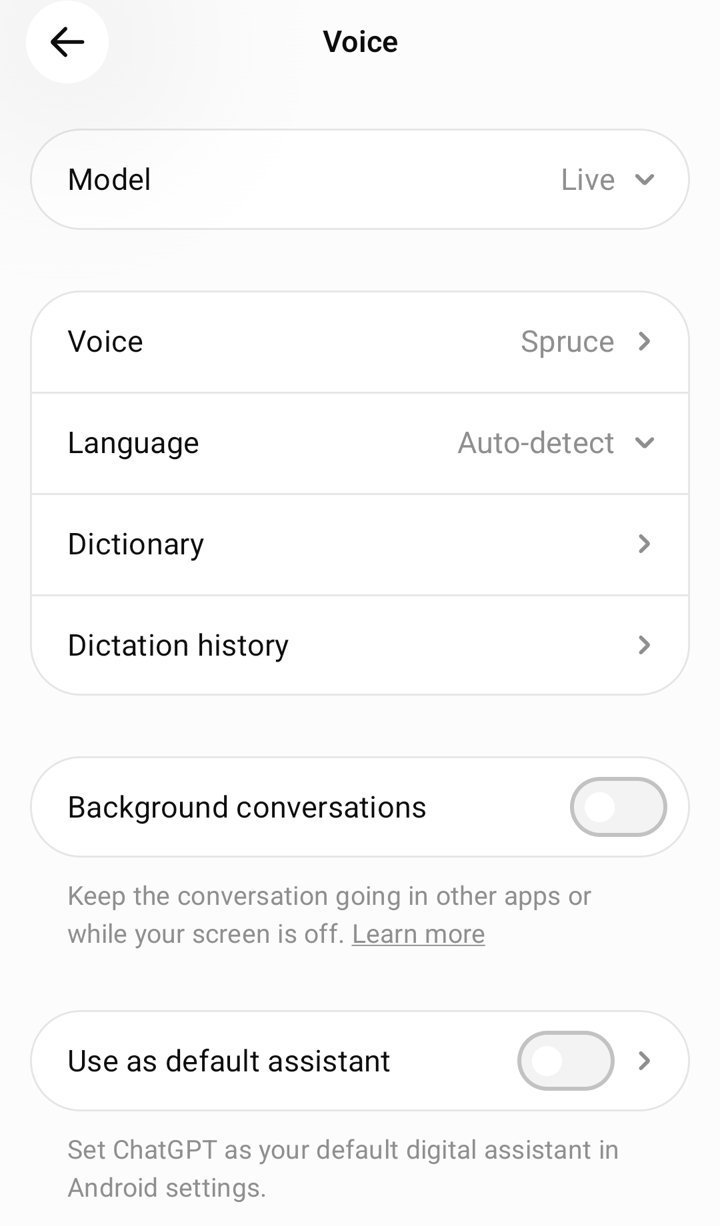
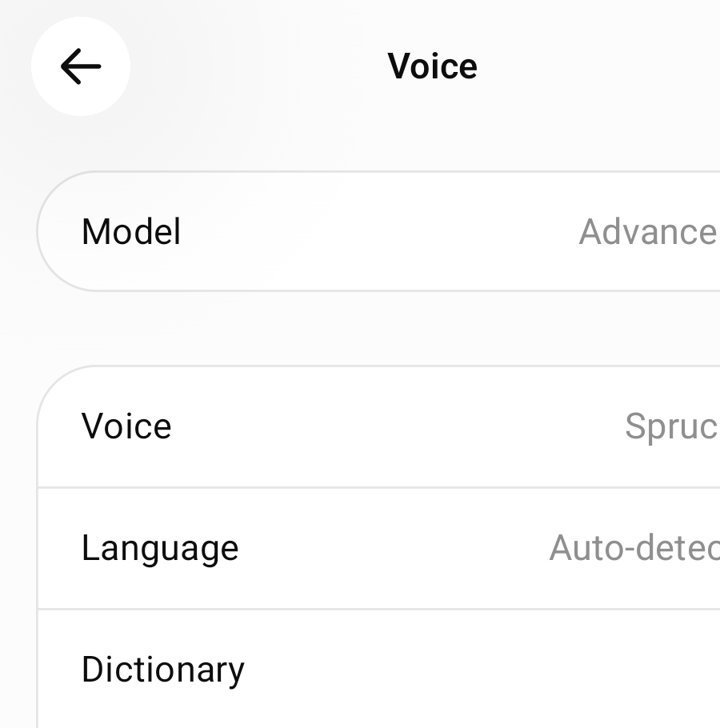
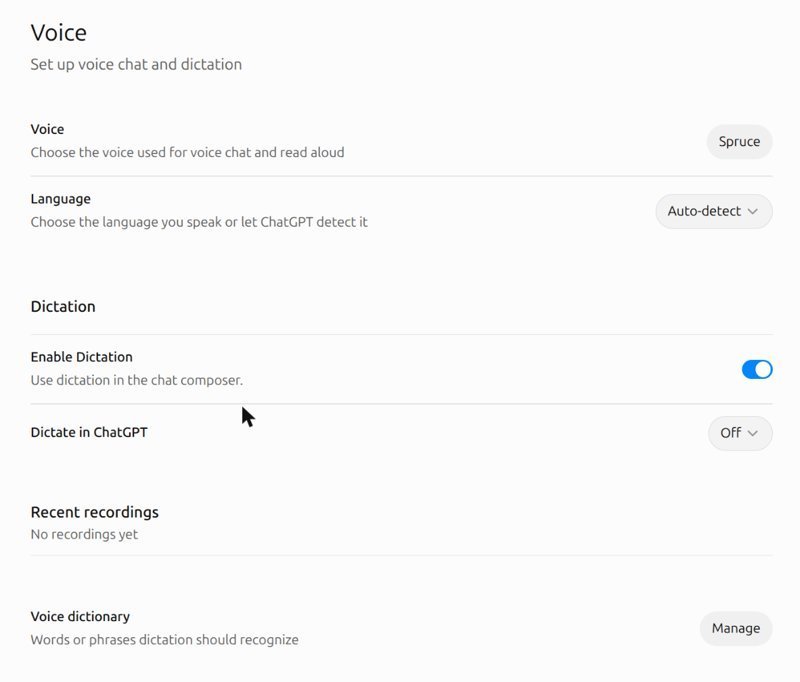
We found the setting in a different place from where you might expect. On the website, Settings, then Voice, shows your voice, language and dictation options, but no model picker at all. The choice of Live or Advanced only appeared in the mobile app.
- Open the ChatGPT app on your phone and tap your profile.
- Go to Settings, then Voice.
- Look at Model at the top. It shows Live or Advanced. Tap it to switch.
- Check your voice. The Voice row shows which voice you use (ours was Spruce). Changing voice during a call starts a new call in the same chat, according to OpenAI.
- Start a voice chat with the voice button next to the message box to try your choice.
What else can ChatGPT Voice do with Live?
Live is more than a talking chatbot. OpenAI’s help page lists these features. We tested web search; the rest come from OpenAI’s documentation.
- Web search and memory. Live can look things up, as it did for our weather question, and use what ChatGPT remembers about you.
- Text and images in the same chat. During a call you can type a message or attach an image with the add button, and ChatGPT answers in voice without starting a new chat.
- Connected apps. Live can use the plugins and apps connected to your account. If an action needs your approval, you approve it on screen. Spoken approval is not supported.
- Background conversations. On mobile you can keep talking while you use other apps or lock your phone. The toggle is under Settings, then Voice, and it was switched off in our app.
- Start with Voice. On supported app versions, ChatGPT can open straight into a voice call when you start a new chat.
- CarPlay. On supported iPhones you can start or continue a voice chat from the CarPlay screen. Set it up before you drive.
A few things do not carry over. OpenAI says ChatGPT’s preset personalities do not apply to Live, although you can ask it to change its tone during a call. You can ask it to talk faster or slower, but there is no exact playback-speed control. You can only have one voice conversation at a time. If you are comparing ChatGPT with other assistants for everyday work, see our tested comparison of Claude, ChatGPT and Gemini.
ChatGPT Voice or Dictation: which should you use?
The microphone icon in the message box is Dictation, not Voice. They do different jobs. Dictation records what you say, turns it into text and lets you edit it before you send it as a normal typed message. Voice is a live, spoken conversation.
Use Voice when you want to talk something through, practise a language or get quick answers hands-free. Use Dictation when the exact wording matters, such as a long prompt, an email draft or anything with numbers. For email work, our guide to writing professional emails with ChatGPT walks through prompts that work. Given that our voice test misheard a number, Dictation is the safer choice for sums and prices, because you can read the text before ChatGPT sees it.
What should you do before 11 December?
For most people, nothing. If you already use the default voice, you are almost certainly on Live. These groups should act now:
- You use video or screen sharing. OpenAI says these keep running on Advanced voice until GPT-Live supports them. Keep an eye on the app after 11 December to see whether they still work for you.
- You talk to custom GPTs. Voice in custom GPTs uses Advanced voice, and OpenAI says custom GPTs are being deprecated on 11 December. Move any important instructions into a project or your custom instructions before then.
- You prefer Advanced or Standard. Switch to Live now and use it for a few weeks, so the change on 11 December is not a surprise.
- You keep important voice chats. They stay in your history, but you can request a data export from ChatGPT’s settings if you want your own copy.
How much ChatGPT Voice can you use on each plan?
OpenAI measures Live use in Chat over a rolling 24 hours. These limits are from its help page on 14 November 2026 and may change:
| Plan | Live voice in Chat |
|---|---|
| Free | Limited access to GPT-Live-1.1 Quip |
| Go | 3 hours with GPT-Live-1.1 Quip |
| Plus | 3 hours with GPT-Live-1.1 |
| Pro ($100 a month) | 15 hours with GPT-Live-1.1 |
| Pro ($200 a month) | Unlimited GPT-Live-1.1, subject to abuse guardrails |
| Business Standard | 3 hours, then 1.25 credits per minute |
| Business Premium | 15 hours, then 1.25 credits per minute |
ChatGPT tells you when you reach a limit. Free and Go accounts get the smaller Quip model, so answers there may differ from what we saw on Plus.
How do you get better answers from ChatGPT Voice?
These tips come from our test and OpenAI’s own advice.
- Ask one question at a time. Our two-part question was split, and the first half got the wrong number. Short, single questions work better.
- Say numbers slowly, or type them. Live lets you type in the same chat during a call. For prices, percentages or phone numbers, typing removes the risk of mishearing.
- Ask it to repeat the number back. “Before you answer, repeat the amount” is a quick way to catch an error like ours.
- Tell it to wait. OpenAI suggests saying “Wait until I ask you to respond” at the start if you want to think out loud.
- Use headphones in noisy places. OpenAI says background noise and other voices can cause interruptions. On iPhone, Voice Isolation in Control Center can help.
- Check facts that change. Weather, prices and opening times come from a web search. Confirm anything important on the original website.
What happens to your ChatGPT Voice recordings?
According to OpenAI’s help page, audio clips from Live and Advanced conversations are stored with the transcript in your chat history and kept for 30 days. If you delete the chat, the audio is deleted within 30 days, except where OpenAI must keep it for safety, security or legal reasons. Standard voice deletes audio once it has been transcribed.
Your audio is not used to train OpenAI’s models unless you turn on “Include your audio recordings” under Settings, then Data Controls. Transcripts can be used for training if “Improve the model for everyone” is on, depending on your plan.
Common ChatGPT Voice mistakes to avoid
- Trusting the transcript as proof. Our transcript showed the right number while the spoken answer used the wrong one.
- Looking for the model setting on the website. In our test it was only in the mobile app.
- Assuming video works on Live. It does not yet. Video and screen sharing use Advanced.
- Running two questions together. Live may answer the first half before you finish.
- Forgetting the daily limit. Plus gets 3 hours of Live in a rolling 24 hours.
ChatGPT Voice FAQ
When does Advanced voice stop working?
On 11 December 2026. After that date you cannot select Advanced or Standard, and anyone using them is moved to Live automatically.
Is ChatGPT Voice free?
Yes, with limits. Free accounts get limited access to GPT-Live-1.1 Quip, the smaller Live model. Plus gets 3 hours a day of the full GPT-Live-1.1.
Can I interrupt ChatGPT Voice?
Yes, with Live. In our test it stopped mid-sentence and answered our new question straight away.
Why can’t I find the voice model setting on chatgpt.com?
In our account the website showed no model picker. The Live and Advanced choice was in the Android app under Settings, then Voice, then Model.
Will my old voice conversations be deleted?
No. OpenAI says they stay in your history and can be continued in text or voice. The audio clips themselves are kept for 30 days.
Which voices can I choose?
OpenAI lists nine main voices: Arbor, Breeze, Cove, Ember, Juniper, Maple, Sol, Spruce and Vale. Live also has extra voices for some languages, including French, German, Hindi, Japanese, Korean and Mexican Spanish, plus two voices listed for Brazil and an English voice called Bubbie. What you see may vary by region.
Can I keep talking with my phone locked?
Yes, if you turn on Background conversations under Settings, then Voice. The conversation ends if you end it, close the app, or reach a usage limit or the maximum session length.
Does Live voice support video and screen sharing?
Not yet. OpenAI says these features keep using Advanced voice until GPT-Live can handle them.
Key takeaways
- ChatGPT Voice moves everyone to Live on 11 December 2026. Advanced and Standard are retired.
- In our test, Live was quick, stopped instantly when interrupted and waited while we paused.
- It misheard 2,340 as 3,340, and the transcript did not show the mistake. Check numbers.
- The Live or Advanced setting was in the mobile app, not on the website.
- Video, screen sharing and custom GPT voice users have the most to check before the deadline.
How we tested and what we checked
We tested on 14 November 2026 between about 20:17 and 20:20 UK time, in the ChatGPT Android app on a Plus account with the Model set to Live. A NextGenAI editor spoke prompts written in advance by Claude, an AI assistant that works for NextGenAI. Claude then read the saved transcript on chatgpt.com, checked the sum by hand and compared the weather answer with timeanddate.com.
We did not run the same prompts on Advanced or Standard voice, and we did not test video, screen sharing, CarPlay or custom GPTs. Product facts come from OpenAI’s help pages and release notes, opened in full on 14 November 2026. Plans, limits and dates may change.